搜尋 * 結果:
由於工作排程往往有數十個甚至百來個 因此需要一個方法能快速備份及移轉到其他 server 的方法
查了一下,好像也只能這樣做
---- 使用指令把全部排程匯出 ----
參考網址
https://msdn.microsoft.com/en-us/library/windows/desktop/bb736357%28v=vs.85%29.aspx?f=255&MSPPError=-2147217396
schtasks /query /XML > all_tasks.xml
schtasks /query /FO CSV /V >sched_tasks.csv
** xml 比較有用,可以用來匯入到其他server排程,但還要額外處理才能匯入
** csv 只是用來看看目前有哪些排程 可以用來做報表看看
** 這些是全部排程,還要特別處理把 Microsoft 及其他軟體建的排程移除
--------------------------------------------------------------
----如何匯入工作排程到其他 server --------
** 需再寫程式把 all_tasks.xml 拆解成所有排程的單一 xml
並且生成指令 bat
** 注意 xml 必須是 UTF-16 (unicode)
因為 "schtasks /query /XML > all_tasks.xml"產生 xml 是 ansi
參考網址
https://serverfault.com/questions/325569/how-do-i-import-multiple-tasks-from-a-xml-in-windows-server-2008
** /TN "排程名稱" --- 排程名稱可以是路徑名
D:\>schtasks.exe /create /TN "\2016JOB\Global\CountryMonthlyStats" /XML "D:\one_task.xml"
** 下面程式碼只是下面程式碼只是參考 還沒實作過
=====================================
var taskXML = new XmlDocument();
taskXML.Load(@"d:\temp\schedtasksBackup.xml");
var batbody = new StringBuilder();
XmlNodeList tasks = taskXML.DocumentElement.GetElementsByTagName("Task");
string strFileName = "d:\\temp\\Task";
for (int i = 0; i < tasks.Count; i++) {
string onetaskXML = tasks[i].OuterXml;
//Create the New File. With a little more extra effort
//you can get the name from a comment above the task -> 應該把註解裡的名稱抓出
XmlWriter xw = XmlWriter.Create(strFileName + "_" + (i+1) + ".xml");
batbody.AppendLine(string.Format("schtasks.exe /create /TN \"{0}\" /XML \"{1}\"", "Task " + (i+1) + " Name", strFileName + "_" + (i+1) + ".xml"));
//Write the XML
xw.WriteRaw(onetaskXML.ToString());
xw.Close();
// Write a bat to import all the tasks
var batfile = new System.IO.StreamWriter("d:\\temp\\importAllTasks.bat");
batfile.WriteLine(batbody.ToString());
batfile.Close();
}
=====================================
#微軟的排程備份真是有夠爛沒有辦法用介面一鍵搞定
查了一下,好像也只能這樣做
---- 使用指令把全部排程匯出 ----
參考網址
https://msdn.microsoft.com/en-us/library/windows/desktop/bb736357%28v=vs.85%29.aspx?f=255&MSPPError=-2147217396
schtasks /query /XML > all_tasks.xml
schtasks /query /FO CSV /V >sched_tasks.csv
** xml 比較有用,可以用來匯入到其他server排程,但還要額外處理才能匯入
** csv 只是用來看看目前有哪些排程 可以用來做報表看看
** 這些是全部排程,還要特別處理把 Microsoft 及其他軟體建的排程移除
--------------------------------------------------------------
----如何匯入工作排程到其他 server --------
** 需再寫程式把 all_tasks.xml 拆解成所有排程的單一 xml
並且生成指令 bat
** 注意 xml 必須是 UTF-16 (unicode)
因為 "schtasks /query /XML > all_tasks.xml"產生 xml 是 ansi
參考網址
https://serverfault.com/questions/325569/how-do-i-import-multiple-tasks-from-a-xml-in-windows-server-2008
** /TN "排程名稱" --- 排程名稱可以是路徑名
D:\>schtasks.exe /create /TN "\2016JOB\Global\CountryMonthlyStats" /XML "D:\one_task.xml"
** 下面程式碼只是下面程式碼只是參考 還沒實作過
=====================================
var taskXML = new XmlDocument();
taskXML.Load(@"d:\temp\schedtasksBackup.xml");
var batbody = new StringBuilder();
XmlNodeList tasks = taskXML.DocumentElement.GetElementsByTagName("Task");
string strFileName = "d:\\temp\\Task";
for (int i = 0; i < tasks.Count; i++) {
string onetaskXML = tasks[i].OuterXml;
//Create the New File. With a little more extra effort
//you can get the name from a comment above the task -> 應該把註解裡的名稱抓出
XmlWriter xw = XmlWriter.Create(strFileName + "_" + (i+1) + ".xml");
batbody.AppendLine(string.Format("schtasks.exe /create /TN \"{0}\" /XML \"{1}\"", "Task " + (i+1) + " Name", strFileName + "_" + (i+1) + ".xml"));
//Write the XML
xw.WriteRaw(onetaskXML.ToString());
xw.Close();
// Write a bat to import all the tasks
var batfile = new System.IO.StreamWriter("d:\\temp\\importAllTasks.bat");
batfile.WriteLine(batbody.ToString());
batfile.Close();
}
=====================================
#微軟的排程備份真是有夠爛沒有辦法用介面一鍵搞定
darren, 2017/5/5 下午 12:07:30
有時SVN資料夾檔案,簽入簽出會出錯,然後就完全不能用了
跑 cleanup之後,會出現這樣的訊息
其實是SVN有個工作執行沒有結束,若要 kill 掉這個工作,就要使用 sqlite 工具
(SVN 是以 sqlite 來儲存資料)
1. 要下載 sqlite3.exe 主程式放在 SVN root 目錄下
2. 開啟 cmd, 執行
3.刪除 work queue
4. 把 SVN root 下的 sqlite3.exe 移走
跑 cleanup之後,會出現這樣的訊息
Command: Update Error: Previous operation has not finished; run 'cleanup' if it was interrupted Error: Please execute the 'Cleanup' command. Completed!:
其實是SVN有個工作執行沒有結束,若要 kill 掉這個工作,就要使用 sqlite 工具
(SVN 是以 sqlite 來儲存資料)
1. 要下載 sqlite3.exe 主程式放在 SVN root 目錄下
2. 開啟 cmd, 執行
sqlite3.exe .svn/wc.db "select * from work_queue"3.刪除 work queue
qlite3.exe .svn/wc.db "delete from work_queue"4. 把 SVN root 下的 sqlite3.exe 移走
darren, 2017/3/2 下午 04:38:58
用 Chrome 下載網頁時, JS 檔的副檔名會被加上 ".下載", 要移除很多檔案的副檔名時, 可以用以下的 Batch
@echo off
for /R "C:\Path\HTML_files" %%f in (*.下載) do (
ren "%%f" "%%~nf"
)
pause
@echo off
for /R "C:\Path\HTML_files" %%f in (*.下載) do (
ren "%%f" "%%~nf"
)
pause
Bike, 2016/12/19 下午 12:52:56
客戶要求
1. 檔案只能放在 Firewall 內的後台用 Web server (Server A).
2. 使用者只能存取 DMZ 的 Web server (Server B).
3. Server B 只能用 HTTP 通過 Firewall 向 Server A 要資料.(i.e. Server B 不能掛戴 Server A 的目錄成為虛擬目錄)
所以在 Server B 上面建立了一支程式用 HTTP 的方式讀取 Server A 的檔案再寫出去.
例如, http://ServerB/Upload/test.pdf 會讀取 http://ServerA/Upload/test.pdf 再送到 Client 端
但不是這樣就好了, 在 RouteConfig.cs 中要加上:
routes.MapRoute(
name: "Upload",
url: "Upload/{filename}",
defaults: new { controller = "Upload", action = "Index", filename = UrlParameter.Optional }
);
此外在 Web.Config 中也要加上:
<system.webServer>
<handlers>
<add name="UrlRoutingHandler_Upload"
type="System.Web.Routing.UrlRoutingHandler,
System.Web, Version=4.0.0.0,
Culture=neutral,
PublicKeyToken=b03f5f7f11d50a3a"
path="/Upload/*"
verb="GET"/>
</handlers>
</system.webServer>
參考:
http://stackoverflow.com/questions/5596747/download-stream-file-from-url-asp-net
http://blog.darkthread.net/post-2014-12-05-mvc-routing-for-url-with-filename.aspx
1. 檔案只能放在 Firewall 內的後台用 Web server (Server A).
2. 使用者只能存取 DMZ 的 Web server (Server B).
3. Server B 只能用 HTTP 通過 Firewall 向 Server A 要資料.(i.e. Server B 不能掛戴 Server A 的目錄成為虛擬目錄)
所以在 Server B 上面建立了一支程式用 HTTP 的方式讀取 Server A 的檔案再寫出去.
例如, http://ServerB/Upload/test.pdf 會讀取 http://ServerA/Upload/test.pdf 再送到 Client 端
namespace WWW.Controllers

{

    public class UploadController : Controller

    {

        // GET: Upload

        public void Index(string Filename)

        {

            //Create a stream for the file

            Stream stream = null;


            //This controls how many bytes to read at a time and send to the client

            int bytesToRead = 10000;


            // Buffer to read bytes in chunk size specified above

            byte[] buffer = new Byte[bytesToRead];


            string url = "http://admin-dev.nanya.bike.idv.tw/newnanyaback/Upload/" + Filename;


            // The number of bytes read

            try

            {

                //Create a WebRequest to get the file

                HttpWebRequest fileReq = (HttpWebRequest)HttpWebRequest.Create(url);


                //Create a response for this request

                HttpWebResponse fileResp = (HttpWebResponse)fileReq.GetResponse();


                if (fileReq.ContentLength > 0)

                    fileResp.ContentLength = fileReq.ContentLength;


                //Get the Stream returned from the response

                stream = fileResp.GetResponseStream();


                // prepare the response to the client. resp is the client Response

                var resp = HttpContext.Response;


                if (Filename.ToLower().EndsWith(".png") ||

                    Filename.ToLower().EndsWith(".jpg") ||

                    Filename.ToLower().EndsWith(".jpeg") ||

                    Filename.ToLower().EndsWith(".gif")

                    )

                {

                    resp.ContentType = "image";

                }

                else

                {

                    //Indicate the type of data being sent

                    resp.ContentType = "application/octet-stream";


                    //Name the file

                    resp.AddHeader("Content-Disposition", "attachment; filename=\"" + HttpUtility.UrlEncode(Filename, Encoding.UTF8) + "\"");

                }


                resp.AddHeader("Content-Length", fileResp.ContentLength.ToString());


                int length;

                do

                {

                    // Verify that the client is connected.

                    if (resp.IsClientConnected)

                    {

                        // Read data into the buffer.

                        length = stream.Read(buffer, 0, bytesToRead);


                        // and write it out to the response's output stream

                        resp.OutputStream.Write(buffer, 0, length);


                        // Flush the data

                        resp.Flush();


                        //Clear the buffer

                        buffer = new Byte[bytesToRead];

                    }

                    else

                    {

                        // cancel the download if client has disconnected

                        length = -1;

                    }

                } while (length > 0); //Repeat until no data is read

            }

            finally

            {

                if (stream != null)

                {

                    //Close the input stream

                    stream.Close();

                }

            }

        }

    }

}
但不是這樣就好了, 在 RouteConfig.cs 中要加上:
routes.MapRoute(
name: "Upload",
url: "Upload/{filename}",
defaults: new { controller = "Upload", action = "Index", filename = UrlParameter.Optional }
);
此外在 Web.Config 中也要加上:
<system.webServer>
<handlers>
<add name="UrlRoutingHandler_Upload"
type="System.Web.Routing.UrlRoutingHandler,
System.Web, Version=4.0.0.0,
Culture=neutral,
PublicKeyToken=b03f5f7f11d50a3a"
path="/Upload/*"
verb="GET"/>
</handlers>
</system.webServer>
參考:
http://stackoverflow.com/questions/5596747/download-stream-file-from-url-asp-net
http://blog.darkthread.net/post-2014-12-05-mvc-routing-for-url-with-filename.aspx
Bike, 2016/12/1 下午 09:34:30
--抓所有的 Table
Select * from INFORMATION_SCHEMA.TABLES
--抓所有的 COLUMNS
Select * from INFORMATION_SCHEMA.COLUMNS
--抓欄位的 Description
select
st.name [Table],
sc.name [Column],
sep.value [Description]
from sys.tables st
inner join sys.columns sc on st.object_id = sc.object_id
left join sys.extended_properties sep on st.object_id = sep.major_id
and sc.column_id = sep.minor_id
and sep.name = 'MS_Description'
where st.name = 'TableName'
and sc.name = 'ColumnName'
--修改欄位的 Description.
EXEC sp_updateextendedproperty
@name = N'MS_Description', @value = 'Your description',
@level0type = N'Schema', @level0name = 'dbo',
@level1type = N'Table', @level1name = 'TableName',
@level2type = N'Column', @level2name = 'Name';
EXEC sp_addextendedproperty
@name = N'MS_Description', @value = 'Code description',
@level0type = N'Schema', @level0name = 'dbo',
@level1type = N'Table', @level1name = 'TableName',
@level2type = N'Column', @level2name = 'ColumnName';
--新增 Table 的 extendedproperty
EXEC sp_addextendedproperty
@name = N'Description', @value = 'Hey, here is TableName description!',
@level0type = N'Schema', @level0name = 'dbo',
@level1type = N'Table', @level1name = 'TableName'
GO
--修改 Table 的 extendedproperty
EXEC sp_updateextendedproperty
@name = N'Description', @value = 'Hey, here is my description! 123',
@level0type = N'Schema', @level0name = 'dbo',
@level1type = N'Table', @level1name = 'TableName'
GO
--讀取 Extended Property
SELECT sys.objects.name AS TableName, ep.name AS PropertyName,
ep.value AS Description
FROM sys.objects
CROSS APPLY fn_listextendedproperty(default,
'SCHEMA', schema_name(schema_id),
'TABLE', name, null, null) ep
WHERE sys.objects.name NOT IN ('sysdiagrams')
ORDER BY sys.objects.name
--讀取 Column 的 Description
SELECT objtype, objname, name, value
FROM fn_listextendedproperty (NULL, 'schema', 'dbo', 'table', 'TableName', 'column', default);
GO
--讀取特定 Table 的 Description
SELECT *
FROM fn_listextendedproperty (NULL, 'schema', 'dbo', 'table', 'TableName', default, default);
GO
--讀取 所有 Table 的 Description
SELECT *
FROM fn_listextendedproperty (NULL, 'schema', 'dbo', 'table', default, default, default);
GO
--新增或修改資料表說明
IF not exists(SELECT * FROM ::fn_listextendedproperty (NULL, 'user', 'dbo', 'table', '資料表名稱', NULL, NULL))
BEGIN
exec sp_addextendedproperty 'MS_Description', '資料表說明', 'user', 'dbo', 'table', '資料表名稱'
END
ELSE
BEGIN
exec sp_updateextendedproperty 'MS_Description', '資料表說明', 'user', 'dbo', 'table', '資料表名稱'
END
--新增或修改欄位說明
IF not exists(SELECT * FROM ::fn_listextendedproperty (NULL, 'user', 'dbo', 'table', '資料表名稱', 'column', '欄位名稱'))
BEGIN
exec sp_addextendedproperty 'MS_Description', '欄位說明', 'user', 'dbo', 'table', '資料表名稱', 'column', '欄位名稱'
END
ELSE
BEGIN
exec sp_updateextendedproperty 'MS_Description', '欄位說明', 'user', 'dbo', 'table', '資料表名稱', 'column', '欄位名稱'
END
Select * from INFORMATION_SCHEMA.TABLES
--抓所有的 COLUMNS
Select * from INFORMATION_SCHEMA.COLUMNS
--抓欄位的 Description
select
st.name [Table],
sc.name [Column],
sep.value [Description]
from sys.tables st
inner join sys.columns sc on st.object_id = sc.object_id
left join sys.extended_properties sep on st.object_id = sep.major_id
and sc.column_id = sep.minor_id
and sep.name = 'MS_Description'
where st.name = 'TableName'
and sc.name = 'ColumnName'
--修改欄位的 Description.
EXEC sp_updateextendedproperty
@name = N'MS_Description', @value = 'Your description',
@level0type = N'Schema', @level0name = 'dbo',
@level1type = N'Table', @level1name = 'TableName',
@level2type = N'Column', @level2name = 'Name';
EXEC sp_addextendedproperty
@name = N'MS_Description', @value = 'Code description',
@level0type = N'Schema', @level0name = 'dbo',
@level1type = N'Table', @level1name = 'TableName',
@level2type = N'Column', @level2name = 'ColumnName';
--新增 Table 的 extendedproperty
EXEC sp_addextendedproperty
@name = N'Description', @value = 'Hey, here is TableName description!',
@level0type = N'Schema', @level0name = 'dbo',
@level1type = N'Table', @level1name = 'TableName'
GO
--修改 Table 的 extendedproperty
EXEC sp_updateextendedproperty
@name = N'Description', @value = 'Hey, here is my description! 123',
@level0type = N'Schema', @level0name = 'dbo',
@level1type = N'Table', @level1name = 'TableName'
GO
--讀取 Extended Property
SELECT sys.objects.name AS TableName, ep.name AS PropertyName,
ep.value AS Description
FROM sys.objects
CROSS APPLY fn_listextendedproperty(default,
'SCHEMA', schema_name(schema_id),
'TABLE', name, null, null) ep
WHERE sys.objects.name NOT IN ('sysdiagrams')
ORDER BY sys.objects.name
--讀取 Column 的 Description
SELECT objtype, objname, name, value
FROM fn_listextendedproperty (NULL, 'schema', 'dbo', 'table', 'TableName', 'column', default);
GO
--讀取特定 Table 的 Description
SELECT *
FROM fn_listextendedproperty (NULL, 'schema', 'dbo', 'table', 'TableName', default, default);
GO
--讀取 所有 Table 的 Description
SELECT *
FROM fn_listextendedproperty (NULL, 'schema', 'dbo', 'table', default, default, default);
GO
--新增或修改資料表說明
IF not exists(SELECT * FROM ::fn_listextendedproperty (NULL, 'user', 'dbo', 'table', '資料表名稱', NULL, NULL))
BEGIN
exec sp_addextendedproperty 'MS_Description', '資料表說明', 'user', 'dbo', 'table', '資料表名稱'
END
ELSE
BEGIN
exec sp_updateextendedproperty 'MS_Description', '資料表說明', 'user', 'dbo', 'table', '資料表名稱'
END
--新增或修改欄位說明
IF not exists(SELECT * FROM ::fn_listextendedproperty (NULL, 'user', 'dbo', 'table', '資料表名稱', 'column', '欄位名稱'))
BEGIN
exec sp_addextendedproperty 'MS_Description', '欄位說明', 'user', 'dbo', 'table', '資料表名稱', 'column', '欄位名稱'
END
ELSE
BEGIN
exec sp_updateextendedproperty 'MS_Description', '欄位說明', 'user', 'dbo', 'table', '資料表名稱', 'column', '欄位名稱'
END
Bike, 2016/6/29 下午 04:42:25
當A網站的 css 去下載另一B網站的字型檔 (.ttf, .woff .. 等)
語法
https://developer.mozilla.org/zh-TW/docs/HTTP/Access_control_CORS
所以無法下載字型檔
解決方法:
B網域網站要加上 http header,允許A網站存取
語法
語法
@font-face { src: url('.....woff')
此時瀏覽器會使用 XHR 方存取字型檔案 因此會產生跨站問題 (CORS)https://developer.mozilla.org/zh-TW/docs/HTTP/Access_control_CORS
所以無法下載字型檔
解決方法:
B網域網站要加上 http header,允許A網站存取
語法
Access-Control-Allow-Origin: http://foo.example
當然,http://foo.example 可以改成 * (星號) 表示所有站台都可以存取darren, 2015/10/23 下午 06:33:46
自從 8/1 起 shopunt 就呈現奇怪的現象
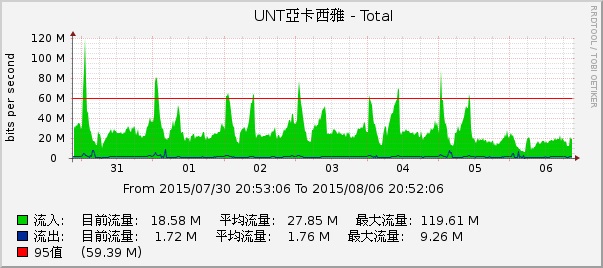
基本上是每日半夜12點流量暴增 (peak 到 80mb),然後逐漸下降,到了 5~6點又慢慢爬升,直到 10 點以後就驟降
基本上,網站沒有掛掉,沒有太多Exception,LB兩台server的流量很平均,Server Diff 查也沒有過多的Session
可以排除被攻擊的可能性
為了找問題,只好從 IIS Log著手......
1. 首先,查詢12點有甚麼網頁或網址異常多點擊數,並且比較 11 點與 12點兩者差異,結果都沒有任何異常
卻意外發現有家廣告合作廠商半夜會來抓產品圖,只是這個流量不大,發生點也不是在12點整,不是兇手
2. 起先因為 IIS log 沒有設定 sc-bytes 這個屬性,只有 time-taken 屬性,發現有些圖片 load 的特別久,但還是無法確定問題,所以想說把 sc-bytes 加到 IIS log 再來觀察
3. 加了 sc-bytes 之後的 IIS log,才發現驚人的事實,有幾張圖片竟然高達好幾MB,最大張是放在周年慶的 landing 圖片,竟高達 7.8MB
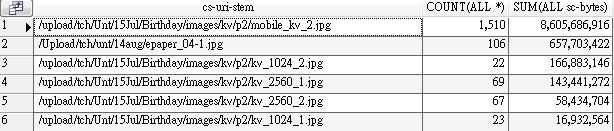
光1小時,一張圖片吃掉 8.6GB 的量,換算平均值約 13 mb/sec , OMG!
趕緊請設計把圖片換掉
只是這樣,還是有一個奇怪現象,為何半夜12點流量暴增,早上 10 點流量驟減?
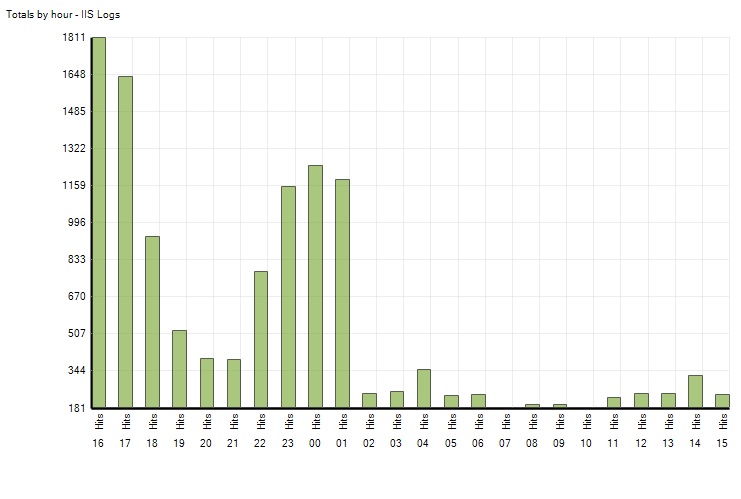
這是禍首最大張圖片的點擊數統計(時間是GMT,16是半夜12點, 15是晚上11點),
就跟流量圖一樣,00~10 點擊數很高,其他時間很低
下面是這張圖片所屬頁面的點擊數統計 (/tch/fixpage.aspx?id=689)
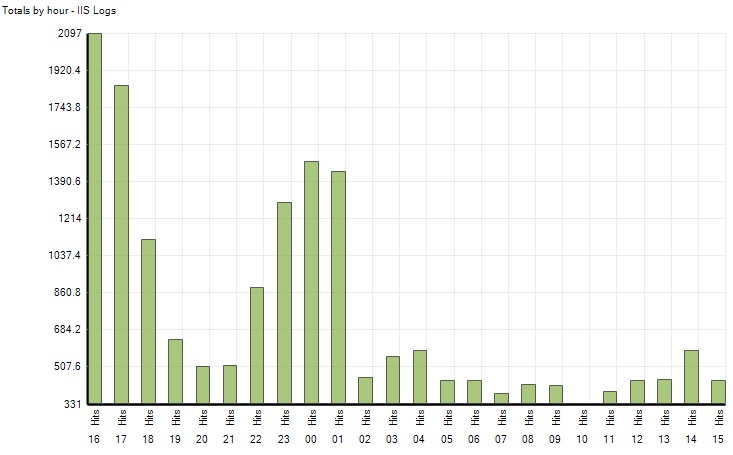
從圖片點擊數看來,我以為是 ISP 某種 transparent proxy cache 發揮作用 (半夜 00~10點關閉 所以流量增加),
但是看到 fixpage.aspx 的點擊數也是一樣的狀況,我就不知道該怎麼解釋了??
ISP transparent proxy 也會處理 *.aspx ??
還是回歸到最基本的原因,網站的廣告曝光量是 00~10點最高??
基本上是每日半夜12點流量暴增 (peak 到 80mb),然後逐漸下降,到了 5~6點又慢慢爬升,直到 10 點以後就驟降
基本上,網站沒有掛掉,沒有太多Exception,LB兩台server的流量很平均,Server Diff 查也沒有過多的Session
可以排除被攻擊的可能性
為了找問題,只好從 IIS Log著手......
1. 首先,查詢12點有甚麼網頁或網址異常多點擊數,並且比較 11 點與 12點兩者差異,結果都沒有任何異常
卻意外發現有家廣告合作廠商半夜會來抓產品圖,只是這個流量不大,發生點也不是在12點整,不是兇手
2. 起先因為 IIS log 沒有設定 sc-bytes 這個屬性,只有 time-taken 屬性,發現有些圖片 load 的特別久,但還是無法確定問題,所以想說把 sc-bytes 加到 IIS log 再來觀察
3. 加了 sc-bytes 之後的 IIS log,才發現驚人的事實,有幾張圖片竟然高達好幾MB,最大張是放在周年慶的 landing 圖片,竟高達 7.8MB
光1小時,一張圖片吃掉 8.6GB 的量,換算平均值約 13 mb/sec , OMG!
趕緊請設計把圖片換掉
只是這樣,還是有一個奇怪現象,為何半夜12點流量暴增,早上 10 點流量驟減?
這是禍首最大張圖片的點擊數統計(時間是GMT,16是半夜12點, 15是晚上11點),
就跟流量圖一樣,00~10 點擊數很高,其他時間很低
下面是這張圖片所屬頁面的點擊數統計 (/tch/fixpage.aspx?id=689)
從圖片點擊數看來,我以為是 ISP 某種 transparent proxy cache 發揮作用 (半夜 00~10點關閉 所以流量增加),
但是看到 fixpage.aspx 的點擊數也是一樣的狀況,我就不知道該怎麼解釋了??
ISP transparent proxy 也會處理 *.aspx ??
還是回歸到最基本的原因,網站的廣告曝光量是 00~10點最高??
darren, 2015/8/9 上午 11:00:45
badmail 常常會累積數萬筆的資料,要一次殺完會等很久,系統常常hang在那裡
這個指令可以一筆一筆殺 比較看的到進度 不過還是要殺很久
若是放在 bat 檔 要注意 % 要多加一個
這個指令可以一筆一筆殺 比較看的到進度 不過還是要殺很久
for %i in (c:\inetpub\mailroot\badmail\\*.*) do del /q %i
若是放在 bat 檔 要注意 % 要多加一個
for %%i in (c:\inetpub\mailroot\badmail\\*.*) do del /q %%i
darren, 2015/4/2 上午 09:18:10
SELECT * FROM sys.tcp_endpoints

ALTER ENDPOINT [Mirroring] AS TCP (listener_port = 5023)
參考:http://www.macaalay.com/2012/10/10/altering-mirroring-endpoints-ports-on-sql-server/
Reiko, 2015/3/19 下午 03:35:35
當我們在本地的SQL以 Linked Server方式存取遠端的資料庫,有時會出現這樣的訊息
不允許遠端資料表值函數呼叫
通常是使用 stored procedure 或是 自定義的function 會出現這樣的錯誤
這時候可以有個變通方法,就是使用 OPENQUERY 方法
不允許遠端資料表值函數呼叫
通常是使用 stored procedure 或是 自定義的function 會出現這樣的錯誤
這時候可以有個變通方法,就是使用 OPENQUERY 方法
原寫法 (UNTDB 是 Linked Server的 Name)

mySQL = "Select count(*) as Cnt from [UNTDB].[ShopUNT]..[V_Order_Main] ....


新寫法

mySQL = "Select count(*) as Cnt from [ShopUNT]..[V_Order_Main] ....

mySQL = "Select * from Openquery([UNTDB],'" + mySQL.Replace("'", "''") + "')";
darren, 2015/1/26 下午 02:37:25