頁數 1 / 56
下一頁
理論上,阻擋 spider 掃網站 只要設定 robot.txt
但有些 spider 不一定會理會 robot.txt
這部分可以用 urlrewrite 處理
Baiduspider : 百度
claudebot@anthropic.com : AI 掃網站
SemrushBot :
Bytespider : 字節跳動
serpstatbot
當然這也只能防君子不防小人
如果有心人刻意要掃網站,改它的 UserAgent 一樣可以掃
但有些 spider 不一定會理會 robot.txt
這部分可以用 urlrewrite 處理
<rule name="BlockBadBots" stopProcessing="true">

<match url=".*" />

<conditions>

<add input="{HTTP_USER_AGENT}" pattern="Baiduspider|claudebot@anthropic\.com|SemrushBot|Bytespider|serpstatbot" />

</conditions>

<action type="CustomResponse" statusCode="403" statusReason="Forbidden" statusDescription="Access denied." />

</rule>
Baiduspider : 百度
claudebot@anthropic.com : AI 掃網站
SemrushBot :
Bytespider : 字節跳動
serpstatbot
當然這也只能防君子不防小人
如果有心人刻意要掃網站,改它的 UserAgent 一樣可以掃
darren, 2026/5/7 上午 11:04:17
因為想把同一網站下的靜態檔用另一個 domain 處理
但是 css 如果有設定下載字型檔 .ttf or .woff
就會出現 CORS 問題,其他 js, css,圖片就能正常
為了解決CORS的問題,其實只要 Response Header 要設定 Access-Control-Allow-Origin: *
或是設定特定網站 Access-Control-Allow-Origin: https://www.s3.com.tw
後來發現 IIS 網站可以設定 web.config 設定 response header 解決
當然要先裝一下 urlrewrite 2.0 才可以使用
只針對 font 類型的靜態檔
{REQUEST_URI} 也可以改為 {PATH_INFO}
但是 css 如果有設定下載字型檔 .ttf or .woff
就會出現 CORS 問題,其他 js, css,圖片就能正常
為了解決CORS的問題,其實只要 Response Header 要設定 Access-Control-Allow-Origin: *
或是設定特定網站 Access-Control-Allow-Origin: https://www.s3.com.tw
後來發現 IIS 網站可以設定 web.config 設定 response header 解決
當然要先裝一下 urlrewrite 2.0 才可以使用
只針對 font 類型的靜態檔
<configuration>

<system.webServer>

    <rewrite>

     <outboundRules>

        <rule name="Add CORS header for fonts" preCondition="IsFontFile">

         <match serverVariable="RESPONSE_Access-Control-Allow-Origin" pattern=".*" />

         <action type="Rewrite" value="*" />

        </rule>

        <preConditions>

         <preCondition name="IsFontFile">

            <add input="{REQUEST_URI}" pattern="\.woff2$|\.woff$|\.ttf$|\.eot$|\.otf$" />

         </preCondition>

        </preConditions>

     </outboundRules>

    </rewrite>

</system.webServer>

</configuration>
{REQUEST_URI} 也可以改為 {PATH_INFO}
darren, 2026/3/4 下午 05:02:35
這幾天因為要把農會收穀系統(使用 mssql) 新增複製到另一個農會專案
想說順便把專案升級到 core 8.0,EF也升到 8.0
結果發生一些狀況,這邊紀錄一下
1. mssql 連線字串要有 TrustServerCertificate=True 這段文字
2. 6.0 與 8.0 有點天差地遠,轉過來時要把 Models 整個重新 build (scaffold 指令)
3. 因為資料庫也改名,所以整個專案 DBCntext 的名稱要整個調一遍
4. 然後因為資料庫是從舊專案複製過來,但因為 EF8.0關係,資料庫也要做升級
COMPATIBILITY_LEVEL 等級要大於等於 130 以上
所以要下這個 SQL 指令
至於為何要把 COMPATIBILITY_LEVEL 改 130 以上,主要是因為 會用到 MS SQL 的 OPENJSON 功能
btw, 發現 EF 轉 SQL 指令,會跟原本想像的不一樣,原來他是把 陣列用 JSON 方式帶進 SQL
結果轉出
而不是 IN ('A','B','C' ..))
想說順便把專案升級到 core 8.0,EF也升到 8.0
結果發生一些狀況,這邊紀錄一下
1. mssql 連線字串要有 TrustServerCertificate=True 這段文字
2. 6.0 與 8.0 有點天差地遠,轉過來時要把 Models 整個重新 build (scaffold 指令)
3. 因為資料庫也改名,所以整個專案 DBCntext 的名稱要整個調一遍
4. 然後因為資料庫是從舊專案複製過來,但因為 EF8.0關係,資料庫也要做升級
COMPATIBILITY_LEVEL 等級要大於等於 130 以上
所以要下這個 SQL 指令
ALTER DATABASE YourDBName SET COMPATIBILITY_LEVEL = 130;
至於為何要把 COMPATIBILITY_LEVEL 改 130 以上,主要是因為 會用到 MS SQL 的 OPENJSON 功能
btw, 發現 EF 轉 SQL 指令,會跟原本想像的不一樣,原來他是把 陣列用 JSON 方式帶進 SQL
_dbContext.V_Storage.AsNoTracking().Where(x => successIds.Contains(x.Id) && x.Is_Deleted == "N").ToList();
結果轉出
[Parameters=[@__successIds_0='?' (Size = 4000)], CommandType='Text', CommandTimeout='30']


SELECT [v].* (省略列舉欄位)

FROM [V_Storage] AS [v]

WHERE [v].[Id] IN (

    SELECT [s].[value]

    FROM OPENJSON(@__successIds_0) WITH ([value] int '$') AS [s]

) AND [v].[Is_Deleted] = 'N'
而不是 IN ('A','B','C' ..))
darren, 2025/12/12 下午 06:24:16
select id from shopline_customer where id not in (select id from shopline_customer_ext)
以上 SQL 跑不完.
SELECT c.id
FROM shopline_customer c
WHERE NOT EXISTS (
SELECT 1
FROM shopline_customer_ext e
WHERE e.id = c.id
);
以上 SQL 只要 0.3 秒.
GPT 的解釋: (ps, id 是 primary key, 非 null)
🚨 一、為什麼會慢:NOT IN 的效能陷阱
NOT IN 會觸發「反半連接(anti-join)」掃描
PostgreSQL 必須逐筆比對左邊的每個 id
並檢查右邊的 id 是否不在其中
若右邊子查詢結果中出現任何 NULL,NOT IN 的邏輯會「不確定」,導致全表掃描與回退
即使 id 是主鍵(有索引),PostgreSQL 通常仍會展開為 Nested Loop Anti Join 或 Hash Anti Join,
當 shopline_customer 和 shopline_customer_ext 都是大表(例如數十萬筆),
時間就會暴漲。
⚠️ NOT IN + NULL 問題:
即使 id 欄位宣告為 NOT NULL,也可能因外層的隱含條件造成額外檢查負擔。
PostgreSQL 會多執行一次 Anti-Join NULL Filter,浪費時間。
以上 SQL 跑不完.
SELECT c.id
FROM shopline_customer c
WHERE NOT EXISTS (
SELECT 1
FROM shopline_customer_ext e
WHERE e.id = c.id
);
以上 SQL 只要 0.3 秒.
GPT 的解釋: (ps, id 是 primary key, 非 null)
🚨 一、為什麼會慢:NOT IN 的效能陷阱
NOT IN 會觸發「反半連接(anti-join)」掃描
PostgreSQL 必須逐筆比對左邊的每個 id
並檢查右邊的 id 是否不在其中
若右邊子查詢結果中出現任何 NULL,NOT IN 的邏輯會「不確定」,導致全表掃描與回退
即使 id 是主鍵(有索引),PostgreSQL 通常仍會展開為 Nested Loop Anti Join 或 Hash Anti Join,
當 shopline_customer 和 shopline_customer_ext 都是大表(例如數十萬筆),
時間就會暴漲。
⚠️ NOT IN + NULL 問題:
即使 id 欄位宣告為 NOT NULL,也可能因外層的隱含條件造成額外檢查負擔。
PostgreSQL 會多執行一次 Anti-Join NULL Filter,浪費時間。
Bike, 2025/10/29 上午 10:24:11
其實這是老問題了,就是IIS每過29小時會重啟 App Pool 機制
這個機制目的是讓主機可以回收記憶體以增進網站效能,過程是smooth的
當此回收機制開始時,新的request會由新的程序跑,舊的request仍會把他跑完(理論上,但太久的程式還是會自動停)
這樣的機制,最明顯的是會造成 inProc 的 session or cache 資料消失
造成程式上的錯誤,或是user的資料消失
另外,這個29小時回收機制,不會因為程式更新,網站重啟,而重新計算
原本以為這機制影響不大,但最近因為電商後台程式有個排程跑太久剛好被回收機制中斷
然後自己假日在外無法即時處理問題,造成電商客戶在等著把問題解決
想說還是把這個 29小時魔咒 處理一下
在某個特定無排程時間,執行重啟網站
這個機制目的是讓主機可以回收記憶體以增進網站效能,過程是smooth的
當此回收機制開始時,新的request會由新的程序跑,舊的request仍會把他跑完(理論上,但太久的程式還是會自動停)
這樣的機制,最明顯的是會造成 inProc 的 session or cache 資料消失
造成程式上的錯誤,或是user的資料消失
另外,這個29小時回收機制,不會因為程式更新,網站重啟,而重新計算
原本以為這機制影響不大,但最近因為電商後台程式有個排程跑太久剛好被回收機制中斷
然後自己假日在外無法即時處理問題,造成電商客戶在等著把問題解決
想說還是把這個 29小時魔咒 處理一下
在某個特定無排程時間,執行重啟網站
darren, 2025/9/1 上午 10:30:33
這是使用新竹物流的範例程式 來源是UNT後台Web專案
* 新竹物流取得配號API必須先在專案加入WEB服務參考 (此專案命名是HctService)
* 取得配號是使用 HctService.Service1SoapClient -> TransData_Json() 來取得
回傳資料因為有 面單(出貨標籤) 圖檔的Hex字串,所以回應訊息很大,建議一次僅處理兩筆出貨單
* 本範例程式有處理Hex字串轉圖檔程式
* 取得貨況的功能。是另一組專用API -> https://www.hct.com.tw/phone/searchGoods_Main_Xml.ashx
* POST參數是xml再加密為base64字串
* Response是base64字串,需解密為xml
* 本程式範例有相關的使用與加解密功能 參考 GetDeliveryStatus
* 新竹物流取得配號API必須先在專案加入WEB服務參考 (此專案命名是HctService)
* 取得配號是使用 HctService.Service1SoapClient -> TransData_Json() 來取得
回傳資料因為有 面單(出貨標籤) 圖檔的Hex字串,所以回應訊息很大,建議一次僅處理兩筆出貨單
* 本範例程式有處理Hex字串轉圖檔程式
* 取得貨況的功能。是另一組專用API -> https://www.hct.com.tw/phone/searchGoods_Main_Xml.ashx
* POST參數是xml再加密為base64字串
* Response是base64字串,需解密為xml
* 本程式範例有相關的使用與加解密功能 參考 GetDeliveryStatus
darren, 2025/8/20 下午 02:40:19
由實體機追查哪一台 VM 的流量最大
# 抓取第一次數據
$before = Get-Counter -Counter @(
'\Hyper-V Virtual Network Adapter(*)\Bytes Sent/sec',
'\Hyper-V Virtual Network Adapter(*)\Bytes Received/sec'
)
# 等待 10 秒
Start-Sleep -Seconds 10
# 抓取第二次數據
$after = Get-Counter -Counter @(
'\Hyper-V Virtual Network Adapter(*)\Bytes Sent/sec',
'\Hyper-V Virtual Network Adapter(*)\Bytes Received/sec'
)
# 分析並計算平均每秒流量
$results = @()
for ($i = 0; $i -lt $before.CounterSamples.Count; $i++) {
$instance = $before.CounterSamples[$i].InstanceName
$sentIndex = $i
$recvIndex = $i + $before.CounterSamples.Count / 2
$sentBefore = $before.CounterSamples[$sentIndex].CookedValue
$sentAfter = $after.CounterSamples[$sentIndex].CookedValue
$recvBefore = $before.CounterSamples[$recvIndex].CookedValue
$recvAfter = $after.CounterSamples[$recvIndex].CookedValue
$sentPerSec = ($sentAfter - $sentBefore) / 10
$recvPerSec = ($recvAfter - $recvBefore) / 10
$results += [PSCustomObject]@{
AdapterName = $instance
SentPerSec = [math]::Round($sentPerSec, 2)
ReceivedPerSec = [math]::Round($recvPerSec, 2)
TotalPerSec = [math]::Round($sentPerSec + $recvPerSec, 2)
}
}
# 顯示結果,依照總流量排序
$results | Sort-Object TotalPerSec -Descending | Format-Table -AutoSize
用 performance monitor 監查看各VM的流量(找不到)
Get-Counter '\Hyper-V Virtual Network Adapter(*)\Bytes Total/sec'
在 VM 上追查哪個網站流量最大
用 performance monitor 監查看各網站的流量
Web Service: Bytes Sent/sec
# 抓取第一次數據
$before = Get-Counter -Counter @(
'\Hyper-V Virtual Network Adapter(*)\Bytes Sent/sec',
'\Hyper-V Virtual Network Adapter(*)\Bytes Received/sec'
)
# 等待 10 秒
Start-Sleep -Seconds 10
# 抓取第二次數據
$after = Get-Counter -Counter @(
'\Hyper-V Virtual Network Adapter(*)\Bytes Sent/sec',
'\Hyper-V Virtual Network Adapter(*)\Bytes Received/sec'
)
# 分析並計算平均每秒流量
$results = @()
for ($i = 0; $i -lt $before.CounterSamples.Count; $i++) {
$instance = $before.CounterSamples[$i].InstanceName
$sentIndex = $i
$recvIndex = $i + $before.CounterSamples.Count / 2
$sentBefore = $before.CounterSamples[$sentIndex].CookedValue
$sentAfter = $after.CounterSamples[$sentIndex].CookedValue
$recvBefore = $before.CounterSamples[$recvIndex].CookedValue
$recvAfter = $after.CounterSamples[$recvIndex].CookedValue
$sentPerSec = ($sentAfter - $sentBefore) / 10
$recvPerSec = ($recvAfter - $recvBefore) / 10
$results += [PSCustomObject]@{
AdapterName = $instance
SentPerSec = [math]::Round($sentPerSec, 2)
ReceivedPerSec = [math]::Round($recvPerSec, 2)
TotalPerSec = [math]::Round($sentPerSec + $recvPerSec, 2)
}
}
# 顯示結果,依照總流量排序
$results | Sort-Object TotalPerSec -Descending | Format-Table -AutoSize
用 performance monitor 監查看各VM的流量(找不到)
Get-Counter '\Hyper-V Virtual Network Adapter(*)\Bytes Total/sec'
在 VM 上追查哪個網站流量最大
用 performance monitor 監查看各網站的流量
Web Service: Bytes Sent/sec
Bike, 2025/8/4 上午 11:11:06
如果列印主機是 windows server 主機,通常會有 "Microsoft Print to PDF" 名稱的印表機
那使用 Print Document 物件另存成 PDF code 如下
那使用 Print Document 物件另存成 PDF code 如下
pd.PrinterSettings.PrinterName = "Microsoft Print to PDF";

pd.PrinterSettings.PrintToFile = true;

pd.PrinterSettings.PrintFileName = @"C:\TEMP\XPS\" + DateTime.Now.ToString("yyyyMMddHHmmss") + ".pdf";
darren, 2025/5/12 下午 04:36:12
在 powershell 執行以下的指令
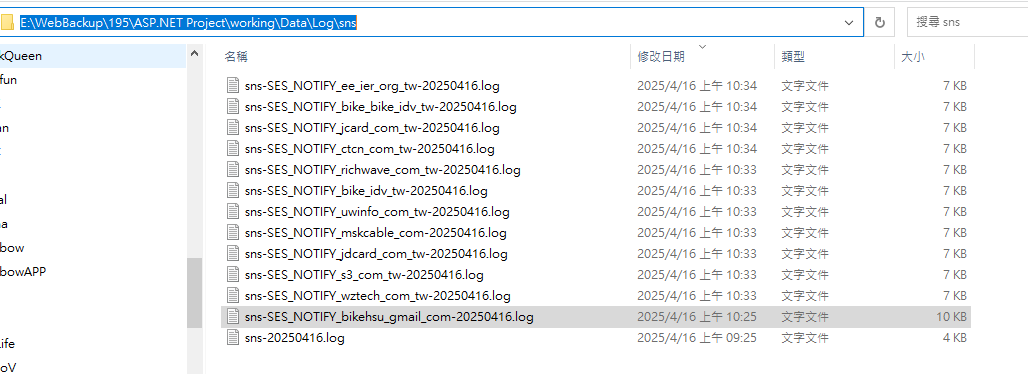
收到的 log 會放在這裡: E:\WebBackup\195\ASP.NET Project\working\Data\Log\sns
# List of SES identities

$identities = @(

    "wztech.com.tw",

    "s3.com.tw",

    "jdcard.com.tw",

    "mskcable.com",

    "uwinfo.com.tw",

    "bike.idv.tw",

    "richwave.com.tw",

    "ctcn.com.tw",

    "jcard.com.tw",

    "bike@bike.idv.tw",

    "ee@ier.org.tw"

)


foreach ($identity in $identities) {

    # Convert identity to a valid topic name by replacing '@' and '.' with '_'

    $safeIdentity = $identity -replace "@", "_" -replace "\.", "_"

    $topicName = "SES_NOTIFY_$safeIdentity"

    $endpoint = "https://working.uwinfo.com.tw/aws/api/sns/receive?topic=$topicName"


    # Validate topic name format

    if ($topicName -notmatch '^[a-zA-Z0-9_\-\$]+$') {

        Write-Host "❌ Invalid topic name: $topicName"

        continue

    }


    # 1. Create SNS topic

    $topicArn = aws sns create-topic `

        --name $topicName `

        --query 'TopicArn' `

        --output text


    Write-Host "✔ Created topic: $topicArn"


    # 2. Subscribe webhook

    aws sns subscribe `

        --topic-arn $topicArn `

        --protocol https `

        --notification-endpoint $endpoint


    Write-Host "✔ Subscribed webhook: $endpoint"


    # 3. Link SES notifications

    foreach ($type in @("Delivery", "Bounce", "Complaint")) {

        aws ses set-identity-notification-topic `

            --identity $identity `

            --notification-type $type `

            --sns-topic $topicArn

        Write-Host "✔ $type linked to $topicName"

    }


    Write-Host "✅ Setup complete for $identity\n"

}


Write-Host "🎉 All identities processed."
收到的 log 會放在這裡: E:\WebBackup\195\ASP.NET Project\working\Data\Log\sns
Bike, 2025/4/16 上午 10:40:39
在 powershell 執行以下的指令
# List of SES identities
$identities = @(
"wztech.com.tw",
"s3.com.tw",
"jdcard.com.tw",
"mskcable.com",
"uwinfo.com.tw",
"bike.idv.tw",
"richwave.com.tw",
"ctcn.com.tw",
"jcard.com.tw",
"bike@bike.idv.tw",
"ee@ier.org.tw"
)
foreach ($identity in $identities) {
# Convert identity to a valid topic name by replacing '@' and '.' with '_'
$safeIdentity = $identity -replace "@", "_" -replace "\.", "_"
$topicName = "SES_NOTIFY_$safeIdentity"
$endpoint = "https://working.uwinfo.com.tw/aws/api/sns/receive?topic=$topicName"
# Validate topic name format
if ($topicName -notmatch '^[a-zA-Z0-9_\-\$]+$') {
Write-Host "❌ Invalid topic name: $topicName"
continue
}
# 1. Create SNS topic
$topicArn = aws sns create-topic `
--name $topicName `
--query 'TopicArn' `
--output text
Write-Host "✔ Created topic: $topicArn"
# 2. Subscribe webhook
aws sns subscribe `
--topic-arn $topicArn `
--protocol https `
--notification-endpoint $endpoint
Write-Host "✔ Subscribed webhook: $endpoint"
# 3. Link SES notifications
foreach ($type in @("Delivery", "Bounce", "Complaint")) {
aws ses set-identity-notification-topic `
--identity $identity `
--notification-type $type `
--sns-topic $topicArn
Write-Host "✔ $type linked to $topicName"
}
Write-Host "✅ Setup complete for $identity\n"
}
Write-Host "🎉 All identities processed."
--
收到的 log 會放在這裡: E:\WebBackup\195\ASP.NET Project\working\Data\Log\sns
# List of SES identities
$identities = @(
"wztech.com.tw",
"s3.com.tw",
"jdcard.com.tw",
"mskcable.com",
"uwinfo.com.tw",
"bike.idv.tw",
"richwave.com.tw",
"ctcn.com.tw",
"jcard.com.tw",
"bike@bike.idv.tw",
"ee@ier.org.tw"
)
foreach ($identity in $identities) {
# Convert identity to a valid topic name by replacing '@' and '.' with '_'
$safeIdentity = $identity -replace "@", "_" -replace "\.", "_"
$topicName = "SES_NOTIFY_$safeIdentity"
$endpoint = "https://working.uwinfo.com.tw/aws/api/sns/receive?topic=$topicName"
# Validate topic name format
if ($topicName -notmatch '^[a-zA-Z0-9_\-\$]+$') {
Write-Host "❌ Invalid topic name: $topicName"
continue
}
# 1. Create SNS topic
$topicArn = aws sns create-topic `
--name $topicName `
--query 'TopicArn' `
--output text
Write-Host "✔ Created topic: $topicArn"
# 2. Subscribe webhook
aws sns subscribe `
--topic-arn $topicArn `
--protocol https `
--notification-endpoint $endpoint
Write-Host "✔ Subscribed webhook: $endpoint"
# 3. Link SES notifications
foreach ($type in @("Delivery", "Bounce", "Complaint")) {
aws ses set-identity-notification-topic `
--identity $identity `
--notification-type $type `
--sns-topic $topicArn
Write-Host "✔ $type linked to $topicName"
}
Write-Host "✅ Setup complete for $identity\n"
}
Write-Host "🎉 All identities processed."
--
收到的 log 會放在這裡: E:\WebBackup\195\ASP.NET Project\working\Data\Log\sns
Bike, 2025/4/16 上午 10:40:31