搜尋 CS 結果:
在 .net framework 的 Web API 專案中.
安裝某些套件時, 會在 Startup.cs 中增加一行:
app.UseWebApi(config);
這個會在 WebApiConfig 的 Register 之後執行. 造成 WebApiConfig.Register 失效.
解決的方法是把 WebApiConfig.Register 的指令全部搬到 Startup.cs 之中, 放在 app.UseWebApi(config) 之後即可...
這大概是為什麼 .Net Core 之後的設定都在 StartUp.cs 裡面的原因..
花了一些時間 : (
安裝某些套件時, 會在 Startup.cs 中增加一行:
app.UseWebApi(config);
這個會在 WebApiConfig 的 Register 之後執行. 造成 WebApiConfig.Register 失效.
解決的方法是把 WebApiConfig.Register 的指令全部搬到 Startup.cs 之中, 放在 app.UseWebApi(config) 之後即可...
這大概是為什麼 .Net Core 之後的設定都在 StartUp.cs 裡面的原因..
花了一些時間 : (
Bike, 2021/9/7 上午 10:39:38
https://docs.microsoft.com/zh-tw/aspnet/core/host-and-deploy/iis/hosting-bundle?view=aspnetcore-5.0
Bike, 2021/6/11 上午 08:48:01
名命規則
C#:
參數, 區域變數: 小駝峰(CamelCasing)
其它: 大駝峰(PascalCasing)
參考:
https://docs.microsoft.com/zh-tw/dotnet/standard/design-guidelines/naming-guidelines
Javascript:
小駝峰(CamelCasing)
網址:
全小寫, 用 - (減號) 分隔單字
參考:
https://www.seoseo.com.tw/article_detail_609.html
https://blog.miniasp.com/post/2011/01/14/Avoid-using-underline-as-domain-name-character
http://epaper.gotop.com.tw/pdf/acn023600.pdf
class 名命 HTML :
全小寫, 用 - (減號) 分隔單字
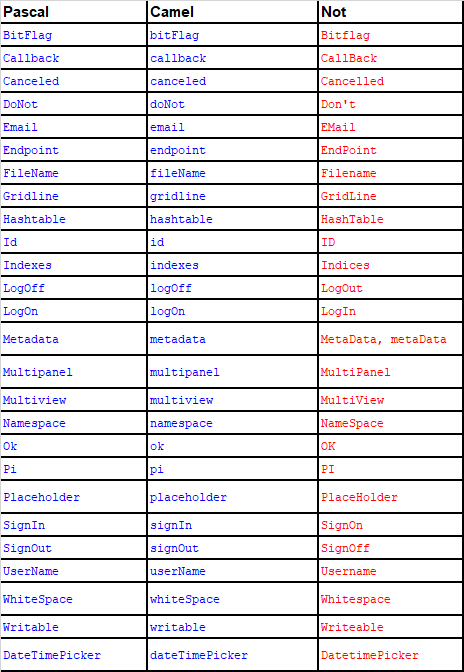
複合字範列:
| Pascal | Camel | Not |
| BitFlag | bitFlag | Bitflag |
| Callback | callback | CallBack |
| Canceled | canceled | Cancelled |
| DoNot | doNot | Don't |
| Endpoint | endpoint | EndPoint |
| FileName | fileName | Filename |
| Gridline | gridline | GridLine |
| Hashtable | hashtable | HashTable |
| Id | id | ID |
| Indexes | indexes | Indices |
| LogOff | logOff | LogOut |
| LogOn | logOn | LogIn |
| Metadata | metadata | MetaData, metaData |
| Multipanel | multipanel | MultiPanel |
| Multiview | multiview | MultiView |
| Namespace | namespace | NameSpace |
| Ok | ok | OK |
| Pi | pi | PI |
| Placeholder | placeholder | PlaceHolder |
| SignIn | signIn | SignOn |
| SignOut | signOut | SignOff |
| UserName | userName | Username |
| WhiteSpace | whiteSpace | Whitespace |
| Writable | writable | Writeable |
| DateTimePicker | dateTimePicker | DatetimePicker |
Bike, 2020/7/28 上午 08:00:08
1. 參考這裡設定第一個網站:
https://blog.johnwu.cc/article/centos-asp-net-core-neginx.html
注意, 文章中有一個錯誤:
/etc/nginx/conf.d/my-website.conf 的第 27 行, 應該是 include /etc/nginx/conf.d/default_proxy_settings;
2. 因為要避開 5000 port, 所以修改第二個網站的 appsettings.json, 讓第二個網站開在 5002 port, 如下.
3. 新增 /etc/nginx/conf.d/my-website2.conf, 要注意
A. portal2
B. server localhost:5002
C. server_name coretest2.bike.idv.tw
當然 SSL 憑証的檔名也要記得改.
改完後就可以用了.
以下是 https://blog.johnwu.cc/article/centos-asp-net-core-neginx.html 抄過來的一些檔案, 作為備份:
setup-aspnet-core.sh
用以下指令執行:
/etc/systemd/system/my-website.service, (/bin/dotnet 有可能是 /usr/bin/dotnet)
服務相關指令:
/etc/nginx/conf.d/default_proxy_settings
/etc/nginx/conf.d/my-website.conf
Nginx 重新啟動:
https://blog.johnwu.cc/article/centos-asp-net-core-neginx.html
注意, 文章中有一個錯誤:
/etc/nginx/conf.d/my-website.conf 的第 27 行, 應該是 include /etc/nginx/conf.d/default_proxy_settings;
2. 因為要避開 5000 port, 所以修改第二個網站的 appsettings.json, 讓第二個網站開在 5002 port, 如下.
{

"Logging": {

    "LogLevel": {

     "Default": "Information",

     "Microsoft": "Warning",

     "Microsoft.Hosting.Lifetime": "Information"

    }

},

"Kestrel": {

        "EndPoints": {

                "Http": {

                        "Url": "http://localhost:5002"

                }

        }

},

"AllowedHosts": "*"

}
3. 新增 /etc/nginx/conf.d/my-website2.conf, 要注意
A. portal2
B. server localhost:5002
C. server_name coretest2.bike.idv.tw
當然 SSL 憑証的檔名也要記得改.
upstream portal2 {

    # localhost:5000 改成 ASP.NET Core 所監聽的 Port

    server localhost:5002;

}


server {

    # 只要是透過這些 Domain 連 HTTP 80 Port,都會轉送封包到 ASP.NET Core

    listen 80;

    # 可透過空白區分,綁定多個 Domain

    server_name coretest2.bike.idv.tw;

    location / {

        proxy_pass http://portal2/;

        include /etc/nginx/conf.d/default_proxy_settings;

    }

}


# 用 HTTPS 必須要有 SSL 憑證,如果沒有要綁定 SSL 可以把下面整段移除

server {

    # 只要是透過這些 Domain 連 HTTPS 443 Port,都會轉送封包到 ASP.NET Core

    listen 443 ssl;

    server_name coretest2.bike.idv.tw;

    ssl_certificate /etc/nginx/ssl/coretest2.bike.idv.tw.crt;

    ssl_certificate_key /etc/nginx/ssl/coretest2.bike.idv.tw.key;


    location / {

        proxy_pass http://portal2/;

        include /etc/nginx/conf.d/default_proxy_settings;

    }

}
改完後就可以用了.
以下是 https://blog.johnwu.cc/article/centos-asp-net-core-neginx.html 抄過來的一些檔案, 作為備份:
setup-aspnet-core.sh
#!/bin/bash


main() {

    sudo yum -y install epel-release

    sudo yum -y update


    install_nginx

    install_dotnet


    sudo firewall-cmd --add-service=http --permanent

    sudo firewall-cmd --add-service=https --permanent

    sudo firewall-cmd --reload

}


install_nginx() {

    echo "###################################"

    echo "########## Install Nginx ##########"

    echo "###################################"

    sudo yum -y install httpd-tools nginx

    sudo setsebool -P httpd_can_network_connect on

    sudo sed -i 's/^SELINUX=.*/SELINUX=disabled/' /etc/selinux/config

    sudo setenforce 0

    sudo systemctl enable nginx

    sudo systemctl restart nginx

}


install_dotnet() {

    echo "###########################################"

    echo "########## Install .NET Core 2.2 ##########"

    echo "###########################################"

    sudo rpm -Uvh https://packages.microsoft.com/config/rhel/7/packages-microsoft-prod.rpm

    sudo yum -y install aspnetcore-runtime-2.2

}


main "$@"
用以下指令執行:
sudo sh setup-aspnet-core.sh
/etc/systemd/system/my-website.service, (/bin/dotnet 有可能是 /usr/bin/dotnet)
[Unit]

# Description=<此服務的摘要說明>

Description=MyWebsite


[Service]

# WorkingDirectory=<ASP.NET Core 專案目錄>

WorkingDirectory=/usr/share/my-website


# ExecStart=/bin/dotnet <ASP.NET Core 起始 dll>

ExecStart=/bin/dotnet MyWebsite.dll


# 啟動若失敗,就重啟到成功為止

Restart=always

# 重啟的間隔秒數

RestartSec=10


# 設定環境變數,注入給 ASP.NET Core 用

Environment=ASPNETCORE_ENVIRONMENT=Production

Environment=DOTNET_PRINT_TELEMETRY_MESSAGE=false


[Install]

WantedBy=multi-user.target
服務相關指令:
# 開啟,開機自動啟動服務

systemctl enable my-website.service


# 關閉,開機自動啟動服務

systemctl disable my-website.service


# 啟動服務

systemctl start my-website.service


# 重啟服務

systemctl restart my-website.service


# 停止服務

systemctl stop my-website.service


# 查看服務狀態

systemctl status my-website.service
/etc/nginx/conf.d/default_proxy_settings
proxy_http_version 1.1;

proxy_set_header Upgrade $http_upgrade;

proxy_set_header Connection $http_connection;

proxy_set_header Host $host;

proxy_set_header X-Real-IP $remote_addr;

proxy_set_header X-Forwarded-Host $remote_addr;

proxy_set_header X-Forwarded-For $proxy_add_x_forwarded_for;

proxy_set_header X-Forwarded-Proto $scheme;

proxy_cache_bypass $http_upgrade;
/etc/nginx/conf.d/my-website.conf
upstream portal {

    # localhost:5000 改成 ASP.NET Core 所監聽的 Port

    server localhost:5000;

}


server {

    # 只要是透過這些 Domain 連 HTTP 80 Port,都會轉送封包到 ASP.NET Core

    listen 80;

    # 可透過空白區分,綁定多個 Domain

    server_name demo.johnwu.cc example.johnwu.cc;

    location / {

        proxy_pass http://portal/;

        include /etc/nginx/conf.d/default_proxy_settings;

    }

}


# 用 HTTPS 必須要有 SSL 憑證,如果沒有要綁定 SSL 可以把下面整段移除

server {

    # 只要是透過這些 Domain 連 HTTPS 443 Port,都會轉送封包到 ASP.NET Core

    listen 443 ssl;

    server_name demo.johnwu.cc;

    ssl_certificate /etc/nginx/ssl/demo.johnwu.cc_bundle.crt;

    ssl_certificate_key /etc/nginx/ssl/demo.johnwu.cc.key;


    location / {

        proxy_pass http://portal/;

        include /etc/nginx/conf.d/default_proxy_settings;

    }

}
Nginx 重新啟動:
# 檢查 Nginx 的設定是否有誤

nginx -t


# 若沒有錯誤,即可套用

nginx -s reload
Bike, 2020/7/7 上午 08:01:43
https://www.foodpanda.com.tw/restaurant/e3cs/you-huo-zao-wu-can-vendor
宮保雞丁
有點辣 圓管粗麵
綜合蛋蛋餅
火腿起司薯餅

偏油 火腿比較鹹 整體而言普普
薯條
跟 綜合蛋蛋餅 比反而沒那麼油
好吃 可以點
宮保雞丁
有點辣 圓管粗麵
綜合蛋蛋餅
火腿起司薯餅
偏油 火腿比較鹹 整體而言普普
薯條
跟 綜合蛋蛋餅 比反而沒那麼油
好吃 可以點
choco, 2020/2/25 上午 11:55:37
可以在這裡下載
https://pkisharp.github.io/win-acme/
或是到
https://github.com/PKISharp/win-acme/releases
下載 x64.pluggable.zip 的檔案
執行 wacs.exe, 然後看說明就可以囉.
wacs.exe --renew 會自動設定更新排程..
.100 可以在這裡找到檔案.
C:\Users\Administrator\win-acme
.195 可以在這裡找到
C:\Users\Administrator\win-acme.v2.1.6.773.x64.pluggable
https://pkisharp.github.io/win-acme/
或是到
https://github.com/PKISharp/win-acme/releases
下載 x64.pluggable.zip 的檔案
執行 wacs.exe, 然後看說明就可以囉.
wacs.exe --renew 會自動設定更新排程..
.100 可以在這裡找到檔案.
C:\Users\Administrator\win-acme
.195 可以在這裡找到
C:\Users\Administrator\win-acme.v2.1.6.773.x64.pluggable
Bike, 2019/12/13 下午 06:32:01
以下這個可以用在 global.asax 中, 但若是執行到了 aspx 就無效了.
HttpContext.Current.Response.Headers.Add("Content-Type", "application/json; charset=utf-8");
在 aspx.cs 中, 指定 ContentType 要用以下的方式
Response.ContentType = "application/json; charset=utf-8";
HttpContext.Current.Response.Headers.Add("Content-Type", "application/json; charset=utf-8");
在 aspx.cs 中, 指定 ContentType 要用以下的方式
Response.ContentType = "application/json; charset=utf-8";
Bike, 2019/8/15 上午 11:02:00
過去都是使用 jquery lazy load js 來實作延遲載圖,
其運作原理是偵測scroll事件以及img物件的相對位置來決定要不要load圖片
現在有更簡單的方式,就是用 IntersectionObserver API 這個 Web標準
來偵測 img 物件是不是進入可視 webview 範圍
https://developers.google.com/web/updates/2016/04/intersectionobserver
網頁裡面只要用 <img data-src='圖片網址' class='lazy' /> 就可以啦
IntersectionObserver API
目前 Can I Use 網站顯示大部分 browser 都支援,iOS safari 要 12.2 版才支援
應該可以放心使用
其運作原理是偵測scroll事件以及img物件的相對位置來決定要不要load圖片
現在有更簡單的方式,就是用 IntersectionObserver API 這個 Web標準
來偵測 img 物件是不是進入可視 webview 範圍
https://developers.google.com/web/updates/2016/04/intersectionobserver
document.addEventListener("DOMContentLoaded", function() {

var lazyImages = [].slice.call(document.querySelectorAll("img.lazy"));;


if ("IntersectionObserver" in window && "IntersectionObserverEntry" in window && "intersectionRatio" in window.IntersectionObserverEntry.prototype) {

    let lazyImageObserver = new IntersectionObserver(function(entries, observer) {

     entries.forEach(function(entry) {

        if (entry.isIntersecting) {

         let lazyImage = entry.target;

         lazyImage.src = lazyImage.dataset.src;

         lazyImage.srcset = lazyImage.dataset.srcset;

         lazyImage.classList.remove("lazy");

         lazyImageObserver.unobserve(lazyImage);

        }

     });

    });


    lazyImages.forEach(function(lazyImage) {

     lazyImageObserver.observe(lazyImage);

    });

}

//這裡可以加上else處理萬一瀏覽器不支援的狀況

});
網頁裡面只要用 <img data-src='圖片網址' class='lazy' /> 就可以啦
IntersectionObserver API
目前 Can I Use 網站顯示大部分 browser 都支援,iOS safari 要 12.2 版才支援
應該可以放心使用
darren, 2019/4/3 下午 07:48:07
sqlcmd -S 192.168.XXX.YYY -d EmailKeeper -U sa -P xxxxxx -Q "Select distinct Email, EncEmail from EmailEnc" -o "EmailEnc.csv" -h -1 -s,
-h: 不要 header
-1; 不用第一行的 -----------
-s,: 用 "," 來分隔欄位.
-h: 不要 header
-1; 不用第一行的 -----------
-s,: 用 "," 來分隔欄位.
Bike, 2018/10/7 下午 09:26:44
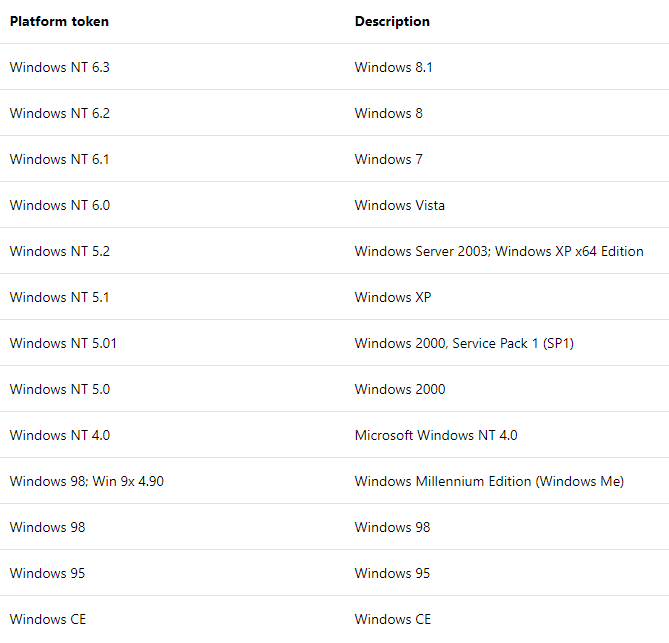
作業系統版本:Platform
參考網址:
https://docs.microsoft.com/en-us/previous-versions/windows/internet-explorer/ie-developer/compatibility/ms537503(v=vs.85)
參考網址:
https://docs.microsoft.com/en-us/previous-versions/windows/internet-explorer/ie-developer/compatibility/ms537503(v=vs.85)
Reiko, 2018/10/4 上午 09:40:34