搜尋 * 結果:
WITH DepartmentTree AS (
SELECT
Id,
Code,
Name,
UpDepartmentId,
1 as Level
FROM
SaintEir_Department
WHERE Id = 1
UNION ALL
SELECT
e.Id,
e.Code,
e.Name,
e.UpDepartmentId,
o.Level + 1 as Level
FROM
SaintEir_Department e
INNER JOIN DepartmentTree o
ON o.Id = e.UpDepartmentId
)
SELECT * FROM DepartmentTree;
SELECT
Id,
Code,
Name,
UpDepartmentId,
1 as Level
FROM
SaintEir_Department
WHERE Id = 1
UNION ALL
SELECT
e.Id,
e.Code,
e.Name,
e.UpDepartmentId,
o.Level + 1 as Level
FROM
SaintEir_Department e
INNER JOIN DepartmentTree o
ON o.Id = e.UpDepartmentId
)
SELECT * FROM DepartmentTree;
Bike, 2023/5/23 上午 11:04:38
Entity Framework 提供了 ExecuteSqlRawAsync 和 FromSqlRaw 之後,可以和 Dapper 非常類似的用法。
我們在用 Dapper 時。最常用的就是 sql command 加上一個物件做為參數,就可以執行 CRUD 的動作。
其實用 Entity Framework 的 ExecuteSqlRawAsync 和 FromSqlRaw 也可以逹到幾乎一樣的效果。
ExecuteSqlRawAsync 和 FromSqlRaw 接受的參數是 object array (其實是 Microsoft.Data.SqlClient.SqlParameter 的 array)
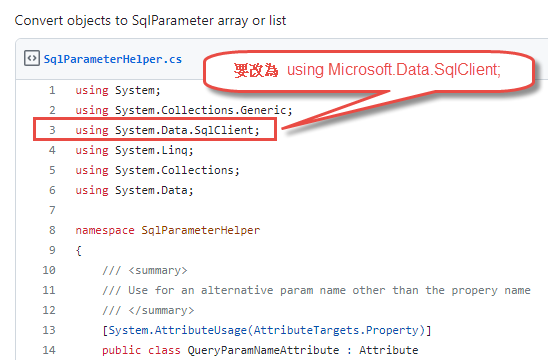
所以我們先做一個 Object to Microsoft.Data.SqlClient.SqlParameter Array 的擴充, 可參考: https://gist.github.com/aliozgur/75182b2e9b0a58b83443
不過很奇怪的是,原作者提供的擴充轉出來的會是 System.Data.SqlClient.SqlParameter Array 無法直接使用於 ExecuteSqlRawAsync 和 FromSqlRaw,所以要稍微改一下,把 using System.Data.SqlClient; 改為 using Microsoft.Data.SqlClient; 即可:
另外,我們再自行 對 DbContext 做一個擴充如下:
最後的結果可以做到以下的效果: (res3 和 res4 是配合 FormattableString 的範例 )
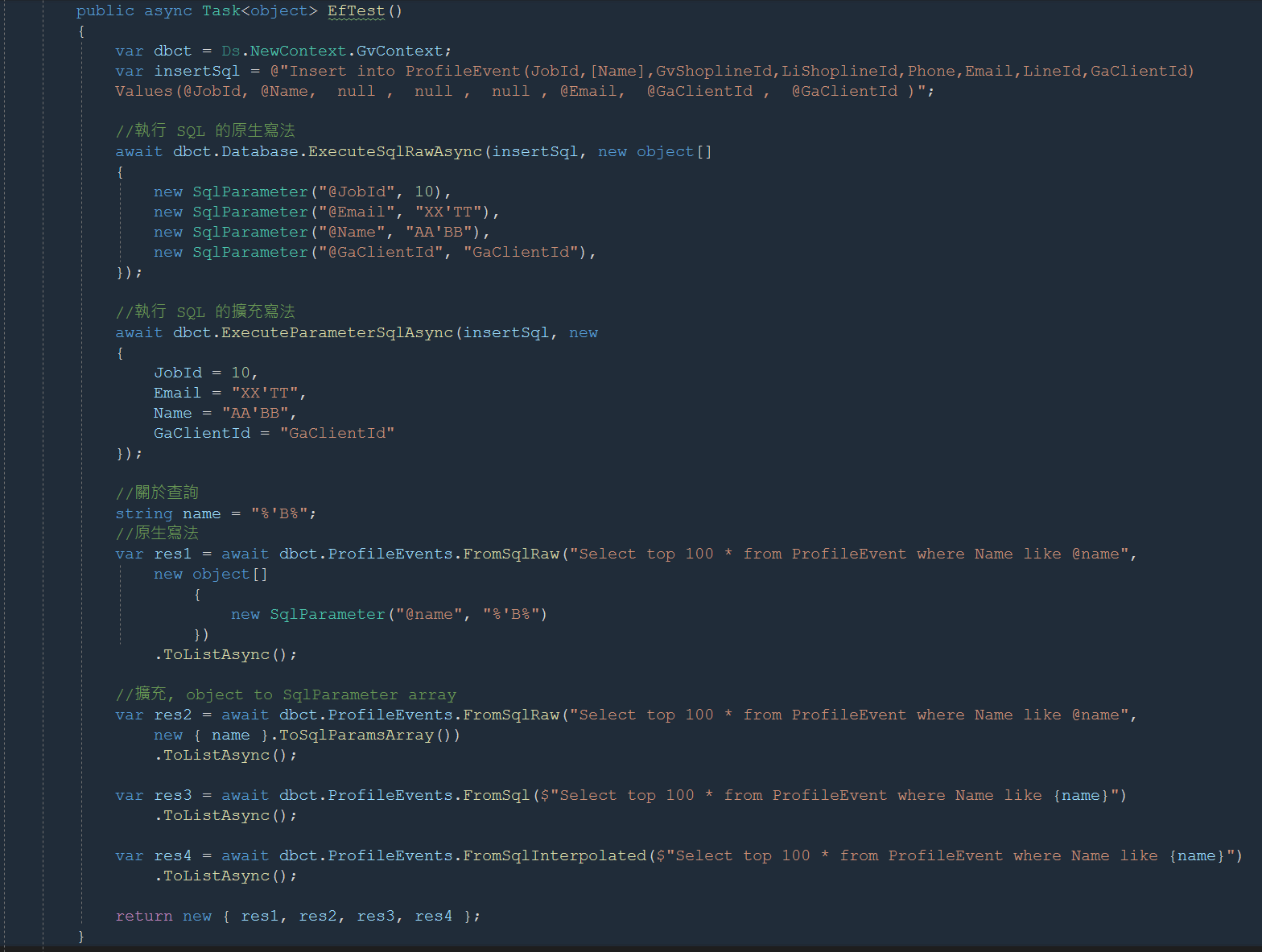
範例程式碼:
我們在用 Dapper 時。最常用的就是 sql command 加上一個物件做為參數,就可以執行 CRUD 的動作。
其實用 Entity Framework 的 ExecuteSqlRawAsync 和 FromSqlRaw 也可以逹到幾乎一樣的效果。
ExecuteSqlRawAsync 和 FromSqlRaw 接受的參數是 object array (其實是 Microsoft.Data.SqlClient.SqlParameter 的 array)
所以我們先做一個 Object to Microsoft.Data.SqlClient.SqlParameter Array 的擴充, 可參考: https://gist.github.com/aliozgur/75182b2e9b0a58b83443
不過很奇怪的是,原作者提供的擴充轉出來的會是 System.Data.SqlClient.SqlParameter Array 無法直接使用於 ExecuteSqlRawAsync 和 FromSqlRaw,所以要稍微改一下,把 using System.Data.SqlClient; 改為 using Microsoft.Data.SqlClient; 即可:
另外,我們再自行 對 DbContext 做一個擴充如下:
        /// <summary>

        /// 會把物件 Parameter 的各 Property 帶入 SQL 中.

        /// </summary>

        /// <param name="dbct"></param>

        /// <param name="sql"></param>

        /// <param name="parameters"></param>

        /// <returns></returns>

        public static async Task<int> ExecuteParameterSqlAsync(this DbContext dbct, string sql, object parameters)

        {

            return await dbct.Database.ExecuteSqlRawAsync(sql, parameters.ToSqlParamsArray());

        }
最後的結果可以做到以下的效果: (res3 和 res4 是配合 FormattableString 的範例 )
範例程式碼:
        public async Task<object> EfTest()

        {

            var dbct = Ds.NewContext.GvContext;

            var insertSql = @"Insert into ProfileEvent(JobId,[Name],GvShoplineId,LiShoplineId,Phone,Email,LineId,GaClientId)

            Values(@JobId, @Name, null , null , null , @Email, @GaClientId , @GaClientId )";


            //執行 SQL 的原生寫法

            await dbct.Database.ExecuteSqlRawAsync(insertSql, new object[]

            {

                new SqlParameter("@JobId", 10),

                new SqlParameter("@Email", "XX'TT"),

                new SqlParameter("@Name", "AA'BB"),

                new SqlParameter("@GaClientId", "GaClientId"),

            });


            //執行 SQL 的擴充寫法

            await dbct.ExecuteParameterSqlAsync(insertSql, new

            {

                JobId = 10,

                Email = "XX'TT",

                Name = "AA'BB",

                GaClientId = "GaClientId"

            });


            //關於查詢

            string name = "%'B%";

            //原生寫法

            var res1 = await dbct.ProfileEvents.FromSqlRaw("Select top 100 * from ProfileEvent where Name like @name",

                new object[]

                    {

                        new SqlParameter("@name", "%'B%")

                    })

                .ToListAsync();


            //擴充, object to SqlParameter array

            var res2 = await dbct.ProfileEvents.FromSqlRaw("Select top 100 * from ProfileEvent where Name like @name",

                new { name }.ToSqlParamsArray())

                .ToListAsync();


            var res3 = await dbct.ProfileEvents.FromSql($"Select top 100 * from ProfileEvent where Name like {name}")

                .ToListAsync();


            var res4 = await dbct.ProfileEvents.FromSqlInterpolated($"Select top 100 * from ProfileEvent where Name like {name}")

                .ToListAsync();


            return new { res1, res2, res3, res4 };

        }
Bike, 2023/5/6 下午 05:37:19
在新增 .Net 7 專案時。不用特別指定 app.UseRouting() 就可以使用 attribute routing.
但會遇到一個問題:
原來應該出靜態檔案的 Request 會被符合 Routing Rule 的 Action 攔截。
解決的方法是 :
在 UseStaticFiles 之後手動再加上 app.UseRouting(), 範例如下:
但會遇到一個問題:
原來應該出靜態檔案的 Request 會被符合 Routing Rule 的 Action 攔截。
解決的方法是 :
在 UseStaticFiles 之後手動再加上 app.UseRouting(), 範例如下:
app.UseStaticFiles(new StaticFileOptions

{

    OnPrepareResponse = ctx =>

    {

        const int durationInSeconds = 60 * 60 * 24 * 365; //一年

        ctx.Context.Response.Headers[HeaderNames.CacheControl] =

            "public,max-age=" + durationInSeconds;

    }

});


app.UseRouting();
Bike, 2023/3/2 下午 03:32:41
錯誤訊息:
dotnet : 因為找不到指定的命令或檔案,所以無法執行。
位於 線路:1 字元:1
+ dotnet ef dbcontext scaffold "Host=xxxxxxxxxxxxx;CommandTimeout=500 ...
+ ~~~~~~~~~~~~~~~~~~~~~~~~~~~~~~~~~~~~~~~~~~~~~~~~~~~~~~~~~~~~~~~~~~~~~
+ CategoryInfo : NotSpecified: (因為找不到指定的命令或檔案,所以無法執行。:String) [], RemoteException
+ FullyQualifiedErrorId : NativeCommandError
可能的原因包括:
* 內建 dotnet 命令拼寫錯誤。
* 您預計要執行 .NET 程式,但不存在 dotnet-ef。
* 您預計要執行全域工具,但在 PATH 上找不到此名稱且開頭為 dotnet 的可執行檔。
解決方法:
重新安裝套件,安裝指令:dotnet tool install --global dotnet-ef

參考:
dotnet ef 找不到指定的命令
dotnet : 因為找不到指定的命令或檔案,所以無法執行。
位於 線路:1 字元:1
+ dotnet ef dbcontext scaffold "Host=xxxxxxxxxxxxx;CommandTimeout=500 ...
+ ~~~~~~~~~~~~~~~~~~~~~~~~~~~~~~~~~~~~~~~~~~~~~~~~~~~~~~~~~~~~~~~~~~~~~
+ CategoryInfo : NotSpecified: (因為找不到指定的命令或檔案,所以無法執行。:String) [], RemoteException
+ FullyQualifiedErrorId : NativeCommandError
可能的原因包括:
* 內建 dotnet 命令拼寫錯誤。
* 您預計要執行 .NET 程式,但不存在 dotnet-ef。
* 您預計要執行全域工具,但在 PATH 上找不到此名稱且開頭為 dotnet 的可執行檔。
解決方法:
重新安裝套件,安裝指令:dotnet tool install --global dotnet-ef
參考:
dotnet ef 找不到指定的命令
Reiko, 2023/2/13 下午 04:36:03
產生 FileStreamResult 物件的 function 如下: (目前置於 SU 之中,以便轉移)
輸出用的 Controller 和 Action 如下:
        static List<Brush> CaptchaBrushes = null;

        public static FileStreamResult CreateCaptcha(string captcha)

        {

            if (CaptchaBrushes == null)

            {

                CaptchaBrushes = new List<Brush>();

                CaptchaBrushes.Add(Brushes.White);

                CaptchaBrushes.Add(Brushes.Gold);

                CaptchaBrushes.Add(Brushes.LightSkyBlue);

                CaptchaBrushes.Add(Brushes.LimeGreen);

                CaptchaBrushes.Add(Brushes.AliceBlue);

                CaptchaBrushes.Add(Brushes.AntiqueWhite);

                CaptchaBrushes.Add(Brushes.BurlyWood);

                CaptchaBrushes.Add(Brushes.Silver);

            }


            int width = 90;

            int height = 45;


            //https://stackoverflow.com/questions/61365732/cannot-access-a-closed-stream-when-returning-filestreamresult-from-c-sharp-netc

            //Using statements close and unload the variable from memory set in the using statement which is why you are getting an error trying to access a closed memory stream.You don't need to use a using statement if you are just going to return the result at the end.


            //這個 memory stream 不用關閉或 dispose

            var ms = new MemoryStream();


            // 釋放所有在 GDI+ 所佔用的記憶體空間 ( 非常重要!! )

            using (Bitmap _bmp = new Bitmap(width, height))

            using (Graphics _graphics = Graphics.FromImage(_bmp))

            using (Font _font = new Font("Courier New", 24, FontStyle.Bold)) // _font 設定要出現在圖片上的文字字型、大小與樣式

            {

                // (封裝 GDI+ 繪圖介面) 所有繪圖作業都需透過 Graphics 物件進行操作

                _graphics.Clear(Color.Black);


                // 如果想啟用「反鋸齒」功能,可以將以下這行取消註解

                //_graphics.TextRenderingHint = TextRenderingHint.AntiAlias;


                // 將亂碼字串「繪製」到之前產生的 Graphics 「繪圖板」上

                var x = 10;

                for(var i = 0; i < captcha.Length; i++)

                {

                    _graphics.DrawString(captcha.Substring(i, 1), _font, CaptchaBrushes[Su.MathUtil.GetRandomInt(CaptchaBrushes.Count)], x, Su.MathUtil.GetRandomInt(15));

                    x += 10 + Su.MathUtil.GetRandomInt(10);

                }


                // 畫線


                _graphics.DrawLine(new Pen(CaptchaBrushes[Su.MathUtil.GetRandomInt(CaptchaBrushes.Count)], 1),

                    Su.MathUtil.GetRandomInt(0, Convert.ToInt32((width * 0.9 / 2))), 0, Su.MathUtil.GetRandomInt(Convert.ToInt32(width / 2), Convert.ToInt32(width * 1.9 / 2)), height);


                _graphics.DrawLine(new Pen(CaptchaBrushes[Su.MathUtil.GetRandomInt(CaptchaBrushes.Count)], 1),

                    Su.MathUtil.GetRandomInt(Convert.ToInt32(width / 2), Convert.ToInt32(width * 1.9 / 2)), 0, Su.MathUtil.GetRandomInt(0, Convert.ToInt32((width * 0.9 / 2))), height);


                _graphics.DrawLine(new Pen(CaptchaBrushes[Su.MathUtil.GetRandomInt(CaptchaBrushes.Count)], 1),

                    0,

                    Su.MathUtil.GetRandomInt(height / 2),

                    width,

                    height / 2 + Su.MathUtil.GetRandomInt(height / 2)

                    );


                _graphics.DrawLine(new Pen(CaptchaBrushes[Su.MathUtil.GetRandomInt(CaptchaBrushes.Count)], 1),

                 0,

                 height / 2 + Su.MathUtil.GetRandomInt(height / 2),

                 width,

                    Su.MathUtil.GetRandomInt(height / 2)

                 );


                _bmp.Save(ms, System.Drawing.Imaging.ImageFormat.Jpeg);

            }


            ms.Seek(0, SeekOrigin.Begin);


            // Controller 的型別為 FileResult

            return new FileStreamResult(ms, "image/jpeg")

            { FileDownloadName = $"{DateTime.Now.Ymdhmsf()}.jpg" };

        }
輸出用的 Controller 和 Action 如下:
namespace Web.Controllers

{

    public class CaptchaController : Controller

    {

        [Route("captcha")]

        public async Task<FileStreamResult> Index()

        {

            //產生 Captcha 並存入 Session 之中。目前是四位數字

            string captcha = (await Ah.ReGetAsync<object>("api/kol/create-captcha-code")).ToString();


            //產生圖檔並回傳 FileStreamResult

            return Su.Wu.CreateCaptcha(captcha);

        }

    }

}
Bike, 2022/9/25 下午 10:03:44
最近剛好發生跟 MS SQL 有關的狀況,所以就記錄一下
1. where 字串欄位要不要加 N'' (unicode)
範例: Select * from OrderDetail where OrderDetailId= N'20220923084533'
基本上,欄位是 char、varchar 就不需要。nvarchar nchar 就要加 N
這好像是廢話,但往往寫程式會沒注意,甚至是會覺得通通加 N 比較沒問題
但如果欄位牽涉到 index 就會影響搜尋 ,所以寫程式當下要注意
2. 當欄位有 null 值,where [clumnName] not in ('A') 也會排除 null 的狀況
直覺上,只要下 not in (..) 那會其他項目都會抓出,但是實際上,該欄位是 null的資料也會被排除
因為資料庫一旦你對某欄位下條件,他就會排除 null 的欄位,除非你指定 [clumnName] is null 才會有資料
1. where 字串欄位要不要加 N'' (unicode)
範例: Select * from OrderDetail where OrderDetailId= N'20220923084533'
基本上,欄位是 char、varchar 就不需要。nvarchar nchar 就要加 N
這好像是廢話,但往往寫程式會沒注意,甚至是會覺得通通加 N 比較沒問題
但如果欄位牽涉到 index 就會影響搜尋 ,所以寫程式當下要注意
-- 假設 OrderDetailId 是 varchar(20)

-- OrderDetail 有千萬筆資料


Select * from OrderDetail where OrderDetailId= N'20220923084533'

-- 結果跑超級久 (未使用 PK 找,掃整個 table)

Select * from OrderDetail where OrderDetailId= '20220923084533'

-- 結果一下就出來 (使用 PK 找)

-- **資料庫設計最好以數值來當 key 比較好
2. 當欄位有 null 值,where [clumnName] not in ('A') 也會排除 null 的狀況
直覺上,只要下 not in (..) 那會其他項目都會抓出,但是實際上,該欄位是 null的資料也會被排除
因為資料庫一旦你對某欄位下條件,他就會排除 null 的欄位,除非你指定 [clumnName] is null 才會有資料
darren, 2022/9/23 下午 04:06:22
        static System.Security.Cryptography.RandomNumberGenerator RandomNumberGenerator = null;


        /// <summary>

        /// 回傳大於等於 0 小於 1

        /// </summary>

        /// <returns></returns>

        public static double NextDouble()

        {

            if (RandomNumberGenerator == null || LastRandomGenerateTime < DateTime.Now.AddMinutes(-1))

            {

                RandomNumberGenerator = System.Security.Cryptography.RandomNumberGenerator.Create();

            }


            // Generate four random bytes

            byte[] four_bytes = new byte[4];

            RandomNumberGenerator.GetBytes(four_bytes);


            // Convert the bytes to a UInt32

            uint scale = BitConverter.ToUInt32(four_bytes, 0);


            // And use that to pick a random number >= min and < max

            // 0 <= (scale / (uint.MaxValue + 1.0)) < 1

            return scale / (uint.MaxValue + 1.0);

        }


        /// <summary>

        /// 回傳值介於 min ~ (max - 1)

        /// </summary>

        /// <param name="min"></param>

        /// <param name="max"></param>

        /// <returns></returns>

        public static int GetRandomInt(int min, int max)

        {

            if(max < min)

            {

                throw new Exception("最大值不可小於最小值");

            }


            // Generate four random bytes

            byte[] four_bytes = new byte[4];

            RandomNumberGenerator.GetBytes(four_bytes);


            // And use that to pick a random number >= min and < max

            return (int)(min + (max - min) * NextDouble()); //因為 NextDouble 會小於 1,所以用無條件捨去.

        }


        /// <summary>

        /// 產生 0 ~ (max - 1) 的亂數

        /// </summary>

        /// <param name="max"></param>

        /// <returns></returns>

        public static int GetRandomInt(int max)

        {

            return GetRandomInt(0, max);

        }


        /// <summary>

        /// 產生 0 ~ (int.MaxValue - 1) 的亂數

        /// </summary>

        /// <returns></returns>

        public static int GetRandomInt()

        {

            return GetRandomInt(int.MaxValue);

        }
Bike, 2022/9/22 下午 08:30:03
--建立 table (要記得改 XXX)
CREATE TABLE IF NOT EXISTS public.table_monitor
(
table_name text COLLATE pg_catalog."default" NOT NULL,
update_at timestamp without time zone NOT NULL DEFAULT now(),
update_count bigint NOT NULL DEFAULT 0,
CONSTRAINT table_monitor_pkey PRIMARY KEY (table_name)
)
TABLESPACE pg_default;
ALTER TABLE IF EXISTS public.table_monitor
OWNER to XXX;
-- 這一段只要執行一次
CREATE OR REPLACE FUNCTION public.table_monitor_trigger_fnc()
RETURNS trigger
LANGUAGE plpgsql
AS $$
BEGIN
-- 1️⃣ 避免監控 table_monitor 自己造成遞迴
IF TG_TABLE_NAME = 'table_monitor' THEN
RETURN NEW;
END IF;
-- 2️⃣ 直接 update(安全遞增)
UPDATE public.table_monitor
SET update_count = update_count + 1,
update_at = now()
WHERE table_name = TG_TABLE_NAME;
RETURN NEW;
END;
$$;
ALTER FUNCTION public.table_monitor_trigger_fnc()
OWNER TO XXX;
-- 對於被監控的 table, 要執行以下的指令,記得 monitor_table_name 要改為 table 的名字(要符合大小寫)
INSERT INTO public.table_monitor (table_name, update_at, update_count) VALUES ('monitor_table_name', '2000-01-01', 0) ON CONFLICT DO NOTHING;
CREATE OR REPLACE TRIGGER table_monitor_trigger
AFTER INSERT OR DELETE OR UPDATE
ON monitor_table_name
FOR EACH STATEMENT
EXECUTE FUNCTION public.table_monitor_trigger_fnc();
監控用的程式碼:
CREATE TABLE IF NOT EXISTS public.table_monitor
(
table_name text COLLATE pg_catalog."default" NOT NULL,
update_at timestamp without time zone NOT NULL DEFAULT now(),
update_count bigint NOT NULL DEFAULT 0,
CONSTRAINT table_monitor_pkey PRIMARY KEY (table_name)
)
TABLESPACE pg_default;
ALTER TABLE IF EXISTS public.table_monitor
OWNER to XXX;
-- 這一段只要執行一次
CREATE OR REPLACE FUNCTION public.table_monitor_trigger_fnc()
RETURNS trigger
LANGUAGE plpgsql
AS $$
BEGIN
-- 1️⃣ 避免監控 table_monitor 自己造成遞迴
IF TG_TABLE_NAME = 'table_monitor' THEN
RETURN NEW;
END IF;
-- 2️⃣ 直接 update(安全遞增)
UPDATE public.table_monitor
SET update_count = update_count + 1,
update_at = now()
WHERE table_name = TG_TABLE_NAME;
RETURN NEW;
END;
$$;
ALTER FUNCTION public.table_monitor_trigger_fnc()
OWNER TO XXX;
-- 對於被監控的 table, 要執行以下的指令,記得 monitor_table_name 要改為 table 的名字(要符合大小寫)
INSERT INTO public.table_monitor (table_name, update_at, update_count) VALUES ('monitor_table_name', '2000-01-01', 0) ON CONFLICT DO NOTHING;
CREATE OR REPLACE TRIGGER table_monitor_trigger
AFTER INSERT OR DELETE OR UPDATE
ON monitor_table_name
FOR EACH STATEMENT
EXECUTE FUNCTION public.table_monitor_trigger_fnc();
監控用的程式碼:
public static void UpdateTableCache()

{

    //標記自已是正在執行的 Thread. 讓舊的 Thread 在執行完畢之後, 應該會自動結束. 以防舊的 Thread 執行超過 10 秒.

    CurrentThreadId = System.Threading.Thread.CurrentThread.ManagedThreadId;


    try

    {

        //確認自已是正在執行的 Thread, 重覆執行. (另一個 Thread 插入執行)

        while (CurrentThreadId == System.Threading.Thread.CurrentThread.ManagedThreadId)

        {

            LastUpdateDate = DateTime.Now;


            foreach (var dbId in CachedDbs)

            {

                var sql = @"select * from table_monitor";


                var dt = Su.PgSql.DtFromSql(sql, dbId);


                foreach (DataRow row in dt.Rows)

                {

                    string changeId = row["update_count"].DBNullToDefault();

                    string CacheKey = TableCacheKey(dbId, row["table_name"].DBNullToDefault());

                    ObjectCache cache = MemoryCache.Default;


                    string OldValue = (string)cache[CacheKey];


                    if (OldValue == null)

                    {

                        cache.Set(CacheKey, changeId, DateTime.MaxValue);

                    }

                    else

                    {

                        if (changeId != OldValue)

                        {

                            cache.Remove(CacheKey);

                            cache.Set(CacheKey, changeId, DateTime.MaxValue);

                        }

                    }

                }

            }


            //每兩秒檢查一次

            System.Threading.Thread.Sleep(2000);

        }

    }

    catch (Exception)

    {

        //依經驗, 只要 DB 能通, 這裡幾乎不會有問題, 所以這裡暫時不處理, 未來有問題時可以考慮寫入文字檔比較好.

    }

}
Bike, 2022/7/20 上午 10:05:39
*分解元組(Deconstructing tuples)的支援必須要至少C# 7.0以上*
以前一個funtion如果需要回傳複數個參數你會怎麼做呢?
1.可能會定義一個物件,在回傳的時候宣告並將值塞進去return。(為了一個function而去定義,好醜...)
2.又或者是將回傳參數型別直接改成dynamic,回傳時直接使用匿名物件。(performance炸裂!!!)
如果你使用了上面兩種方式...請一定!一定!!一定!!!要把這篇文章看完。
先來說說在C#7.0以前的處理方法,在呼叫function之前先將欲接收的參數宣告好並傳入。

但是這樣做有幾個缺點,
1. 當傳入的參數與傳出的參數一多起來,function定義時的參數會又臭又長。
2. 使用這個function前每次都需要宣告變數,不累嗎?
3. 不管你要不要使用這個參數,你都一定要傳入,因為ref與out不能有預設值。
接下來...讓我與各位介紹 " 元 組 元 素 "!!! (Tuple)
早上好台灣,現在我有Tuple。我很喜歡Tuple,但是速度與激情9比...咳咳...沒事。
先來個簡單的範例
定義一個funciton JohnCena
然後我們就可以很漂亮的一次性取得JohnCena的姓名、出生日期、國籍、年齡等等資料!

假如你的參數需要在外面先行宣告也沒問題!

而從C#10開始,甚至可以混合使用也沒關係!

這樣我們就輕鬆解決了以前的兩個缺點了,而要解決最後一個缺點更是簡單,
只需要將你想要丟棄(discard)或是用不到的那個參數使用UnderLine( _ )就可以囉!

元組元素的基礎講完了再來說說解構元素的部分
建構式想必大家都已經很熟悉了

但是'分解式'你有聽過嗎?
顧名思義就是可以定義物件被指派出去的參數!
驚不驚喜! 意不意外?
使用的方法就是在class底下新增一個Deconstruct function

如此一來我們就可以來試試看將John Cena解ㄊ一.... 分解!

建構式可以多載,分解式當然也可以!

以上就是這次的內容,有沒有覺得Coding時的可玩性又更好了呢?
不過要提醒一點,目前解構式並無法使用查看定義來移置相對應的位置,
對於可讀性會有不小的影響,但如果你想要把某個東西藏起來不讓你同事找到... (請不要這樣做!)
這次的範例也歡迎到我的GitHub參考囉!
06/09/2022 由Bike 補充

可以將function的回傳參數先行命名!!
直接當成物件使用,對開發效率與可讀性有著明顯的提升,相信會是未來的趨勢。
另外要道歉並修正之前將Deconstruct翻譯成解構式的錯誤
Destruct (解構式)指的是class生命周期結束前執行的function
使用方式是class名稱為dunction名稱並在前面加上波浪符號 '~'
Deconstruct的翻譯應該為分解式
以前一個funtion如果需要回傳複數個參數你會怎麼做呢?
1.可能會定義一個物件,在回傳的時候宣告並將值塞進去return。(為了一個function而去定義,好醜...)
2.又或者是將回傳參數型別直接改成dynamic,回傳時直接使用匿名物件。(performance炸裂!!!)
如果你使用了上面兩種方式...請一定!一定!!一定!!!要把這篇文章看完。
先來說說在C#7.0以前的處理方法,在呼叫function之前先將欲接收的參數宣告好並傳入。
但是這樣做有幾個缺點,
1. 當傳入的參數與傳出的參數一多起來,function定義時的參數會又臭又長。
2. 使用這個function前每次都需要宣告變數,不累嗎?
3. 不管你要不要使用這個參數,你都一定要傳入,因為ref與out不能有預設值。
接下來...讓我與各位介紹 " 元 組 元 素 "!!! (Tuple)
早上好台灣,現在我有Tuple。我很喜歡Tuple,但是速度與激情9比...咳咳...沒事。
先來個簡單的範例
定義一個funciton JohnCena
然後我們就可以很漂亮的一次性取得JohnCena的姓名、出生日期、國籍、年齡等等資料!
假如你的參數需要在外面先行宣告也沒問題!
而從C#10開始,甚至可以混合使用也沒關係!
這樣我們就輕鬆解決了以前的兩個缺點了,而要解決最後一個缺點更是簡單,
只需要將你想要丟棄(discard)或是用不到的那個參數使用UnderLine( _ )就可以囉!
元組元素的基礎講完了再來說說解構元素的部分
建構式想必大家都已經很熟悉了
但是'分解式'你有聽過嗎?
顧名思義就是可以定義物件被指派出去的參數!
驚不驚喜! 意不意外?
使用的方法就是在class底下新增一個Deconstruct function
如此一來我們就可以來試試看將John Cena解ㄊ一.... 分解!
建構式可以多載,分解式當然也可以!
以上就是這次的內容,有沒有覺得Coding時的可玩性又更好了呢?
不過要提醒一點,目前解構式並無法使用查看定義來移置相對應的位置,
對於可讀性會有不小的影響,但如果你想要把某個東西藏起來不讓你同事找到... (請不要這樣做!)
這次的範例也歡迎到我的GitHub參考囉!
06/09/2022 由Bike 補充
可以將function的回傳參數先行命名!!
直接當成物件使用,對開發效率與可讀性有著明顯的提升,相信會是未來的趨勢。
另外要道歉並修正之前將Deconstruct翻譯成解構式的錯誤
Destruct (解構式)指的是class生命周期結束前執行的function
使用方式是class名稱為dunction名稱並在前面加上波浪符號 '~'
Deconstruct的翻譯應該為分解式
梨子, 2022/5/26 下午 07:58:00
最近發生 email 有人輸入中文可以過的狀況。測試後才發現 \w 在 C# 可以輸入中文驗證過
把 \w 換成 A-Za-z0-9_ 就可以驗證過
可是搬到 js 處理,就可以過
我想這是 C# 把 \w 當作 [word] 處理的關係,非符號都當作是文字
其他程式語言沒有測試過。不知是不是 c# 獨有的狀況
        string strPattern = @"^[\w\.-]{1,}@[a-zA-Z0-9][\w\.-]*\.[a-zA-Z][a-zA-Z\.]*[a-zA-Z]$";

        System.Text.RegularExpressions.Regex regEx = new System.Text.RegularExpressions.Regex(strPattern);

        string email = "darrenTEST@gmail.com";

        Response.Write(email + " - > " + regEx.IsMatch(email) + "<br/>");

        email = "darren_東@gmail.com";

        Response.Write(email + " - > " + regEx.IsMatch(email) + "<br/>");


// darrenTEST@gmail.com - > True

// darren_東@gmail.com - > True
把 \w 換成 A-Za-z0-9_ 就可以驗證過
string strPattern = @"^[a-zA-Z0-9_\.-]{1,}@[a-zA-Z0-9][\w\.-]*\.[a-zA-Z][a-zA-Z\.]*[a-zA-Z]$";

        System.Text.RegularExpressions.Regex regEx = new System.Text.RegularExpressions.Regex(strPattern);

        string email = "darrenTEST@gmail.com";

        Response.Write(email + " - > " + regEx.IsMatch(email) + "<br/>");

        email = "darren_東@gmail.com";

        Response.Write(email + " - > " + regEx.IsMatch(email) + "<br/>");


// darrenTEST@gmail.com - > True

// darren_東@gmail.com - > False
可是搬到 js 處理,就可以過
        const regex = /^[\w\.-]{1,}@[a-zA-Z0-9][\w\.-]*\.[a-zA-Z][a-zA-Z\.]*[a-zA-Z]$/;

        console.log(regex.test('darrenTEST@gmail.com')); // true

        console.log(regex.test('darren_東@gmail.com')); // false
我想這是 C# 把 \w 當作 [word] 處理的關係,非符號都當作是文字
其他程式語言沒有測試過。不知是不是 c# 獨有的狀況
darren, 2022/4/27 上午 09:29:25