頁數 1 / 6
下一頁
搜尋 � 結果:
這幾天因為要把農會收穀系統(使用 mssql) 新增複製到另一個農會專案
想說順便把專案升級到 core 8.0,EF也升到 8.0
結果發生一些狀況,這邊紀錄一下
1. mssql 連線字串要有 TrustServerCertificate=True 這段文字
2. 6.0 與 8.0 有點天差地遠,轉過來時要把 Models 整個重新 build (scaffold 指令)
3. 因為資料庫也改名,所以整個專案 DBCntext 的名稱要整個調一遍
4. 然後因為資料庫是從舊專案複製過來,但因為 EF8.0關係,資料庫也要做升級
COMPATIBILITY_LEVEL 等級要大於等於 130 以上
所以要下這個 SQL 指令
至於為何要把 COMPATIBILITY_LEVEL 改 130 以上,主要是因為 會用到 MS SQL 的 OPENJSON 功能
btw, 發現 EF 轉 SQL 指令,會跟原本想像的不一樣,原來他是把 陣列用 JSON 方式帶進 SQL
結果轉出
而不是 IN ('A','B','C' ..))
想說順便把專案升級到 core 8.0,EF也升到 8.0
結果發生一些狀況,這邊紀錄一下
1. mssql 連線字串要有 TrustServerCertificate=True 這段文字
2. 6.0 與 8.0 有點天差地遠,轉過來時要把 Models 整個重新 build (scaffold 指令)
3. 因為資料庫也改名,所以整個專案 DBCntext 的名稱要整個調一遍
4. 然後因為資料庫是從舊專案複製過來,但因為 EF8.0關係,資料庫也要做升級
COMPATIBILITY_LEVEL 等級要大於等於 130 以上
所以要下這個 SQL 指令
ALTER DATABASE YourDBName SET COMPATIBILITY_LEVEL = 130;
至於為何要把 COMPATIBILITY_LEVEL 改 130 以上,主要是因為 會用到 MS SQL 的 OPENJSON 功能
btw, 發現 EF 轉 SQL 指令,會跟原本想像的不一樣,原來他是把 陣列用 JSON 方式帶進 SQL
_dbContext.V_Storage.AsNoTracking().Where(x => successIds.Contains(x.Id) && x.Is_Deleted == "N").ToList();
結果轉出
[Parameters=[@__successIds_0='?' (Size = 4000)], CommandType='Text', CommandTimeout='30']


SELECT [v].* (省略列舉欄位)

FROM [V_Storage] AS [v]

WHERE [v].[Id] IN (

    SELECT [s].[value]

    FROM OPENJSON(@__successIds_0) WITH ([value] int '$') AS [s]

) AND [v].[Is_Deleted] = 'N'
而不是 IN ('A','B','C' ..))
darren, 2025/12/12 下午 06:24:16
在 powershell 執行以下的指令
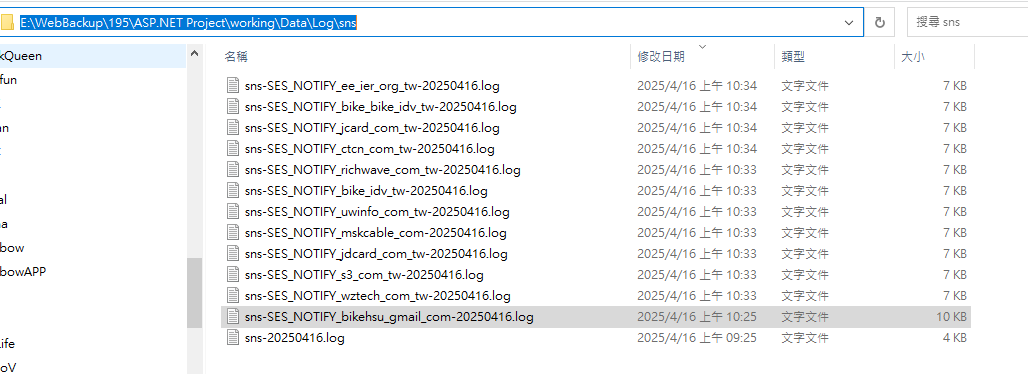
收到的 log 會放在這裡: E:\WebBackup\195\ASP.NET Project\working\Data\Log\sns
# List of SES identities

$identities = @(

    "wztech.com.tw",

    "s3.com.tw",

    "jdcard.com.tw",

    "mskcable.com",

    "uwinfo.com.tw",

    "bike.idv.tw",

    "richwave.com.tw",

    "ctcn.com.tw",

    "jcard.com.tw",

    "bike@bike.idv.tw",

    "ee@ier.org.tw"

)


foreach ($identity in $identities) {

    # Convert identity to a valid topic name by replacing '@' and '.' with '_'

    $safeIdentity = $identity -replace "@", "_" -replace "\.", "_"

    $topicName = "SES_NOTIFY_$safeIdentity"

    $endpoint = "https://working.uwinfo.com.tw/aws/api/sns/receive?topic=$topicName"


    # Validate topic name format

    if ($topicName -notmatch '^[a-zA-Z0-9_\-\$]+$') {

        Write-Host "❌ Invalid topic name: $topicName"

        continue

    }


    # 1. Create SNS topic

    $topicArn = aws sns create-topic `

        --name $topicName `

        --query 'TopicArn' `

        --output text


    Write-Host "✔ Created topic: $topicArn"


    # 2. Subscribe webhook

    aws sns subscribe `

        --topic-arn $topicArn `

        --protocol https `

        --notification-endpoint $endpoint


    Write-Host "✔ Subscribed webhook: $endpoint"


    # 3. Link SES notifications

    foreach ($type in @("Delivery", "Bounce", "Complaint")) {

        aws ses set-identity-notification-topic `

            --identity $identity `

            --notification-type $type `

            --sns-topic $topicArn

        Write-Host "✔ $type linked to $topicName"

    }


    Write-Host "✅ Setup complete for $identity\n"

}


Write-Host "🎉 All identities processed."
收到的 log 會放在這裡: E:\WebBackup\195\ASP.NET Project\working\Data\Log\sns
Bike, 2025/4/16 上午 10:40:39
在 powershell 執行以下的指令
# List of SES identities
$identities = @(
"wztech.com.tw",
"s3.com.tw",
"jdcard.com.tw",
"mskcable.com",
"uwinfo.com.tw",
"bike.idv.tw",
"richwave.com.tw",
"ctcn.com.tw",
"jcard.com.tw",
"bike@bike.idv.tw",
"ee@ier.org.tw"
)
foreach ($identity in $identities) {
# Convert identity to a valid topic name by replacing '@' and '.' with '_'
$safeIdentity = $identity -replace "@", "_" -replace "\.", "_"
$topicName = "SES_NOTIFY_$safeIdentity"
$endpoint = "https://working.uwinfo.com.tw/aws/api/sns/receive?topic=$topicName"
# Validate topic name format
if ($topicName -notmatch '^[a-zA-Z0-9_\-\$]+$') {
Write-Host "❌ Invalid topic name: $topicName"
continue
}
# 1. Create SNS topic
$topicArn = aws sns create-topic `
--name $topicName `
--query 'TopicArn' `
--output text
Write-Host "✔ Created topic: $topicArn"
# 2. Subscribe webhook
aws sns subscribe `
--topic-arn $topicArn `
--protocol https `
--notification-endpoint $endpoint
Write-Host "✔ Subscribed webhook: $endpoint"
# 3. Link SES notifications
foreach ($type in @("Delivery", "Bounce", "Complaint")) {
aws ses set-identity-notification-topic `
--identity $identity `
--notification-type $type `
--sns-topic $topicArn
Write-Host "✔ $type linked to $topicName"
}
Write-Host "✅ Setup complete for $identity\n"
}
Write-Host "🎉 All identities processed."
--
收到的 log 會放在這裡: E:\WebBackup\195\ASP.NET Project\working\Data\Log\sns
# List of SES identities
$identities = @(
"wztech.com.tw",
"s3.com.tw",
"jdcard.com.tw",
"mskcable.com",
"uwinfo.com.tw",
"bike.idv.tw",
"richwave.com.tw",
"ctcn.com.tw",
"jcard.com.tw",
"bike@bike.idv.tw",
"ee@ier.org.tw"
)
foreach ($identity in $identities) {
# Convert identity to a valid topic name by replacing '@' and '.' with '_'
$safeIdentity = $identity -replace "@", "_" -replace "\.", "_"
$topicName = "SES_NOTIFY_$safeIdentity"
$endpoint = "https://working.uwinfo.com.tw/aws/api/sns/receive?topic=$topicName"
# Validate topic name format
if ($topicName -notmatch '^[a-zA-Z0-9_\-\$]+$') {
Write-Host "❌ Invalid topic name: $topicName"
continue
}
# 1. Create SNS topic
$topicArn = aws sns create-topic `
--name $topicName `
--query 'TopicArn' `
--output text
Write-Host "✔ Created topic: $topicArn"
# 2. Subscribe webhook
aws sns subscribe `
--topic-arn $topicArn `
--protocol https `
--notification-endpoint $endpoint
Write-Host "✔ Subscribed webhook: $endpoint"
# 3. Link SES notifications
foreach ($type in @("Delivery", "Bounce", "Complaint")) {
aws ses set-identity-notification-topic `
--identity $identity `
--notification-type $type `
--sns-topic $topicArn
Write-Host "✔ $type linked to $topicName"
}
Write-Host "✅ Setup complete for $identity\n"
}
Write-Host "🎉 All identities processed."
--
收到的 log 會放在這裡: E:\WebBackup\195\ASP.NET Project\working\Data\Log\sns
Bike, 2025/4/16 上午 10:40:31
近日處理我們公司某個使用 my sql 的專案,已經被雷的幾次,紀錄一下
1. 使用 EF Scaffolding 指令去更新 Model ,有些欄位原本是明確型別 變成 可null型別
也就是本來是 datetime 變成 datetime?, int 變成 int?
看起來是一些 view 的欄位會有這些狀況,這時就要去 git revert ,避免build專案又一堆錯誤
2. 使用 IQueryable 語法處理時間要小心,不要在裡面計算時間。
要把時間計算先算出來,再帶入式子
1. 使用 EF Scaffolding 指令去更新 Model ,有些欄位原本是明確型別 變成 可null型別
也就是本來是 datetime 變成 datetime?, int 變成 int?
看起來是一些 view 的欄位會有這些狀況,這時就要去 git revert ,避免build專案又一堆錯誤
2. 使用 IQueryable 語法處理時間要小心,不要在裡面計算時間。
DateTime shouldBeGiveCoinDateTime = DateTime.Now.AddDays(-14);

return dbContext.ViewOrderForCoinCronJob.AsNoTracking().Where(x =>

    x.CompletedAt <= shouldBeGiveCoinDateTime

    && x.CreatedAt >= DateTime.Now.AddYears(-1) // -> 這裡轉換mysql指令會出錯

    && x.DeletedAt == null

    && x.CoinAmount > 0

    && x.Status == (byte)ORDER_STATUS.COMPLETED

    && dbContext.PackingMain.Any(y => y.OrderId == x.Id)

    && x.IsGiveCoin != 0

    && !dbContext.CoinLog.Any(y =>

        y.OrderId == x.Id

        && y.StrKey.Contains(COIN_LOG.STRING_KEY_PREFIX.ORDER_ACCUMULATION)

    )

).ToList();
要把時間計算先算出來,再帶入式子
DateTime shouldBeGiveCoinDateTime = DateTime.Now.AddDays(-14);

DateTime createDateStartAt = DateTime.Now.AddYears(-1); // -> 先算出日期

return dbContext.ViewOrderForCoinCronJob.AsNoTracking().Where(x =>

    x.CompletedAt <= shouldBeGiveCoinDateTime

    && x.CreatedAt >= createDateStartAt // -> 帶入算好的日期

    && x.DeletedAt == null

    && x.CoinAmount > 0

    && x.Status == (byte)ORDER_STATUS.COMPLETED

    && dbContext.PackingMain.Any(y => y.OrderId == x.Id)

    && x.IsGiveCoin != 0

    && !dbContext.CoinLog.Any(y =>

        y.OrderId == x.Id

        && y.StrKey.Contains(COIN_LOG.STRING_KEY_PREFIX.ORDER_ACCUMULATION)

    )

).ToList();
darren, 2025/3/10 下午 05:43:38
優點:
1. 易於單元測試
2. ??
缺點:
1. 所有的 function 必需先建立 Interface, 暫麻煩.
2. debug 時必需先 trace 到 interface 再 trace 到實際 implement 的 code.
1. 易於單元測試
2. ??
缺點:
1. 所有的 function 必需先建立 Interface, 暫麻煩.
2. debug 時必需先 trace 到 interface 再 trace 到實際 implement 的 code.
Bike, 2024/2/8 下午 04:38:17
Restful 的 API 範例,比較特別的是取得單一筆資料時,不是用一般常見的 {id} 而是用 get?id=xxx 的方式,以避免 XXS 的功擊。(不要把原網頁中的參數拼入 API 網址,要改用 Query String 的方式傳給 API)
再增加一個同步範例(只例出 action)
using Ds;

using Ds.Gv;

using iText.Kernel.Geom;

using Microsoft.AspNetCore.Mvc;

using Microsoft.EntityFrameworkCore;

using NPOI.SS.Formula.Functions;

using NPOI.SS.Util;

using Su;

using System.Linq.Expressions;


namespace CallCampaign.Api

{

    /// <summary>

    /// 行銷活動

    /// </summary>

    [Route("api/call-campaign")]

    [ApiController]

    [SetAuthorizationFilter(Sh.AuthCode.不設限)]

    public class ReserveCampaignController : Controller

    {

        /// <summary>

        /// 取得行銷活動列表

        /// </summary>

        /// <param name="reserveCampaignName"></param>

        /// <param name="currentPage"></param>

        /// <param name="pageSize"></param>

        /// <param name="orderByName"></param>

        /// <param name="sort"></param>

        /// <returns></returns>

        /// <exception cref="Exception"></exception>

        [HttpGet("")]

        public async Task<object> ListAsync([FromQuery] string reserveCampaignName = "", [FromQuery] int? currentPage = 1, [FromQuery] int? pageSize = 20, [FromQuery] string orderByName = "OrderNo", [FromQuery] string sort = "asc")

        {

            if (pageSize > 500)

            {

                pageSize = 500;

            }


            if (!(sort == "asc" || sort == "desc"))

            {

                throw new CustomException(System.Net.HttpStatusCode.BadRequest, "sort只能是asc或desc");

            }


            var temp = new V_ReserveCampaign().GetType().GetProperty(orderByName);

            if (temp == null)

            {

                throw new CustomException(System.Net.HttpStatusCode.BadRequest, "不存在欄位");

            }


            Expression<Func<V_ReserveCampaign, bool>> q = p => p.Is_Deleted == "N"

                    && (string.IsNullOrEmpty(reserveCampaignName) || (p.ReserveCampaignName != null && p.ReserveCampaignName.Contains(reserveCampaignName)))

                    ;


            if (orderByName.ToLower().Trim() != "id")

            {

                orderByName += " " + sort + ", id desc";

            }

            else

            {

                orderByName += " " + sort;

            }


            var ct = NewContext.GvContext;

            var list = await ct.GetPageListAsync(q, columns: "Id, ReserveCampaignName, OrderNo, StartAt, EndAt, ModifierName, ModifyDate, CreatorName, CreateDate", page: currentPage ?? 1, pageSize: pageSize ?? 20, orderByName);

            //var list = await ct.GetPageListAsync(q, page: currentPage ?? 1, pageSize: pageSize ?? 20, orderByName + " " + sort);

            return list;

        }


        /// <summary>

        /// 取得行銷活動

        /// </summary>

        /// <param name="Id"></param>

        /// <returns></returns>

        /// <exception cref="Exception"></exception>

        [HttpGet("get")]

        public async Task<dynamic> GetAsync([FromQuery] int Id)

        {

            var res = await Ds.NewContext.GvContext.ReserveCampaigns.Where(r => r.Id == Id)

                .FirstOrDefaultAsync();


            if (res == null)

            {

                throw new CustomException(System.Net.HttpStatusCode.BadRequest, "查無資料 " + Id.ToString());

            }

            return res;

        }


        /// <summary>

        /// 建立行銷活動

        /// </summary>

        /// <param name="dto"></param>

        /// <returns></returns>

        /// <exception cref="CustomException"></exception>

        [HttpPost("")]

        public async Task<object> CreateAsync(Dtos.CreateReserveCampaign dto)

        {

            var ct = NewContext.GvContext;

            var res = await Models.ReserveCampaignHelper.CreateReserveCampaignAsync(ct, dto);

            return res;

        }


        /// <summary>

        /// 編輯行銷活動

        /// </summary>

        /// <param name="dto"></param>

        /// <returns></returns>

        /// <exception cref="CustomException"></exception>

        [HttpPatch("")]

        public async Task<object> UpdateAsync(Dtos.UpdateReserveCampaign dto)

        {

            var ct = NewContext.GvContext;

            var res = await Models.ReserveCampaignHelper.UpdateReserveCampaignAsync(ct, dto);

            return res;

        }


        /// <summary>

        /// 刪除行銷活動

        /// </summary>

        /// <param name="id"></param>

        /// <returns></returns>

        /// <exception cref="CustomException"></exception>

        [HttpDelete("")]

        public async Task<object> DeleteAsync([FromQuery] int id)

        {

            var res = await Ds.NewContext.GvContext.MarkDeleteAsync<Ds.Gv.ReserveCampaign>(id, Sh.ModifyInfo);

            return res;

        }

    }

}
再增加一個同步範例(只例出 action)
        /// <summary>

        /// 取得列表

        /// </summary>

        /// <param name="name"></param>

        /// <param name="currentPage"></param>

        /// <param name="pageSize"></param>

        /// <param name="orderByName"></param>

        /// <param name="sort"></param>

        /// <returns></returns>

        [HttpGet("")]

        public object List([FromQuery] string name = "", [FromQuery] int? currentPage = 1, [FromQuery] int? pageSize = 20, [FromQuery] string orderByName = "OrderNo", [FromQuery] string sort = "asc")

        {

            return "";

        }


        /// <summary>

        /// 取得明細資料

        /// </summary>

        /// <param name="Id"></param>

        /// <returns></returns>

        /// <exception cref="Exception"></exception>

        [HttpGet("get")]

        public object Get([FromQuery] int id)

        {

            return "";

        }


        /// <summary>

        /// 建立

        /// </summary>

        /// <param name="dto"></param>

        /// <returns></returns>

        /// <exception cref="CustomException"></exception>

        [HttpPost("")]

        public object Create(Dtos.PhysicalCheckUpType dto)

        {

            return "";

        }


        /// <summary>

        /// 編輯

        /// </summary>

        /// <param name="dto"></param>

        /// <returns></returns>

        /// <exception cref="CustomException"></exception>

        [HttpPatch("")]

        public object Update(Dtos.PhysicalCheckUpType dto)

        {

            return "";

        }


        /// <summary>

        /// 刪除

        /// </summary>

        /// <param name="id"></param>

        /// <returns></returns>

        /// <exception cref="CustomException"></exception>

        [HttpDelete("")]

        public object Delete([FromQuery] int id)

        {

            return 1;

        }
Bike, 2023/12/13 上午 08:54:28
程式碼上色
https://highlightjs.org/
Vue
https://github.com/highlightjs/vue-plugin
中文
https://fenxianglu.cn/highlight.html?theme=atom-one-light
https://highlightjs.org/
Vue
https://github.com/highlightjs/vue-plugin
中文
https://fenxianglu.cn/highlight.html?theme=atom-one-light
hannah, 2023/9/18 下午 03:46:03
問題:
在開出新分頁後,無法讀取 sessionStorage 的資料
可能原因:
Chrome 某個版本,Stop cloning sessionStorage for windows opened with noopener
a标签_blank默认 rel="noopener" ,所以a标签需要加入rel=“opener” 而才能像window.open("同源页面")这种方式新开的页面会复制之前的sessionStorage
解決方法:
開新分頁前,加入 rel=“opener”參數即可。
例:
參考:
面试官:你确定多窗口之间sessionStorage不能共享状态吗???
在開出新分頁後,無法讀取 sessionStorage 的資料
可能原因:
Chrome 某個版本,Stop cloning sessionStorage for windows opened with noopener
a标签_blank默认 rel="noopener" ,所以a标签需要加入rel=“opener” 而才能像window.open("同源页面")这种方式新开的页面会复制之前的sessionStorage
解決方法:
開新分頁前,加入 rel=“opener”參數即可。
例:
<a href="http://..." target="_blank" rel="opener">Link</a>
$(".hlkPrint").click(function () {

    $("form").setPostDataToStorage();


    $("form").attr("rel", "opener");

    $("form").attr("target", "_blank");

    $("form").attr("action", "xxxxx.aspx");

    $("form").submit();

});
參考:
面试官:你确定多窗口之间sessionStorage不能共享状态吗???
Reiko, 2022/12/1 下午 05:57:23
把使用者輸入的內容顯示於網頁上,需要注意什麼 ?
客人在前台例如輸入留言,客服在後台查看留言。
客人在前台例如輸入留言,客服在後台查看留言。
Bike, 2022/9/22 下午 03:09:40
為了遏止垃圾郵件以及釣魚郵件,SPAM組織有定義一些規則,這些規則主要是經由 DNS 反查相關設定,看郵件來源是不是沒有問題。其中一個就是 SPF 設定。
SPF 設定(txt)我這邊就不多說,網路上很多資源有相關介紹,基本上 他的設定就會像是
"v=spf1 include:_spf.mx.cloudflare.net ~all"
中間 include: 就是寄件來源的 domain, include 也可以設定多筆,
也可以設定 ip4 格式或是 mx 所以他可能會長得像這樣
"v=spf1 include:_spf.emfwd.name-services.com include:amazonses.com ip4:112.121.xxx.0/24 ?all"
最後的 all 前面用 ? - ~ 都有他的意義,請參考網路上的資源
在這裡不管是 include 或是 ip4 設定,都是寄件者的IP來源白名單。
其工作原理大致是
1. 郵件伺服器收到一封email後,抓出寄件者的 email domain
2. 由 email domain 去 DNS 檢查 spf 設定,若有,就從裡面IP來源白名單,比對寄信來源的伺服器IP是不是在白名單
3. 若不是白名單,郵件伺服器可能直接拒收(收件者完全找不到新件),或是列入垃圾郵件
---------------------------------------------------------
對於我們公司的客戶而言,若他的網站通知信不是經由 aws ses寄送
是經由我們公司建立的 smtp 寄送,其實是可以請他們去 DNS 做一下設定
而且最好建議寄件者是使用子網域,避免跟 root 網域的 email 設定有衝突
例如 service@ec.examplesite.com.tw
這樣就可以請客戶去 DNS ec.example.com.tw 設定 spf txt
"v=spf1 ip4:112.121.xxx.0/24 ?all"
這樣就可以減少email變成垃圾郵件的狀況
不過以上僅限在 "通知信"範疇
如果客戶要大量寄送 EDM,還是要請他們是用外部資源, aws ses 或是 mail trimp, 電子豹
不要使用內建的 SMTP 主機,因為同一IP同時發送大量郵件,也會被 SPAM 組織列為黑名單
SPF 設定(txt)我這邊就不多說,網路上很多資源有相關介紹,基本上 他的設定就會像是
"v=spf1 include:_spf.mx.cloudflare.net ~all"
中間 include: 就是寄件來源的 domain, include 也可以設定多筆,
也可以設定 ip4 格式或是 mx 所以他可能會長得像這樣
"v=spf1 include:_spf.emfwd.name-services.com include:amazonses.com ip4:112.121.xxx.0/24 ?all"
最後的 all 前面用 ? - ~ 都有他的意義,請參考網路上的資源
在這裡不管是 include 或是 ip4 設定,都是寄件者的IP來源白名單。
其工作原理大致是
1. 郵件伺服器收到一封email後,抓出寄件者的 email domain
2. 由 email domain 去 DNS 檢查 spf 設定,若有,就從裡面IP來源白名單,比對寄信來源的伺服器IP是不是在白名單
3. 若不是白名單,郵件伺服器可能直接拒收(收件者完全找不到新件),或是列入垃圾郵件
---------------------------------------------------------
對於我們公司的客戶而言,若他的網站通知信不是經由 aws ses寄送
是經由我們公司建立的 smtp 寄送,其實是可以請他們去 DNS 做一下設定
而且最好建議寄件者是使用子網域,避免跟 root 網域的 email 設定有衝突
例如 service@ec.examplesite.com.tw
這樣就可以請客戶去 DNS ec.example.com.tw 設定 spf txt
"v=spf1 ip4:112.121.xxx.0/24 ?all"
這樣就可以減少email變成垃圾郵件的狀況
不過以上僅限在 "通知信"範疇
如果客戶要大量寄送 EDM,還是要請他們是用外部資源, aws ses 或是 mail trimp, 電子豹
不要使用內建的 SMTP 主機,因為同一IP同時發送大量郵件,也會被 SPAM 組織列為黑名單
darren, 2022/5/30 下午 01:06:51