搜尋 . 結果:
1. 參考這裡設定第一個網站:
https://blog.johnwu.cc/article/centos-asp-net-core-neginx.html
注意, 文章中有一個錯誤:
/etc/nginx/conf.d/my-website.conf 的第 27 行, 應該是 include /etc/nginx/conf.d/default_proxy_settings;
2. 因為要避開 5000 port, 所以修改第二個網站的 appsettings.json, 讓第二個網站開在 5002 port, 如下.
3. 新增 /etc/nginx/conf.d/my-website2.conf, 要注意
A. portal2
B. server localhost:5002
C. server_name coretest2.bike.idv.tw
當然 SSL 憑証的檔名也要記得改.
改完後就可以用了.
以下是 https://blog.johnwu.cc/article/centos-asp-net-core-neginx.html 抄過來的一些檔案, 作為備份:
setup-aspnet-core.sh
用以下指令執行:
/etc/systemd/system/my-website.service, (/bin/dotnet 有可能是 /usr/bin/dotnet)
服務相關指令:
/etc/nginx/conf.d/default_proxy_settings
/etc/nginx/conf.d/my-website.conf
Nginx 重新啟動:
https://blog.johnwu.cc/article/centos-asp-net-core-neginx.html
注意, 文章中有一個錯誤:
/etc/nginx/conf.d/my-website.conf 的第 27 行, 應該是 include /etc/nginx/conf.d/default_proxy_settings;
2. 因為要避開 5000 port, 所以修改第二個網站的 appsettings.json, 讓第二個網站開在 5002 port, 如下.
{

"Logging": {

    "LogLevel": {

     "Default": "Information",

     "Microsoft": "Warning",

     "Microsoft.Hosting.Lifetime": "Information"

    }

},

"Kestrel": {

        "EndPoints": {

                "Http": {

                        "Url": "http://localhost:5002"

                }

        }

},

"AllowedHosts": "*"

}
3. 新增 /etc/nginx/conf.d/my-website2.conf, 要注意
A. portal2
B. server localhost:5002
C. server_name coretest2.bike.idv.tw
當然 SSL 憑証的檔名也要記得改.
upstream portal2 {

    # localhost:5000 改成 ASP.NET Core 所監聽的 Port

    server localhost:5002;

}


server {

    # 只要是透過這些 Domain 連 HTTP 80 Port,都會轉送封包到 ASP.NET Core

    listen 80;

    # 可透過空白區分,綁定多個 Domain

    server_name coretest2.bike.idv.tw;

    location / {

        proxy_pass http://portal2/;

        include /etc/nginx/conf.d/default_proxy_settings;

    }

}


# 用 HTTPS 必須要有 SSL 憑證,如果沒有要綁定 SSL 可以把下面整段移除

server {

    # 只要是透過這些 Domain 連 HTTPS 443 Port,都會轉送封包到 ASP.NET Core

    listen 443 ssl;

    server_name coretest2.bike.idv.tw;

    ssl_certificate /etc/nginx/ssl/coretest2.bike.idv.tw.crt;

    ssl_certificate_key /etc/nginx/ssl/coretest2.bike.idv.tw.key;


    location / {

        proxy_pass http://portal2/;

        include /etc/nginx/conf.d/default_proxy_settings;

    }

}
改完後就可以用了.
以下是 https://blog.johnwu.cc/article/centos-asp-net-core-neginx.html 抄過來的一些檔案, 作為備份:
setup-aspnet-core.sh
#!/bin/bash


main() {

    sudo yum -y install epel-release

    sudo yum -y update


    install_nginx

    install_dotnet


    sudo firewall-cmd --add-service=http --permanent

    sudo firewall-cmd --add-service=https --permanent

    sudo firewall-cmd --reload

}


install_nginx() {

    echo "###################################"

    echo "########## Install Nginx ##########"

    echo "###################################"

    sudo yum -y install httpd-tools nginx

    sudo setsebool -P httpd_can_network_connect on

    sudo sed -i 's/^SELINUX=.*/SELINUX=disabled/' /etc/selinux/config

    sudo setenforce 0

    sudo systemctl enable nginx

    sudo systemctl restart nginx

}


install_dotnet() {

    echo "###########################################"

    echo "########## Install .NET Core 2.2 ##########"

    echo "###########################################"

    sudo rpm -Uvh https://packages.microsoft.com/config/rhel/7/packages-microsoft-prod.rpm

    sudo yum -y install aspnetcore-runtime-2.2

}


main "$@"
用以下指令執行:
sudo sh setup-aspnet-core.sh
/etc/systemd/system/my-website.service, (/bin/dotnet 有可能是 /usr/bin/dotnet)
[Unit]

# Description=<此服務的摘要說明>

Description=MyWebsite


[Service]

# WorkingDirectory=<ASP.NET Core 專案目錄>

WorkingDirectory=/usr/share/my-website


# ExecStart=/bin/dotnet <ASP.NET Core 起始 dll>

ExecStart=/bin/dotnet MyWebsite.dll


# 啟動若失敗,就重啟到成功為止

Restart=always

# 重啟的間隔秒數

RestartSec=10


# 設定環境變數,注入給 ASP.NET Core 用

Environment=ASPNETCORE_ENVIRONMENT=Production

Environment=DOTNET_PRINT_TELEMETRY_MESSAGE=false


[Install]

WantedBy=multi-user.target
服務相關指令:
# 開啟,開機自動啟動服務

systemctl enable my-website.service


# 關閉,開機自動啟動服務

systemctl disable my-website.service


# 啟動服務

systemctl start my-website.service


# 重啟服務

systemctl restart my-website.service


# 停止服務

systemctl stop my-website.service


# 查看服務狀態

systemctl status my-website.service
/etc/nginx/conf.d/default_proxy_settings
proxy_http_version 1.1;

proxy_set_header Upgrade $http_upgrade;

proxy_set_header Connection $http_connection;

proxy_set_header Host $host;

proxy_set_header X-Real-IP $remote_addr;

proxy_set_header X-Forwarded-Host $remote_addr;

proxy_set_header X-Forwarded-For $proxy_add_x_forwarded_for;

proxy_set_header X-Forwarded-Proto $scheme;

proxy_cache_bypass $http_upgrade;
/etc/nginx/conf.d/my-website.conf
upstream portal {

    # localhost:5000 改成 ASP.NET Core 所監聽的 Port

    server localhost:5000;

}


server {

    # 只要是透過這些 Domain 連 HTTP 80 Port,都會轉送封包到 ASP.NET Core

    listen 80;

    # 可透過空白區分,綁定多個 Domain

    server_name demo.johnwu.cc example.johnwu.cc;

    location / {

        proxy_pass http://portal/;

        include /etc/nginx/conf.d/default_proxy_settings;

    }

}


# 用 HTTPS 必須要有 SSL 憑證,如果沒有要綁定 SSL 可以把下面整段移除

server {

    # 只要是透過這些 Domain 連 HTTPS 443 Port,都會轉送封包到 ASP.NET Core

    listen 443 ssl;

    server_name demo.johnwu.cc;

    ssl_certificate /etc/nginx/ssl/demo.johnwu.cc_bundle.crt;

    ssl_certificate_key /etc/nginx/ssl/demo.johnwu.cc.key;


    location / {

        proxy_pass http://portal/;

        include /etc/nginx/conf.d/default_proxy_settings;

    }

}
Nginx 重新啟動:
# 檢查 Nginx 的設定是否有誤

nginx -t


# 若沒有錯誤,即可套用

nginx -s reload
Bike, 2020/7/7 上午 08:01:43
Visual Studio 2019安裝篇
1. 主程式
https://visualstudio.microsoft.com/zh-hant/vs/?rr=https%3A%2F%2Fwww.google.com%2F
2. SVN套件
https://marketplace.visualstudio.com/items?itemName=VisualSVNLimited.VisualSVN-VS2019
3. .Net 放置到IIS要的額外設定
https://blog.johnwu.cc/article/iis-run-asp-net-core.html
1. 主程式
https://visualstudio.microsoft.com/zh-hant/vs/?rr=https%3A%2F%2Fwww.google.com%2F
2. SVN套件
https://marketplace.visualstudio.com/items?itemName=VisualSVNLimited.VisualSVN-VS2019
3. .Net 放置到IIS要的額外設定
https://blog.johnwu.cc/article/iis-run-asp-net-core.html
choco, 2019/10/17 下午 06:33:49
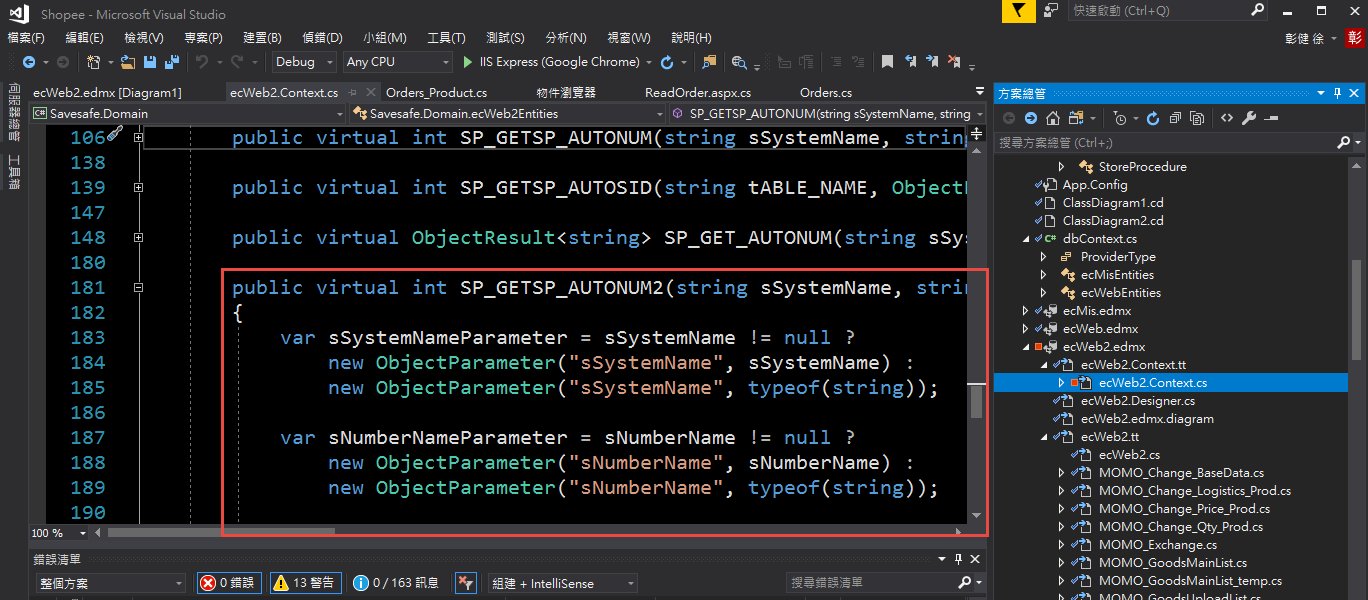
今天因為一個客戶的專案, 試了一下用 Entity Framework 把 Store Procedure 包成一個 function. 被卡了一下, 發現要先 Compile 才會看到新增的 function, 記錄一下, 希望看到的人能省點時間 .....
1. 從資料庫更新模型

2. 選擇要匯入的 Store Procedure
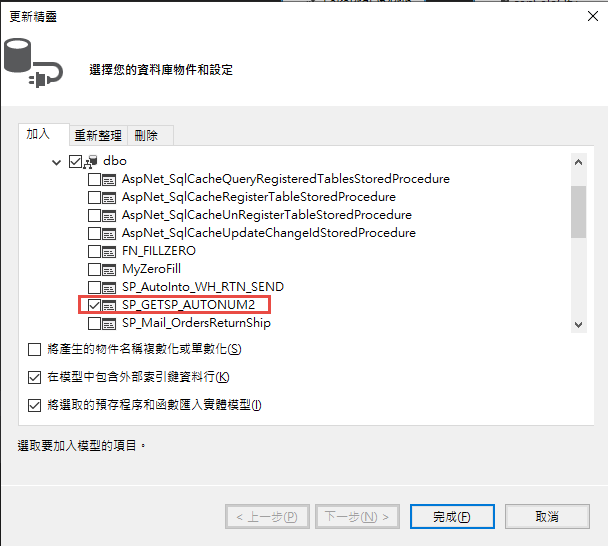
3. 完成匯入匯入後, function 並不會生出來.
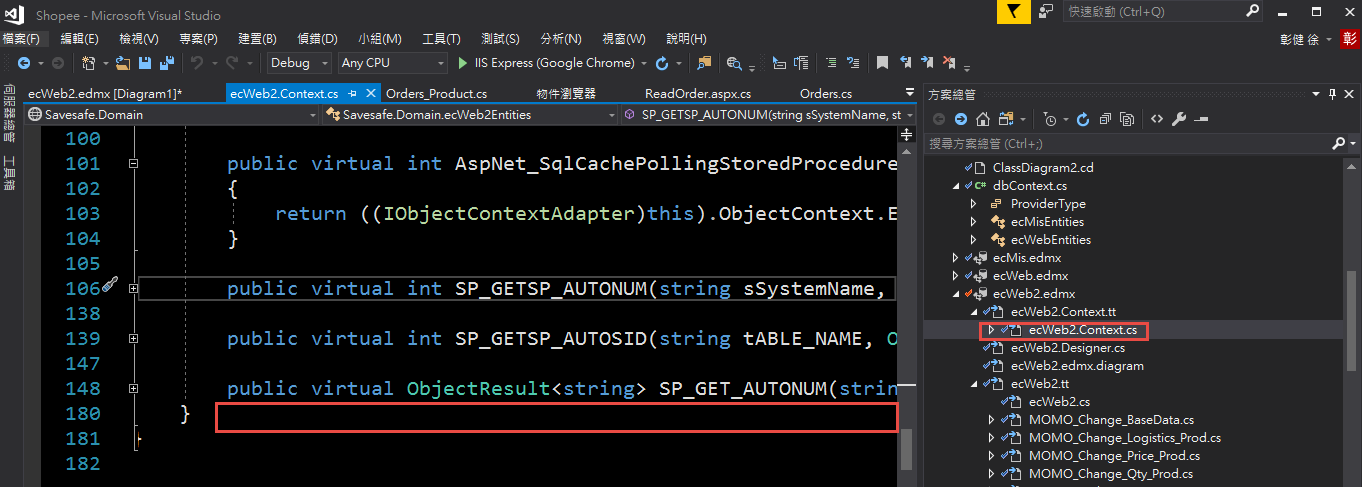
4. Compile 之後, 才會看到這個 function.
1. 從資料庫更新模型
2. 選擇要匯入的 Store Procedure
3. 完成匯入匯入後, function 並不會生出來.
4. Compile 之後, 才會看到這個 function.
Bike, 2019/9/21 下午 08:04:53
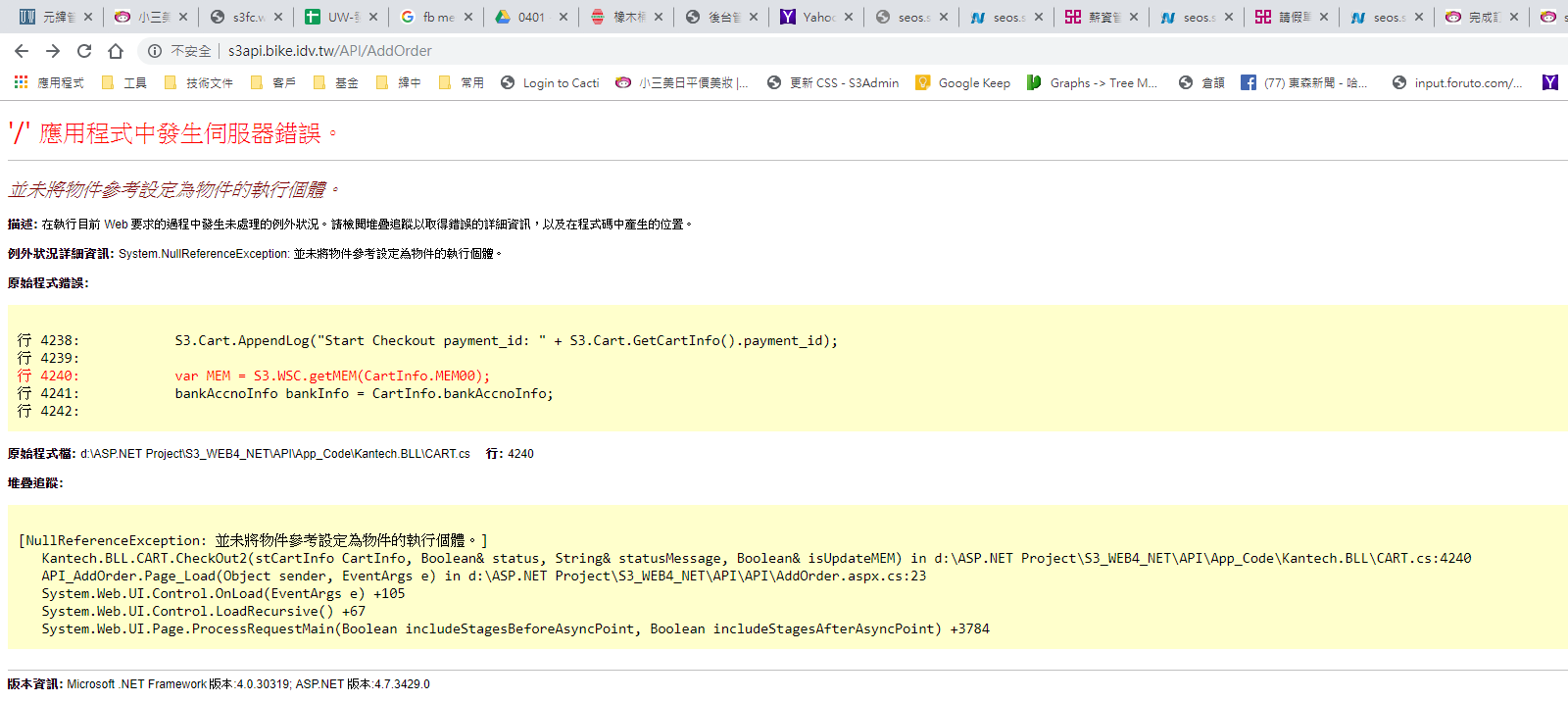
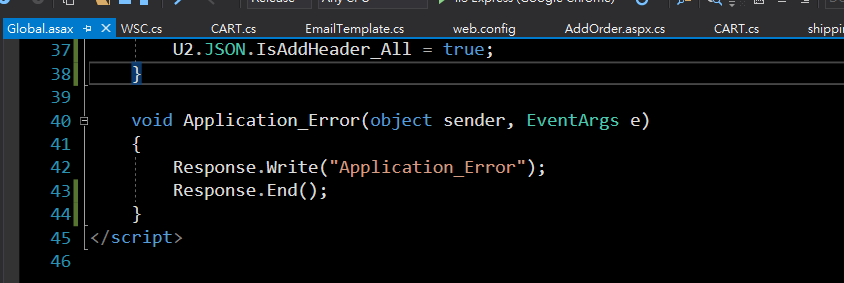
在 Global.asax 中, 定義了 Application_PreSendRequestContent 的話, 會影響到 Application_Error 的輸出, 即始 Application_PreSendRequestContent 是空的: 感覺像是 Application_Error 失效
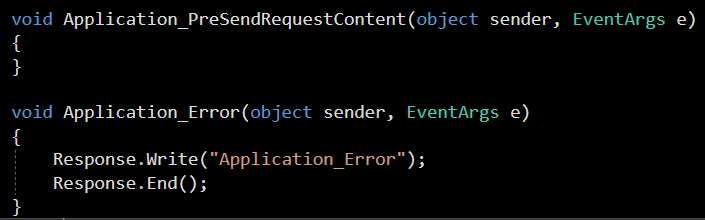
若是沒有 Application_PreSendRequestContent 的情況下. 結果如下圖:
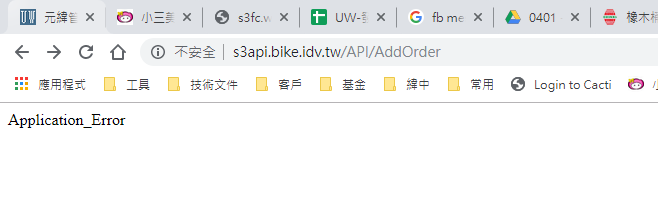
若是沒有 Application_PreSendRequestContent 的情況下. 結果如下圖:
Bike, 2019/8/16 下午 05:05:45
VS 2013 發生的錯誤
https://stackoverflow.com/questions/23893497/no-editoroptiondefinition-export-found-error
1. Close Visual Studio
2. Open the folder: %LocalAppData%\Microsoft\VisualStudio\12.0\ (in C:\users\'%userName%'\AppData\Local\Microsoft\VisualStudio\12.0\)
3. Rename the ComponentModelCache folder
4. Restart Visual Studio.
https://stackoverflow.com/questions/23893497/no-editoroptiondefinition-export-found-error
1. Close Visual Studio
2. Open the folder: %LocalAppData%\Microsoft\VisualStudio\12.0\ (in C:\users\'%userName%'\AppData\Local\Microsoft\VisualStudio\12.0\)
3. Rename the ComponentModelCache folder
4. Restart Visual Studio.
sean, 2019/7/19 上午 09:59:06
先寫幾個, 有空再整理.
1. Upload Folder 的執行權限要關閉
2. 在HTTP Header加入X-Frame-Options: DENY或SAMEORIGIN。
3. web.config 的 connection string 和 app setting 要加密
1. Upload Folder 的執行權限要關閉
2. 在HTTP Header加入X-Frame-Options: DENY或SAMEORIGIN。
3. web.config 的 connection string 和 app setting 要加密
Bike, 2019/6/19 下午 05:53:18
好像為了這個找了很多次 google, 每次都花了不少時間..
1. 新增功能角色

2. 新增管理服務
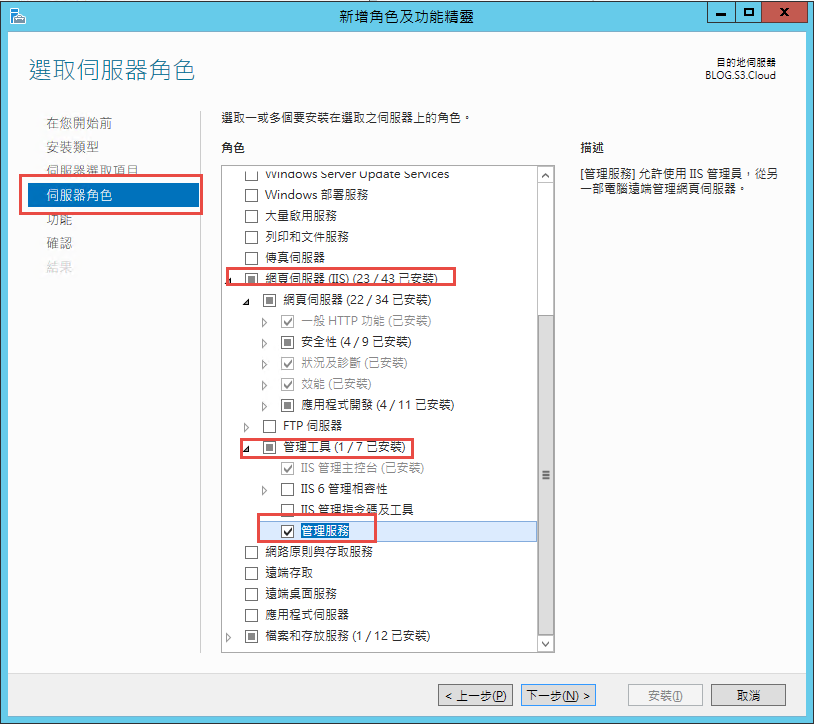
3. 安裝 Web Deploy 套件
https://www.iis.net/downloads/microsoft/web-deploy
4. 完工..
參考: https://stackoverflow.com/questions/41386690/missing-import-web-application-option-in-web-deploy-3-6
1. 新增功能角色
2. 新增管理服務
3. 安裝 Web Deploy 套件
https://www.iis.net/downloads/microsoft/web-deploy
4. 完工..
參考: https://stackoverflow.com/questions/41386690/missing-import-web-application-option-in-web-deploy-3-6
Bike, 2019/5/22 下午 07:47:55
1. Asp.Net Session 會造成 Block
2. ashx 和 aspx 在 Session 的預設值是不同的.
3. Clinet 的非同步和 Session 造成的 block 的差異
4. 靜態物件也會互相等待(Browser concurrent connetion 的限制, Edge:8個 Connection, Chrome: 6 個, 2019/4 的測試)
5.ashx 和 aspx 的 session 閞關方式.
6. asp.net 的 session 是看 Cookie, 嘗試做 session hijack
額外追加: 服務的三個 Level(告知, 陪同完成, 詢問並給予進一步的建議)
2. ashx 和 aspx 在 Session 的預設值是不同的.
3. Clinet 的非同步和 Session 造成的 block 的差異
4. 靜態物件也會互相等待(Browser concurrent connetion 的限制, Edge:8個 Connection, Chrome: 6 個, 2019/4 的測試)
5.ashx 和 aspx 的 session 閞關方式.
6. asp.net 的 session 是看 Cookie, 嘗試做 session hijack
額外追加: 服務的三個 Level(告知, 陪同完成, 詢問並給予進一步的建議)
Bike, 2019/5/2 下午 02:41:33
若是在某個 namespace 之下, 有和 Root 階層相同名稱的物件. 此時, 該 namespace 之下的物件無法直接指定根目錄下的物件.
解決方法, 在物件名稱前面加上 global::
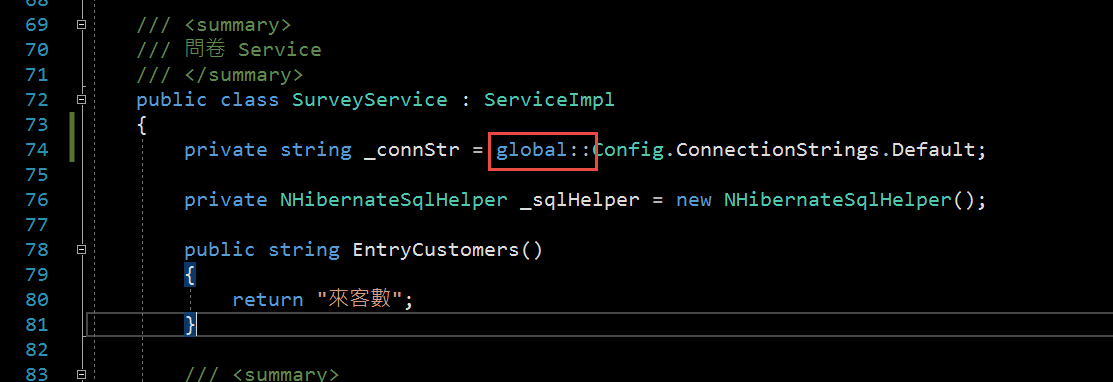
解決方法, 在物件名稱前面加上 global::
Bike, 2019/1/3 上午 09:47:20