搜尋 ti 結果:

ASP.NET 在處理 HTTP POST 要求時最多只能接受 1,000 個參數,一般來說不會有人透過 POST 傳遞表單資料超過 1,000 個欄位 ( 以筆者的經驗來說,傳過最多的一次是 700 個欄位,當時是個問卷系統 ),如果傳數參數超過 1,000 筆的話,就會出現 Operation is not valid due to the current state of the object. (英文) 或 由於該物件目前的狀態,導致作業無效。 (中文) 例外狀況,細部的例外訊息會有 HttpException (0x80004005): The URL-encoded form data is not valid. (英文) 或 HttpException (0x80004005): URL 編碼型式資料無效。
參考:http://blog.miniasp.com/post/2012/01/01/Efficient-Denial-of-Service-Attacks-on-Web-Application-Platforms.aspx
解:
web.config加下面這個設定
<appSettings>

     <add key="aspnet:MaxHttpCollectionKeys" value="5000" />

</appSettings>
Reiko, 2012/8/15 下午 06:39:13
當我們使用 XmlWriter 配合 StringBuilder 建立xml文件時,會產生結果是 UTF-16 的 xml 文件
即使 XmlWriter 有配合 XmlWriterSetting 設定為 UTF-8 但結果還是 UTF-16
我網路上找了一下解決方式 整理出以下是比較好的解決方式 請參考程式碼
最終還是要靠 StreamReader 轉一次
即使 XmlWriter 有配合 XmlWriterSetting 設定為 UTF-8 但結果還是 UTF-16
我網路上找了一下解決方式 整理出以下是比較好的解決方式 請參考程式碼
最終還是要靠 StreamReader 轉一次
        Encoding enc = Encoding.UTF8;
        XmlWriterSettings xws = new XmlWriterSettings();
        xws.Encoding = enc;
        xws.Indent = true;
        MemoryStream ms = new MemoryStream();
        string strXml = "";
        using (XmlWriter writer = XmlWriter.Create(ms, xws))
        {

            writer.WriteStartDocument();
            writer.WriteStartElement("rss");
            writer.WriteAttributeString("version", "2.0");

            writer.WriteStartElement("channel");

            // channel data
            writer.WriteElementString("title", "最新文章");
            ...(XML 資料)......

            writer.WriteEndElement(); // channel end

            writer.WriteEndElement(); //rss end
            writer.WriteEndDocument();

            writer.Flush();

            StreamReader reader = new StreamReader(ms, enc, true);
            ms.Seek(0, SeekOrigin.Begin);
            strXml = reader.ReadToEnd();
        }
darren, 2012/8/9 下午 12:56:25
使用 APPCMD
所在位置: cd %windir%\system32\inetsrv
匯出整個網站設定: appcmd list site "SiteName" /config /xml > D:\IISSetting\SiteName.xml
匯入整個網站設定: appcmd.exe add site /in < D:\IISSetting\SiteName.xml
在執行匯入的動作之前,要先檢查一下 .XML 裡面的 ID, 是否和現有的網站衝突,一般會有兩個地方。
有時在 XML 裡面會多一個 ftpServer 的區塊,要記得刪掉,另外 Application Pool 要記得,建立可以使用以下指令。
export
appcmd list apppool 116foto /config /xml >D:\IISSetting\app_116foto.xml
import
appcmd add apppool /name:116foto /in <D:\IISSetting\app_116foto.xml
所在位置: cd %windir%\system32\inetsrv
匯出整個網站設定: appcmd list site "SiteName" /config /xml > D:\IISSetting\SiteName.xml
匯入整個網站設定: appcmd.exe add site /in < D:\IISSetting\SiteName.xml
在執行匯入的動作之前,要先檢查一下 .XML 裡面的 ID, 是否和現有的網站衝突,一般會有兩個地方。
有時在 XML 裡面會多一個 ftpServer 的區塊,要記得刪掉,另外 Application Pool 要記得,建立可以使用以下指令。
export
appcmd list apppool 116foto /config /xml >D:\IISSetting\app_116foto.xml
import
appcmd add apppool /name:116foto /in <D:\IISSetting\app_116foto.xml
Bike, 2012/8/8 下午 11:32:33
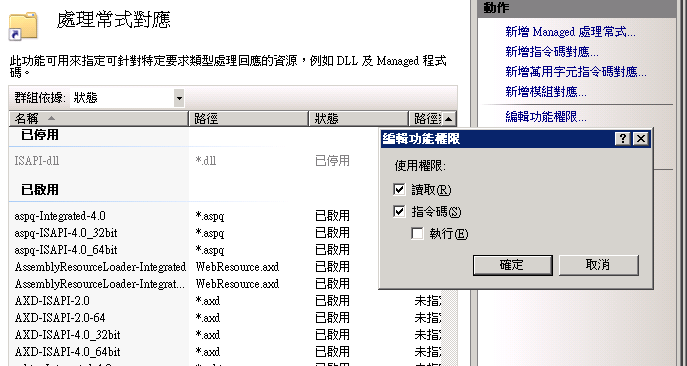
在 IIS 7.0 網站下掛入的 virtual directory 預設是可以執行指令碼的,所以若是使用者上傳了 aspx, 那該 aspx 就可以執行.. 這會是一個很大的安全問題. 要解決這個, 必需在該目錄的處理常式對應中,把指令碼的功能取消. 看來又要做一次大檢查了.
1. 處理常式對應:

2. 編輯功能權限,並且把指令碼拿掉。
1. 處理常式對應:
2. 編輯功能權限,並且把指令碼拿掉。
Bike, 2012/7/30 下午 12:02:17
突然發現網站在大流量卡住時,看 CPU 和記憶體都沒有什麼問題時,可能是以下的原因。
在 C:\Windows\Microsoft.NET\Framework64\v2.0.50727\Aspnet.config 之下, 可以設定


<system.web> <applicationPool maxConcurrentRequestsPerCPU="12" maxConcurrentThreadsPerCPU="0" requestQueueLimit="5000"/></system.web>
另外,在 registry 中,可以設定 HKEY_LOCAL_MACHINE\SOFTWARE\Microsoft\ASP.NET\2.0.50727.0\MaxConcurrentRequestsPerCPU
參考:
http://blogs.msdn.com/b/tmarq/archive/2007/07/21/asp-net-thread-usage-on-iis-7-0-and-6-0.aspxBike, 2012/7/30 上午 09:04:47
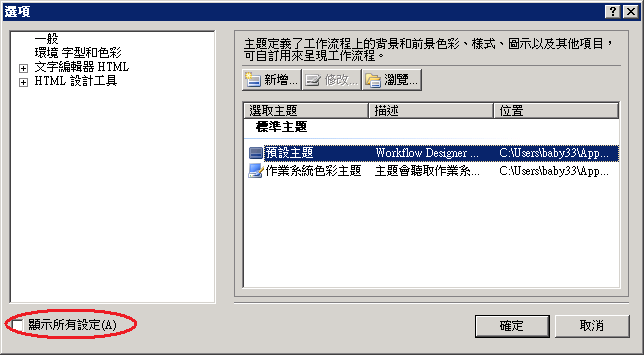
很久沒有用 Word 了, Word 2010 和以前的 Word 2000 實在差很多, 很多東西都找不到, 目錄即是一例, 做了兩次還是記不得, 乾脆做個記錄, 未來大家做 SA 文件時也可以用到.
1. 先在該行按右鍵, 選取樣式 -> 標題 1

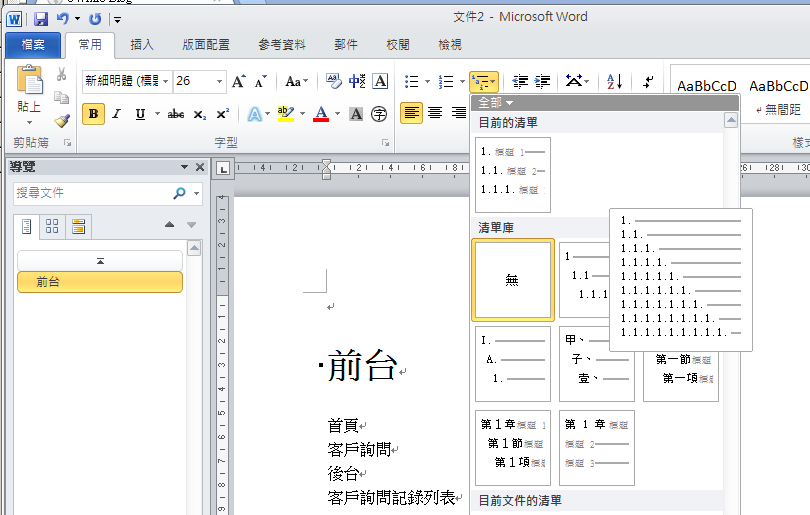
2. 在常用標籤的地方找到階層式編號, 選擇要用的編號.
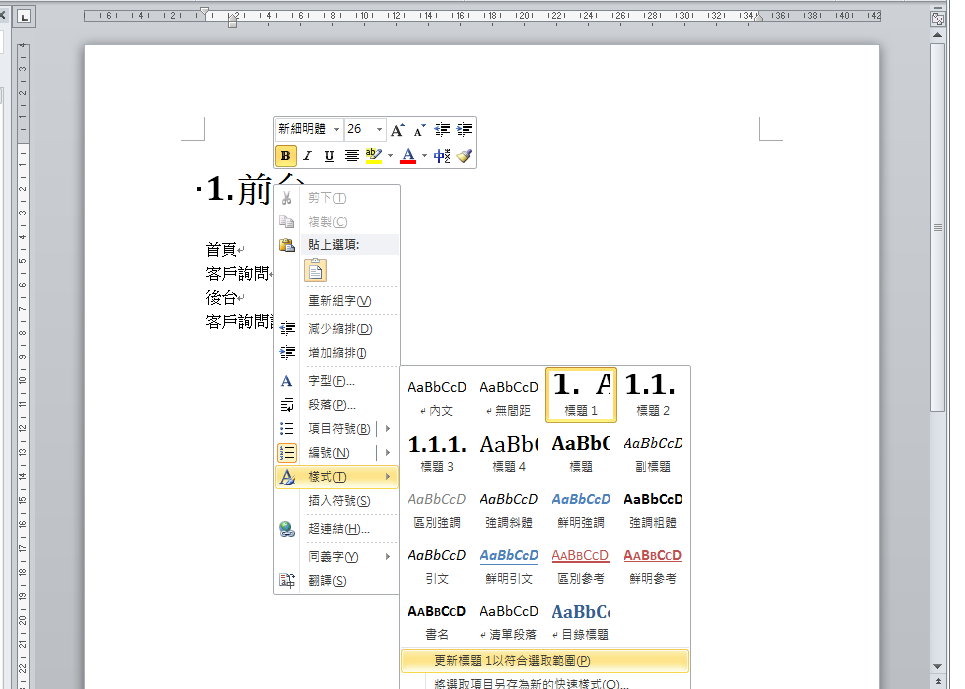
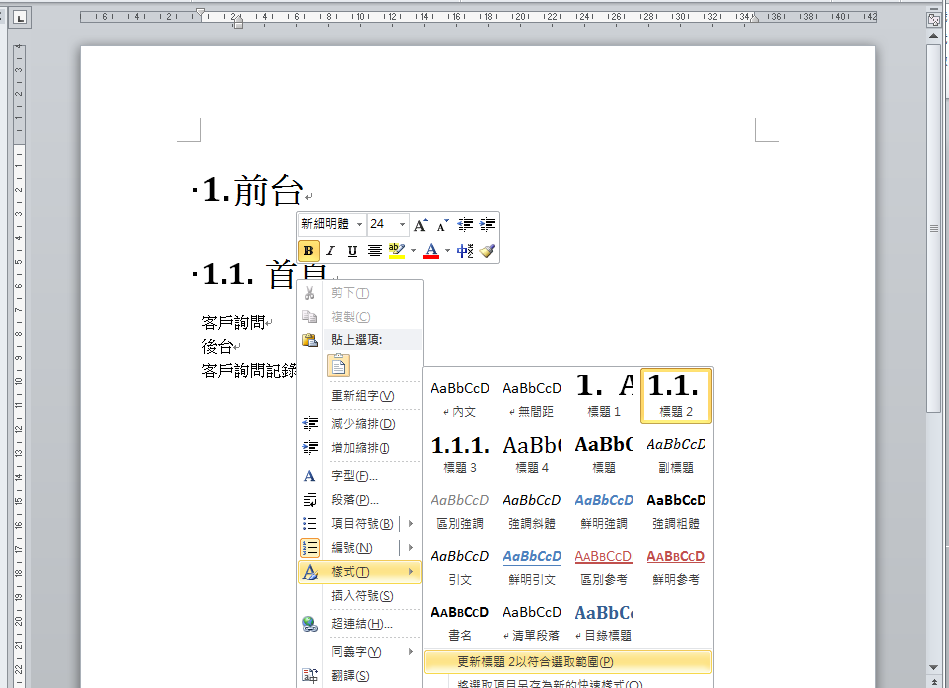
3. 讓所有的標題 1 都會自動編號, 一樣是用右鍵, 選樣式, 再選更新標題 1 以符合選取範圍.
4. 設定標題 2, 一樣是用右鍵選樣式.
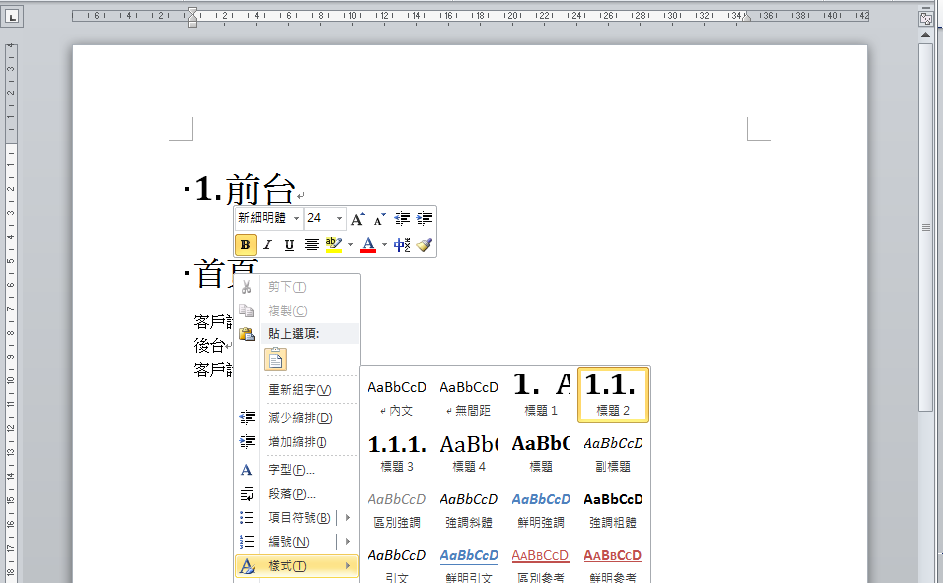
5. 最神奇的一步來了, 第二階的編號要用一般的編號, 不能用階層編號, 不然編號會重新開始. 今天就是在這裡搞了很久.
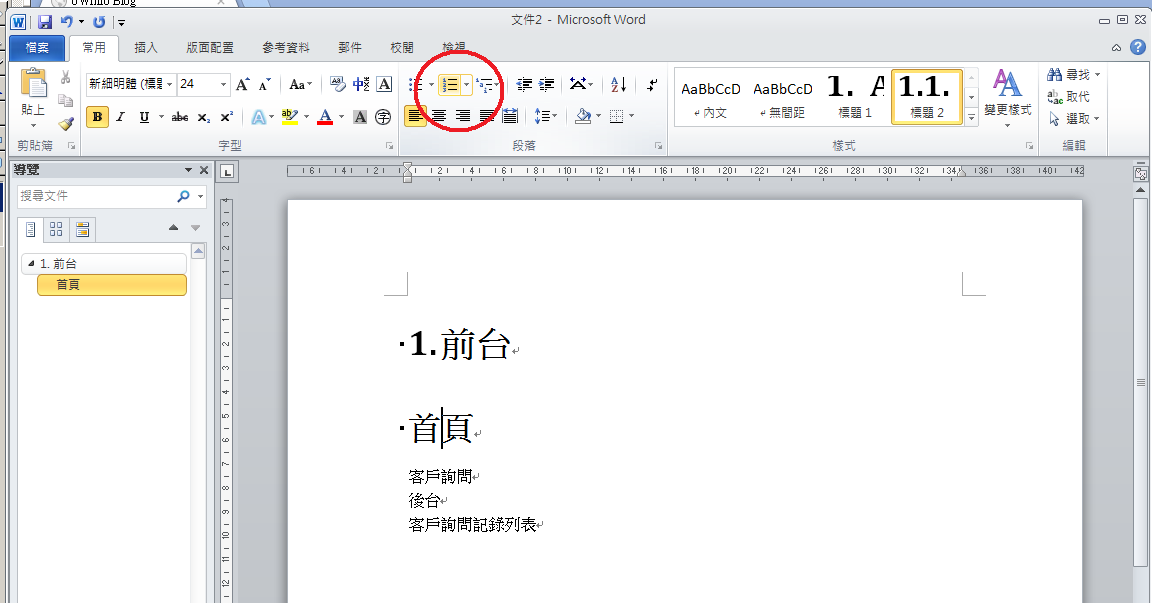
6. 一樣要讓編號套用到所有的標題 2
7. 結果, 值得一提, 上面和左邊各有一個快捷工具可以使用.
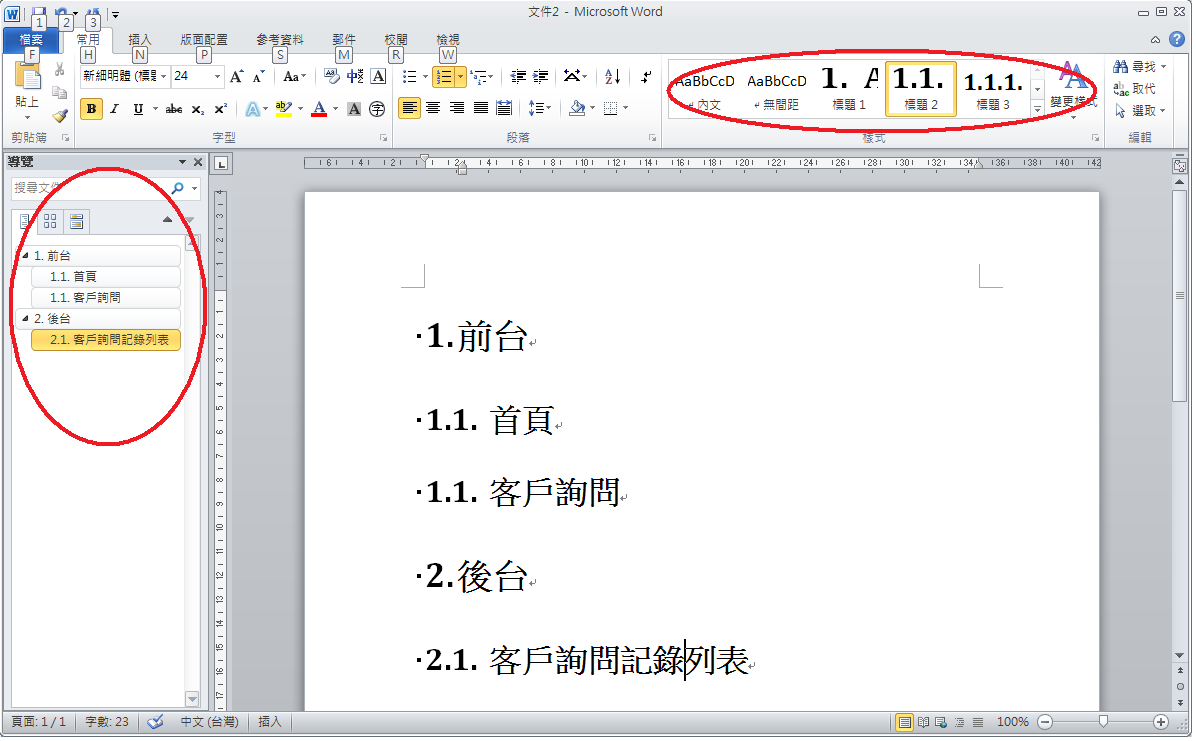
8 最後, 要插入目錄, 它的位置是在 "參考資料" 裡.
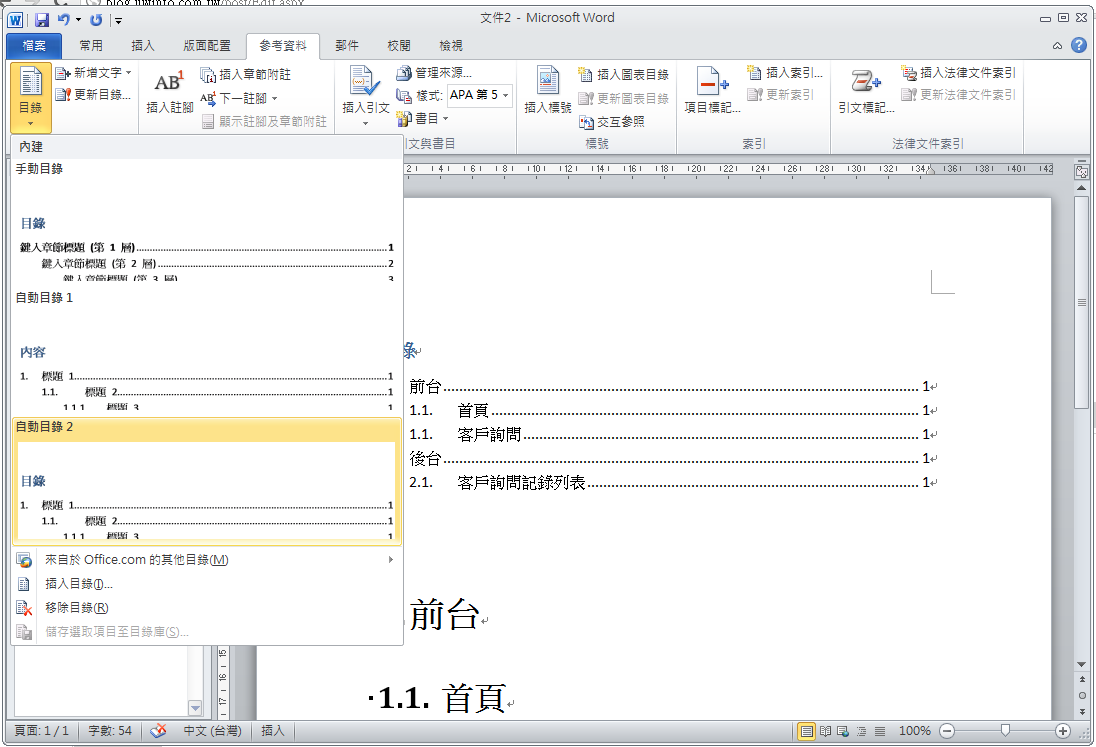
1. 先在該行按右鍵, 選取樣式 -> 標題 1
2. 在常用標籤的地方找到階層式編號, 選擇要用的編號.
3. 讓所有的標題 1 都會自動編號, 一樣是用右鍵, 選樣式, 再選更新標題 1 以符合選取範圍.
4. 設定標題 2, 一樣是用右鍵選樣式.
5. 最神奇的一步來了, 第二階的編號要用一般的編號, 不能用階層編號, 不然編號會重新開始. 今天就是在這裡搞了很久.
6. 一樣要讓編號套用到所有的標題 2
7. 結果, 值得一提, 上面和左邊各有一個快捷工具可以使用.
8 最後, 要插入目錄, 它的位置是在 "參考資料" 裡.
Bike, 2012/7/13 下午 07:03:26
由於網站的user來自全世界各地,而我們網站產生的時間卻是Server的時間
因此需要使用javascript來做一些轉換,讓user看到是他當地的時間
1. Server端產生具有時區的時間字串,用特定的span + class把它包起來, 時間格式 DateTime.ToUniversalTime().ToString("r")
<span class="timeString">Fri, 31 Aug 2012 10:57:04 GMT</span>
2. Client端利用jQuery於網頁load的時候將所有時間轉換成當地時間
這個地方我用了 date.format.js 來轉換成當地時間 (參考 http://blog.stevenlevithan.com/archives/date-time-format )
$(".timeString").each(function () {var content = $(this).text();var d = new Date(content);if (!isNaN(d)) $(this).text(d.format("yyyy-mm-dd hh:MM tt"));});
這樣user看到的時間就不會錯了
darren, 2012/6/19 下午 04:14:57
1. 在要匯出的 DB 上, 按右鍵, 選取工作 --> 產生令碼.

2. 歡迎頁

3. 選取資料庫

4. 設定選項, 記得要選取 "編寫資料的指令碼"

5. 選取資料表

6. 選擇要匯出的資料表

7. 指定 Script 要儲存的位置

8. 檢視摘要

9. 完工
2. 歡迎頁
3. 選取資料庫
4. 設定選項, 記得要選取 "編寫資料的指令碼"
5. 選取資料表
6. 選擇要匯出的資料表
7. 指定 Script 要儲存的位置
8. 檢視摘要
9. 完工
Bike, 2012/6/19 上午 11:11:33
當使用 WebRequest 來 Get 網址時,出現"已經嘗試太多次自動重新導向"。
通常為對方網站有進行某種判斷。以下為試過的項目。
上次是將 CookieContainer 設定一個 New Net.CookieContainer 即可。
            Dim http As Net.HttpWebRequest = Net.WebRequest.Create(Url)

            http.Method = "GET"

            http.ContentType = "application/x-www-form-urlencoded;"


            http.UserAgent = "Mozilla/5.0 (compatible; MSIE 9.0; Windows NT 6.0; Win64; x64; Trident/5.0)"

            http.CookieContainer = New Net.CookieContainer

            http.Referer = Url
Jerry, 2012/6/18 下午 07:54:03