搜尋 web.config 結果:
客戶要求
1. 檔案只能放在 Firewall 內的後台用 Web server (Server A).
2. 使用者只能存取 DMZ 的 Web server (Server B).
3. Server B 只能用 HTTP 通過 Firewall 向 Server A 要資料.(i.e. Server B 不能掛戴 Server A 的目錄成為虛擬目錄)
所以在 Server B 上面建立了一支程式用 HTTP 的方式讀取 Server A 的檔案再寫出去.
例如, http://ServerB/Upload/test.pdf 會讀取 http://ServerA/Upload/test.pdf 再送到 Client 端
但不是這樣就好了, 在 RouteConfig.cs 中要加上:
routes.MapRoute(
name: "Upload",
url: "Upload/{filename}",
defaults: new { controller = "Upload", action = "Index", filename = UrlParameter.Optional }
);
此外在 Web.Config 中也要加上:
<system.webServer>
<handlers>
<add name="UrlRoutingHandler_Upload"
type="System.Web.Routing.UrlRoutingHandler,
System.Web, Version=4.0.0.0,
Culture=neutral,
PublicKeyToken=b03f5f7f11d50a3a"
path="/Upload/*"
verb="GET"/>
</handlers>
</system.webServer>
參考:
http://stackoverflow.com/questions/5596747/download-stream-file-from-url-asp-net
http://blog.darkthread.net/post-2014-12-05-mvc-routing-for-url-with-filename.aspx
1. 檔案只能放在 Firewall 內的後台用 Web server (Server A).
2. 使用者只能存取 DMZ 的 Web server (Server B).
3. Server B 只能用 HTTP 通過 Firewall 向 Server A 要資料.(i.e. Server B 不能掛戴 Server A 的目錄成為虛擬目錄)
所以在 Server B 上面建立了一支程式用 HTTP 的方式讀取 Server A 的檔案再寫出去.
例如, http://ServerB/Upload/test.pdf 會讀取 http://ServerA/Upload/test.pdf 再送到 Client 端
namespace WWW.Controllers

{

    public class UploadController : Controller

    {

        // GET: Upload

        public void Index(string Filename)

        {

            //Create a stream for the file

            Stream stream = null;


            //This controls how many bytes to read at a time and send to the client

            int bytesToRead = 10000;


            // Buffer to read bytes in chunk size specified above

            byte[] buffer = new Byte[bytesToRead];


            string url = "http://admin-dev.nanya.bike.idv.tw/newnanyaback/Upload/" + Filename;


            // The number of bytes read

            try

            {

                //Create a WebRequest to get the file

                HttpWebRequest fileReq = (HttpWebRequest)HttpWebRequest.Create(url);


                //Create a response for this request

                HttpWebResponse fileResp = (HttpWebResponse)fileReq.GetResponse();


                if (fileReq.ContentLength > 0)

                    fileResp.ContentLength = fileReq.ContentLength;


                //Get the Stream returned from the response

                stream = fileResp.GetResponseStream();


                // prepare the response to the client. resp is the client Response

                var resp = HttpContext.Response;


                if (Filename.ToLower().EndsWith(".png") ||

                    Filename.ToLower().EndsWith(".jpg") ||

                    Filename.ToLower().EndsWith(".jpeg") ||

                    Filename.ToLower().EndsWith(".gif")

                    )

                {

                    resp.ContentType = "image";

                }

                else

                {

                    //Indicate the type of data being sent

                    resp.ContentType = "application/octet-stream";


                    //Name the file

                    resp.AddHeader("Content-Disposition", "attachment; filename=\"" + HttpUtility.UrlEncode(Filename, Encoding.UTF8) + "\"");

                }


                resp.AddHeader("Content-Length", fileResp.ContentLength.ToString());


                int length;

                do

                {

                    // Verify that the client is connected.

                    if (resp.IsClientConnected)

                    {

                        // Read data into the buffer.

                        length = stream.Read(buffer, 0, bytesToRead);


                        // and write it out to the response's output stream

                        resp.OutputStream.Write(buffer, 0, length);


                        // Flush the data

                        resp.Flush();


                        //Clear the buffer

                        buffer = new Byte[bytesToRead];

                    }

                    else

                    {

                        // cancel the download if client has disconnected

                        length = -1;

                    }

                } while (length > 0); //Repeat until no data is read

            }

            finally

            {

                if (stream != null)

                {

                    //Close the input stream

                    stream.Close();

                }

            }

        }

    }

}
但不是這樣就好了, 在 RouteConfig.cs 中要加上:
routes.MapRoute(
name: "Upload",
url: "Upload/{filename}",
defaults: new { controller = "Upload", action = "Index", filename = UrlParameter.Optional }
);
此外在 Web.Config 中也要加上:
<system.webServer>
<handlers>
<add name="UrlRoutingHandler_Upload"
type="System.Web.Routing.UrlRoutingHandler,
System.Web, Version=4.0.0.0,
Culture=neutral,
PublicKeyToken=b03f5f7f11d50a3a"
path="/Upload/*"
verb="GET"/>
</handlers>
</system.webServer>
參考:
http://stackoverflow.com/questions/5596747/download-stream-file-from-url-asp-net
http://blog.darkthread.net/post-2014-12-05-mvc-routing-for-url-with-filename.aspx
Bike, 2016/12/1 下午 09:34:30
在 windows 2008 的 IIS7 跑 MVC, 會遇到 Application_BeginRequest 沒有作用, 可以在 web.config 中加一個:
<system.webServer>
<modules runAllManagedModulesForAllRequests="true" />
</system.webServer>
另外聽說裝 KB980368 會是比較好的解決方法, 有空再來試試.
參考: http://blog.darkthread.net/post-2015-05-30-aspnet-mvc-on-win2008.aspx
<system.webServer>
<modules runAllManagedModulesForAllRequests="true" />
</system.webServer>
另外聽說裝 KB980368 會是比較好的解決方法, 有空再來試試.
參考: http://blog.darkthread.net/post-2015-05-30-aspnet-mvc-on-win2008.aspx
Bike, 2016/11/29 上午 09:17:41
在 .100 安裝 MVC 專案時, web.config 要記得檢查有沒有設定 UrlRoutingModule, 如下. 否則會出現 404 的錯誤.
<system.webServer>
  <modules>
    <remove name="UrlRoutingModule-4.0" />
    <add name="UrlRoutingModule-4.0" type="System.Web.Routing.UrlRoutingModule" preCondition="" />
  </modules>
</system.webServer>Bike, 2016/11/22 上午 06:51:17
對於了解或設定 web.config 蠻有幫助的
http://weblogs.asp.net/jongalloway/10-things-asp-net-developers-should-know-about-web-config-inheritance-and-overrides
http://weblogs.asp.net/jongalloway/10-things-asp-net-developers-should-know-about-web-config-inheritance-and-overrides
darren, 2015/9/23 上午 11:49:47
自從網站上了 net4.0 之後,網站會有為數不少的 "潛在危險" 的 exception
大都來自不友善的攻擊,想要測試網站的漏洞
網站做這層防護是好事,只是這個東西太敏感了,連簡單的冒號 & 符號都會跳 exception
更慘的是 Google Analytics 會在一些 user cookies 寫入xml文字 ( __utmz=... )
導致正常的 User 都不能正常瀏覽我們網站
解法有兩種:
1. 直接在 web.config 直接設定 不檢查
2. 自訂 RequestValidate (4.0以上才可以用)
請參考此文章 http://msdn.microsoft.com/en-us/library/system.web.util.requestvalidator(v=vs.100).aspx
大都來自不友善的攻擊,想要測試網站的漏洞
網站做這層防護是好事,只是這個東西太敏感了,連簡單的冒號 & 符號都會跳 exception
更慘的是 Google Analytics 會在一些 user cookies 寫入xml文字 ( __utmz=... )
導致正常的 User 都不能正常瀏覽我們網站
解法有兩種:
1. 直接在 web.config 直接設定 不檢查
<system.web>

    <httpRuntime requestValidationMode="2.0" />

    <pages validateRequest="false" />

</system.web>
2. 自訂 RequestValidate (4.0以上才可以用)
請參考此文章 http://msdn.microsoft.com/en-us/library/system.web.util.requestvalidator(v=vs.100).aspx
後者比較算是正解 基本上處理掉 <script 我想 XSS 就解決一大半
darren, 2014/7/22 上午 11:53:17
今天設計反應新增電子報時發生問題
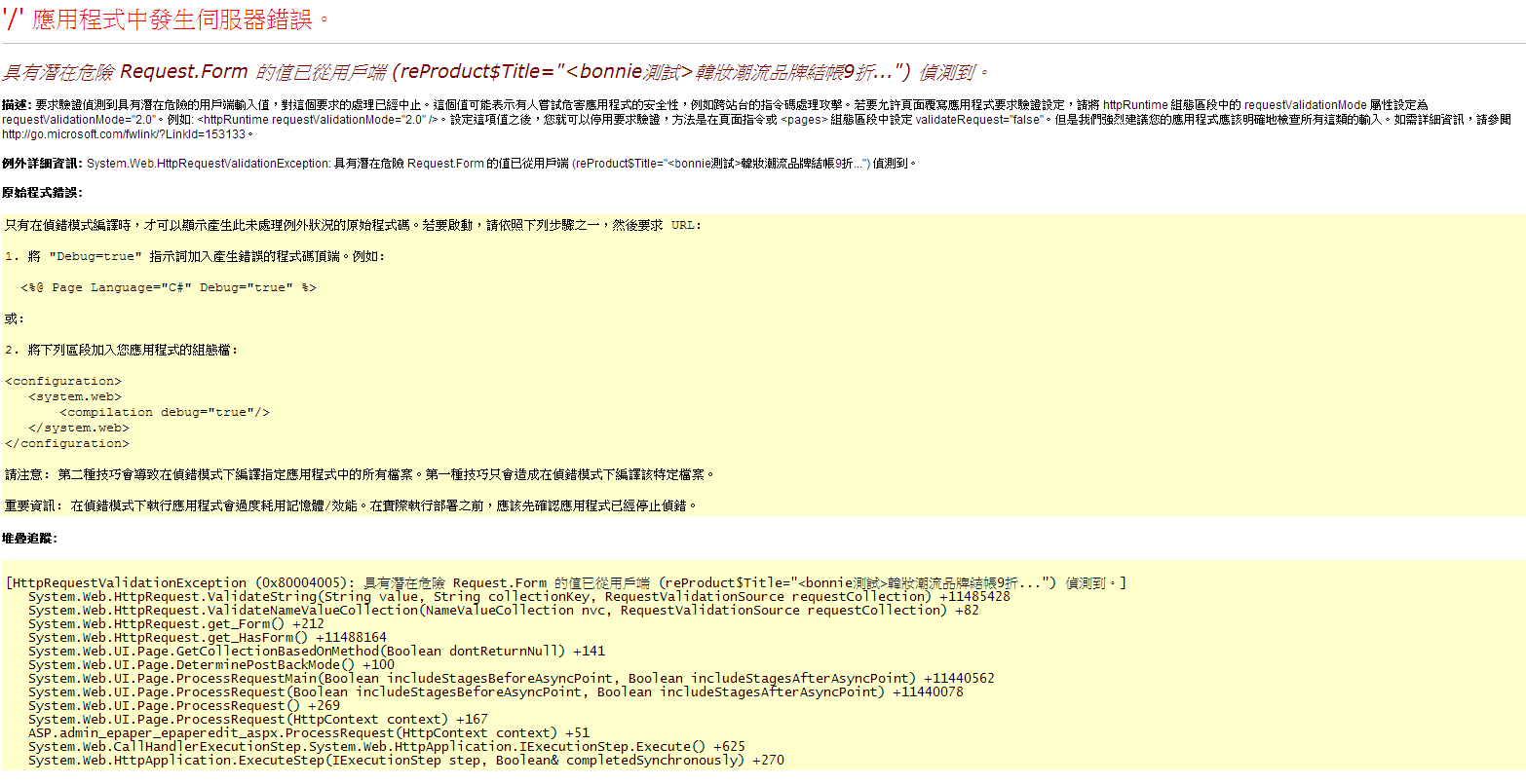
解決方式
1. 先確認 aspx => ValidateRequest="false
2. 上面如果設定對
解決方式
1. 先確認 aspx => ValidateRequest="false
2. 上面如果設定對
在Web.config中<system.web>中加入
這段 <httpRuntime requestValidationMode="2.0" />就ok了!!!
造成的原因
是.NET 4.0跟2.0版本在請求驗證的定義不同:
ASP.NET Request Validation 請求驗證是ASP.NET提供來保護XSS攻擊的一項功能
在2.0 僅針對.aspx及class進行驗證…
但到了4.0,請求驗認範圍擴大到所有的請求…
而不是只有.aspx,還包含WebService呼叫以及自訂的http Handlers,都會去驗證http請求的內容…
Vicky, 2014/5/19 上午 11:24:52
假如你現在在ASP.NET 4.0 的環境下的話,就算進行上述的設定,可能仍會出現驗證失敗的訊息(潛在危險Request.QueryString的錯誤訊息)
因為ASP.NET4.0與2.0版本在請求驗證的定義上已經有所不同:
這時為了避免這樣的問題,一樣在Web.Config中 <system.web>下加入下列語句
<httpRuntime requestValidationMode="2.0" />
http://www.dotblogs.com.tw/pin0513/archive/2010/10/22/18522.aspx
因為ASP.NET4.0與2.0版本在請求驗證的定義上已經有所不同:
這時為了避免這樣的問題,一樣在Web.Config中 <system.web>下加入下列語句
<httpRuntime requestValidationMode="2.0" />
http://www.dotblogs.com.tw/pin0513/archive/2010/10/22/18522.aspx
Doug, 2014/3/28 下午 05:35:11
建立新網站還滿麻煩的,記錄一下容易漏的步驟。
1. 本機建立 fileshare 帳號。
2. 安裝 urlrewrite。
3. 匯出和匯入 IIS (參考這個: http://blog.uwinfo.com.tw/auth/article/bike/97)。
4. 要指定 SSL 用的憑証。
5. 修正 web.config。
1. 本機建立 fileshare 帳號。
2. 安裝 urlrewrite。
3. 匯出和匯入 IIS (參考這個: http://blog.uwinfo.com.tw/auth/article/bike/97)。
4. 要指定 SSL 用的憑証。
5. 修正 web.config。
Bike, 2014/1/2 下午 01:58:20
由於遇到信用卡 return 的 Form 中文是用 big5 encode 狀況
而我們網站都是UTF-8, 因此 Request.Form 的中文內容會變成亂碼
因此必須設定網頁的 RequestEncoding 為 big5
可惜 .NET 2.0 的 @Page 屬性無法設定 RequestEncoding, 只能由 web.config 下手
幸好 web.config 可以設定 locaion 為特定網頁或目錄設定屬性
設定如下(append 在根目錄 configuration 下即可):
<location path="tch/Shopping/NCCReturn.aspx">
<system.web>
<globalization fileEncoding="utf-8" requestEncoding="big5" responseEncoding="utf-8" culture="zh-TW"/>
</system.web>
</location>
而我們網站都是UTF-8, 因此 Request.Form 的中文內容會變成亂碼
因此必須設定網頁的 RequestEncoding 為 big5
可惜 .NET 2.0 的 @Page 屬性無法設定 RequestEncoding, 只能由 web.config 下手
幸好 web.config 可以設定 locaion 為特定網頁或目錄設定屬性
設定如下(append 在根目錄 configuration 下即可):
<location path="tch/Shopping/NCCReturn.aspx">
<system.web>
<globalization fileEncoding="utf-8" requestEncoding="big5" responseEncoding="utf-8" culture="zh-TW"/>
</system.web>
</location>
darren, 2013/8/7 下午 03:21:04
若是在 Web.Config 中有 URL Rewrite 規則,把網站複製到新的 Server 時,要先安裝 URL Rewrite,否則會發先 web.config 的格式錯誤。
Bike, 2013/6/7 下午 07:41:42