搜尋 0 結果:
IIS 如果要使用 reverse proxy server 服務,其實網路上已經有很多文章可以參考
這篇文章只是記錄一下安裝上要注意的事
過去安裝 IIS 套件 可以透過 Web Platform Installer 搜尋下載
但現在 IIS 的 Web Platform Installer 已經不讓人搜尋下載可安裝的套件
所以要直接去微軟網站找相關套件 可以用 IIS ARR 搜尋
https://www.iis.net/downloads/microsoft/application-request-routing
下載 requestRouter_amd64.msi 安裝這個 (3.0版 2021 年以後就沒有更新了)
安裝前,IIS也要預先安裝 URLRewrite 2 套件
安裝很簡單,msi 安裝後,IIS重啟就可以看到
IIS 的主機設定,可以看到 "Application Reuest Routing Cache" --> 點進後右邊有 Server Proxy Settings
proxy 的設定有一些地方要注意一下,避免未來採到雷
首先 當然先開啟 Enable proxy,下面針對一些要注意的屬性說明一下
1. Time-out : 預設120秒,如果你後端的站台有一些操作可能超過兩分鐘(例如處理報表),這個就調長一點
2. Reverse rewrite host in response header: 這個勾勾預設是開的,他的好意是同站台redirect(302) 到其他網頁,可以覆蓋
host 讓 client端能跑到正常的網址。但如果你是 redirect 到其他站台,建議把它關掉,不然後端網站如果下
redirect (302) 到別的站台,他會主動把 redirect網址 host 改為本站 (被雷過,所以要特別記下來)
3. Include TCP port from client IP: 這是一個 X-Forwarded-For 設定,預設是打開,這樣後端主機抓 client 來源 IP就會類似
"112.121.100.100:443" ,但後端網站在抓 client端IP通常不會管 port number,因此就會造成比對 IP 發生錯誤
所以建議還是把它關閉
4. Enable disk cache: 預設是勾勾打開,如果後端是靜態網站,例如圖片server,這個打開沒有問題,但如果後端網站是動態網站
那還是關掉
這篇文章只是記錄一下安裝上要注意的事
過去安裝 IIS 套件 可以透過 Web Platform Installer 搜尋下載
但現在 IIS 的 Web Platform Installer 已經不讓人搜尋下載可安裝的套件
所以要直接去微軟網站找相關套件 可以用 IIS ARR 搜尋
https://www.iis.net/downloads/microsoft/application-request-routing
下載 requestRouter_amd64.msi 安裝這個 (3.0版 2021 年以後就沒有更新了)
安裝前,IIS也要預先安裝 URLRewrite 2 套件
安裝很簡單,msi 安裝後,IIS重啟就可以看到
IIS 的主機設定,可以看到 "Application Reuest Routing Cache" --> 點進後右邊有 Server Proxy Settings
proxy 的設定有一些地方要注意一下,避免未來採到雷
首先 當然先開啟 Enable proxy,下面針對一些要注意的屬性說明一下
1. Time-out : 預設120秒,如果你後端的站台有一些操作可能超過兩分鐘(例如處理報表),這個就調長一點
2. Reverse rewrite host in response header: 這個勾勾預設是開的,他的好意是同站台redirect(302) 到其他網頁,可以覆蓋
host 讓 client端能跑到正常的網址。但如果你是 redirect 到其他站台,建議把它關掉,不然後端網站如果下
redirect (302) 到別的站台,他會主動把 redirect網址 host 改為本站 (被雷過,所以要特別記下來)
3. Include TCP port from client IP: 這是一個 X-Forwarded-For 設定,預設是打開,這樣後端主機抓 client 來源 IP就會類似
"112.121.100.100:443" ,但後端網站在抓 client端IP通常不會管 port number,因此就會造成比對 IP 發生錯誤
所以建議還是把它關閉
4. Enable disk cache: 預設是勾勾打開,如果後端是靜態網站,例如圖片server,這個打開沒有問題,但如果後端網站是動態網站
那還是關掉
darren, 2025/1/10 上午 11:01:38
<!DOCTYPE html>

<html lang="en">

<head>

    <meta charset="UTF-8">

    <meta name="viewport" content="width=device-width, initial-scale=1.0">

    <title>BLE Printer Test</title>

    <script src="https://cdn.jsdelivr.net/npm/iconv-lite-umd@0.6.10/lib/iconv-lite-umd.js"></script>

</head>

<body>

    <h1>BLE Printer Test 123</h1>

    <button id="printTestButton">Test Print</button>

    <button id="printAgain">Print Again</button>

    <pre id="log"></pre>

    <script>

        // Function to log messages on the page

        function logMessage(message) {

            const logElement = document.getElementById('log');

            logElement.textContent += message + '\n';

        }

        var device;

        var server;

        var service;

        var characteristic;

        var name = 'T58_6752'; // 藍芽設備的名稱

        var uuid = 0x1800; //service UUID (用 BLE Scanner 找到的)

        var characteristicUuid = 0x2A00; // characteristic UUID (用 BLE Scanner 找到的)

        // Function to connect to BLE printer and send test data


        async function connectAndTestPrint() {


            try {

                logMessage("Requesting Bluetooth device...");


                // Request the BLE device

                device = await navigator.bluetooth.requestDevice({

                    //acceptAllDevices: true,

                    filters: [

                        { name: name }

                    ],

                    optionalServices: [uuid] // Replace with the correct service UUID

                });


                logMessage(`Device selected: ${device.name}`);

                logMessage(`Device uuid: ${device.id}`);


                await printAgain();


            } catch (error) {

                logMessage(`Error: ${error.message}`);

            }

        }


        // 转码方法

        function stringToGbk(str) {

            const ranges = [

                [0xA1, 0xA9, 0xA1, 0xFE],

                [0xB0, 0xF7, 0xA1, 0xFE],

                [0x81, 0xA0, 0x40, 0xFE],

                [0xAA, 0xFE, 0x40, 0xA0],

                [0xA8, 0xA9, 0x40, 0xA0],

                [0xAA, 0xAF, 0xA1, 0xFE],

                [0xF8, 0xFE, 0xA1, 0xFE],

                [0xA1, 0xA7, 0x40, 0xA0],

            ]

            const codes = new Uint16Array(23940)

            let i = 0


            for (const [b1Begin, b1End, b2Begin, b2End] of ranges) {

                for (let b2 = b2Begin; b2 <= b2End; b2++) {

                    if (b2 !== 0x7F) {

                        for (let b1 = b1Begin; b1 <= b1End; b1++) {

                            codes[i++] = b2 << 8 | b1

                        }

                    }

                }

            }

            const cstr = new TextDecoder('gbk').decode(codes)


            // 编码表

            const table = new Uint16Array(65536)

            for (let i = 0; i < cstr.length; i++) {

                table[cstr.charCodeAt(i)] = codes[i]

            }

            const buf = new Uint8Array(str.length * 2)

            let n = 0


            for (let i = 0; i < str.length; i++) {

                const code = str.charCodeAt(i)

                if (code < 0x80) {

                    buf[n++] = code

                } else {

                    const gbk = table[code]

                    buf[n++] = gbk & 0xFF

                    buf[n++] = gbk >> 8

                }

            }

            u8buf = buf.subarray(0, n)

            // console.log(u8buf);

            return u8buf

        }


        async function printAgain() {

            // Connect to the GATT server

            server = await device.gatt.connect();

            logMessage("Connected to GATT server.");


            // Get the printer service

            service = await server.getPrimaryService(uuid); // Replace with your printer's service UUID

            logMessage("Printer service retrieved.");


            // Get the characteristic for writing data

            characteristic = await service.getCharacteristic(characteristicUuid); // Replace with the correct characteristic UUID

            logMessage("Printer characteristic retrieved.");


            // Prepare test print data

            const encoder = new TextEncoder();

            const testData = encoder.encode("TEST PRINT: Hello from Web Bluetooth!\n");

            const finalData = encoder.encode("--\n--\n \n \n");


            const setFontSize = new Uint8Array([0x1D, 0x21, 0x11]); // GS ! n

            const setFontSize2 = new Uint8Array([0x1D, 0x21, 0x22]); // GS ! n

            const setFontSize3 = new Uint8Array([0x1D, 0x21, 0x33]); // GS ! n


            // Write test data to the printer

            logMessage("Sending test data to printer...");


            await characteristic.writeValue(new Uint8Array([0x1D, 0x21, 0x00]));

            await characteristic.writeValue(encoder.encode("1x1!\n"));

            await characteristic.writeValue(setFontSize);

            await characteristic.writeValue(encoder.encode("2x2!\n"));

            await characteristic.writeValue(setFontSize2);

            await characteristic.writeValue(encoder.encode("3x3!\n"));

            await characteristic.writeValue(setFontSize3);

            await characteristic.writeValue(encoder.encode("4x4!\n"));


            const initPrinter = new Uint8Array([0x1B, 0x40]); // ESC @

            await characteristic.writeValue(initPrinter);


            // 3. 設置字符集為 GBK

            const setGBK = new Uint8Array([0x1B, 0x74, 0x11]); // ESC t 0x11 (GBK)

            await characteristic.writeValue(setGBK);


            const text = "繁體中文測試\n \n";

            const encodedText = stringToGbk(text);

            await characteristic.writeValue(encodedText);

            logMessage("Test data sent successfully!");


            // QrCode 列印

            const qrData = "https://example.com"; // Your QR code data

            const qrDataLength = qrData.length + 3;

            const pL = qrDataLength & 0xFF; // Low byte

            const pH = (qrDataLength >> 8) & 0xFF; // High byte


            const commands = [

                0x1B, 0x40, // Initialize printer

                0x1D, 0x28, 0x6B, pL, pH, 0x31, 0x50, 0x30, ...new TextEncoder().encode(qrData), // Store data

                0x1D, 0x28, 0x6B, 0x03, 0x00, 0x31, 0x51, 0x30 // Print QR code

            ];


            const buffer = new Uint8Array(commands);

            await characteristic.writeValue(buffer);

            logMessage("QrCode sent successfully!");


            await characteristic.writeValue(finalData);

            logMessage("finalData sent successfully!");


            // Disconnect the GATT server

            server.disconnect();

            logMessage("Disconnected from printer.");

        }


        // Bind the function to the button

        document.getElementById('printTestButton').addEventListener('click', connectAndTestPrint);

        document.getElementById('printAgain').addEventListener('click', printAgain);

    </script>

</body>

</html>
Bike, 2025/1/2 下午 02:20:15
多專案(multiple projects)時,會產生多個 xml document, 叫用 IncludeXmlComments 時記得要把每個專案的 xml document 都載入,才能顯示不同專案中的註解和說明 (comment)。
範例如下:
這些都可以從註解中讀取:


範例如下:
builder.Services.AddSwaggerGen(options =>

{

    options.SwaggerDoc("v1", new OpenApiInfo { Title = "My API", Version = "v1" });


    //多個 Project, 每一個 xmldocument 都要載入

    List<string> xmlFiles = Directory.GetFiles(AppContext.BaseDirectory, "*.xml", SearchOption.TopDirectoryOnly).ToList();

    foreach (string fileName in xmlFiles)

    {

        string xmlFilePath = Path.Combine(AppContext.BaseDirectory, fileName);

        if (File.Exists(xmlFilePath))

            options.IncludeXmlComments(xmlFilePath, includeControllerXmlComments: true);

    }


    //防止 SchemaId 的錯誤

    options.CustomSchemaIds(type => type.ToString());

});
這些都可以從註解中讀取:
Bike, 2024/8/8 上午 10:21:46
每次在 swagger 中輸入的資料都會因為 Visual Stodio 在 compile 後,自動更新 Broswer 而被清除,實在很討厭。
在 Properties/launchSettings.json 中設定以下參數:
"hotReloadEnabled" : false

順帶一提,可以加一個設定 "launchBrowser": false ,這樣就不會一直開 Browser,可以加快速度。
在 Properties/launchSettings.json 中設定以下參數:
"hotReloadEnabled" : false
順帶一提,可以加一個設定 "launchBrowser": false ,這樣就不會一直開 Browser,可以加快速度。
Bike, 2024/7/30 上午 09:55:07
每次都找不到,在這裡記錄一下。
進入 Official Account Manager 之後,點右上方的 Setting,在左側選單有 Message API
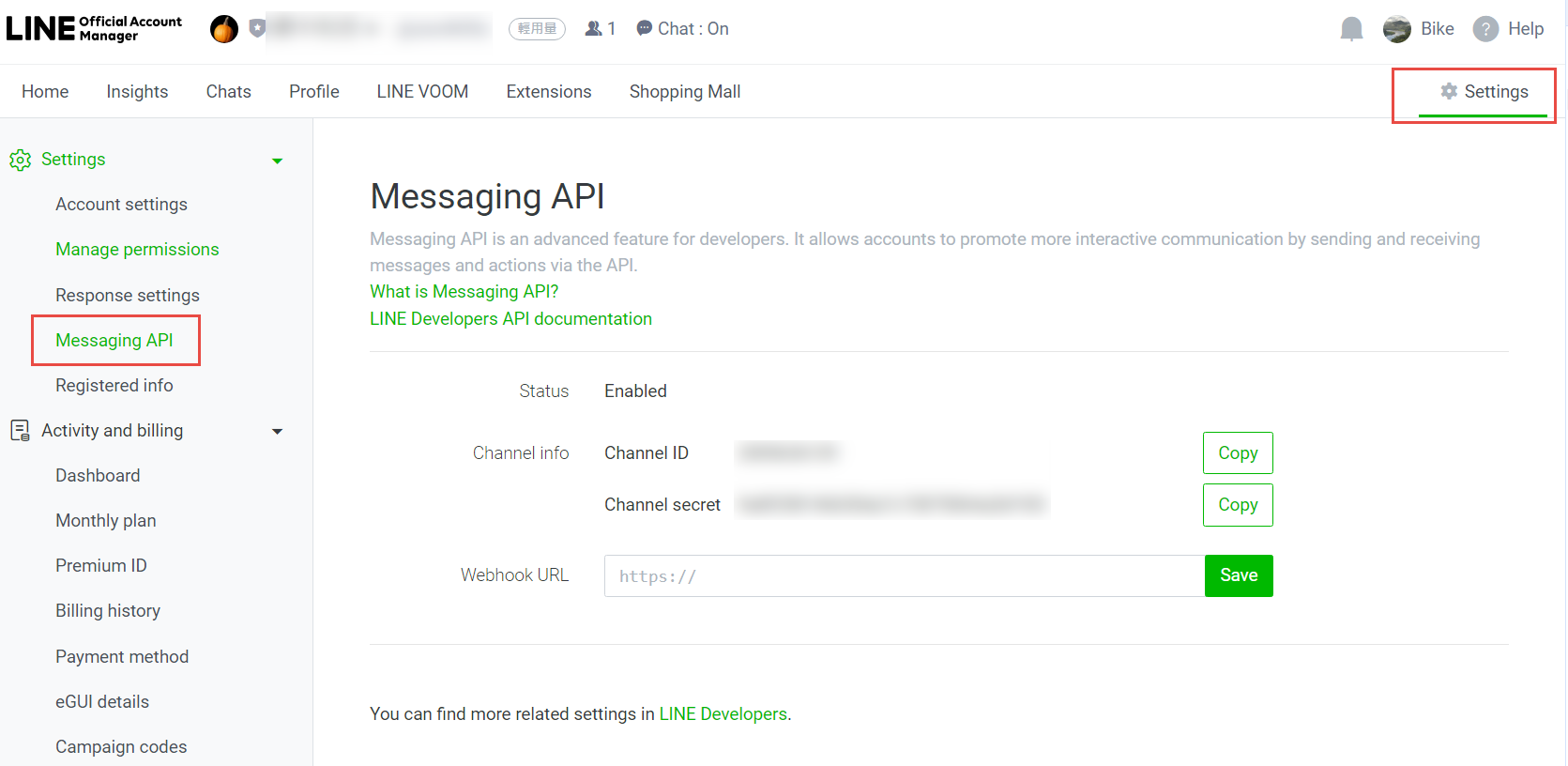
進入 Official Account Manager 之後,點右上方的 Setting,在左側選單有 Message API
Bike, 2024/6/17 上午 10:22:44
使用 putty 連線到 ubuntu 後,使用 vi 編輯設定檔,註解會變成深藍色,幾乎看不到
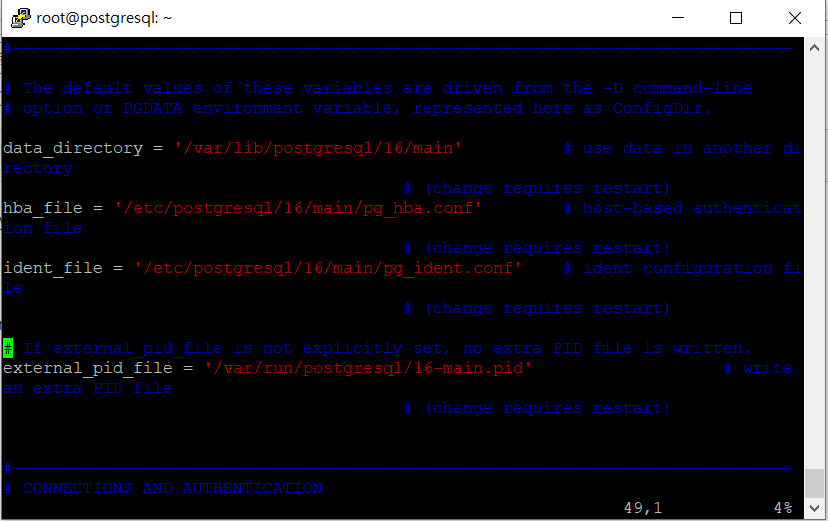
要改顏色可以用以下的指令:
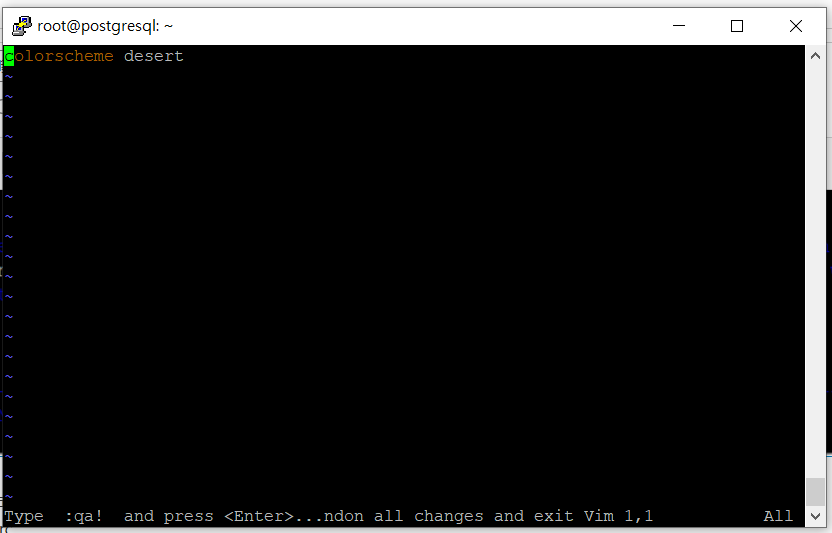
vi ~/.vimrc
加入一行
colorscheme desert
結果:
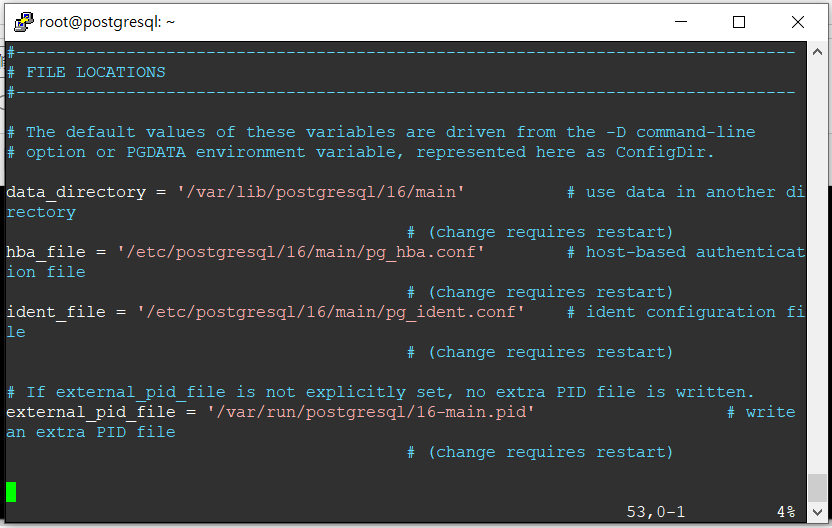
要改顏色可以用以下的指令:
vi ~/.vimrc
加入一行
colorscheme desert
結果:
Bike, 2024/6/14 上午 08:20:43
錯誤代碼 NETSDK1064
找不到套件 BouncyCastle.Cryptography,版本 2.3.0。該套件可能因 NuGet restore 還原而刪除,或是可能因為路徑長度上限的限制,而讓 NuGet restore 可能只有部分完成所致。
試了好久總算可以正常打開
工具>>NuGet套件管理員>>套件管理員設定
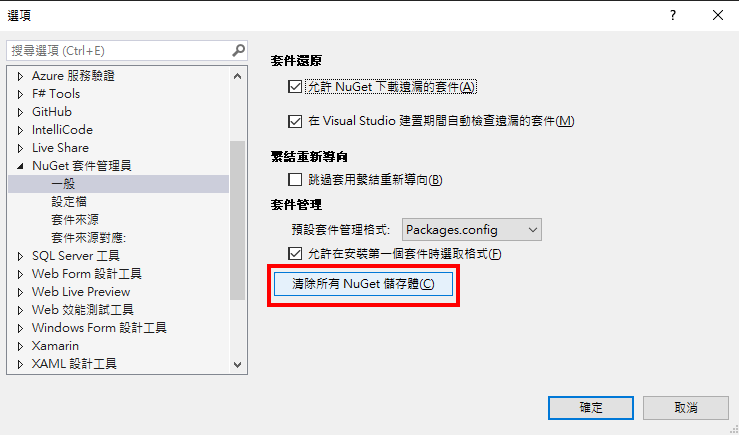
重起就可以正常跑了!!!
找不到套件 BouncyCastle.Cryptography,版本 2.3.0。該套件可能因 NuGet restore 還原而刪除,或是可能因為路徑長度上限的限制,而讓 NuGet restore 可能只有部分完成所致。
試了好久總算可以正常打開
工具>>NuGet套件管理員>>套件管理員設定
重起就可以正常跑了!!!
hannah, 2024/5/31 上午 09:48:53
如果網站需要有一個簡易的SMTP服務,最簡單的方式就是安裝SMTP服務

然後安裝後,記得要去 [服務] 把 [簡易郵件傳送通訊定(SMTP)] 啟動,並且記得要改為"自動啟動" (不然重開機不會啟動)

管理SMTP設定,要到這個介面的 IIS6 管理員

But, 如果你是用 win server 2022,就會出現掛掉無法編輯使用的狀況,不知為何win server 2022 會有這個奇怪的bug
請遵照下面步驟修改,就可以正常運作
開啟IIS6的管理介面後,還要設定一下 允許轉送清單,對於來源IP作管控

這樣大致上就可以正常運作
然後安裝後,記得要去 [服務] 把 [簡易郵件傳送通訊定(SMTP)] 啟動,並且記得要改為"自動啟動" (不然重開機不會啟動)
管理SMTP設定,要到這個介面的 IIS6 管理員
But, 如果你是用 win server 2022,就會出現掛掉無法編輯使用的狀況,不知為何win server 2022 會有這個奇怪的bug
請遵照下面步驟修改,就可以正常運作
1. Stop SMTPSVC service [Display Name: Simple Mail Transfer Protocol (SMTP)]

2. Stop IISADMIN service [Display name: IIS Admin Service]

3. Edit "C:\Windows\System32\inetsrv\MetaBase.xml"

4. Find: <IIsSmtpServer Location ="/LM/SmtpSvc/1"

5. Add (Settings are alphabetical): RelayIpList=""

6. Save file

7. Start IISAdmin Service

8. Start SMTPSVC service
開啟IIS6的管理介面後,還要設定一下 允許轉送清單,對於來源IP作管控
這樣大致上就可以正常運作
darren, 2024/4/10 下午 03:18:35
1. 使用 "具名的 ConnectionString"時,必需在 ODBC Data Sources (32-bit) 中設定,不是 ODBC Data Sources (64-bit)

2. 若日期或數字欄位為 Null 時,會無法轉換,此時必需用 "寫入查詢來指定要傳送的資料"

2. 若日期或數字欄位為 Null 時,會無法轉換,此時必需用 "寫入查詢來指定要傳送的資料"
Bike, 2024/2/17 下午 04:03:59
可參考本文章:
https://dba.stackexchange.com/questions/245990/postgresql-extremely-slow-count-with-index-simple-query
vacuum analyze insider_event;
執行了 7 分鐘
ALTER TABLE insider_event SET (autovacuum_vacuum_scale_factor = 0, autovacuum_analyze_scale_factor = 0, autovacuum_vacuum_threshold = 10000, autovacuum_analyze_threshold = 10000);
跑了 1.2 分鐘
修改 work_mem:
https://www.pgmustard.com/blog/work-mem
記憶體調整
https://www.enterprisedb.com/postgres-tutorials/how-tune-postgresql-memory
https://dba.stackexchange.com/questions/245990/postgresql-extremely-slow-count-with-index-simple-query
vacuum analyze insider_event;
執行了 7 分鐘
ALTER TABLE insider_event SET (autovacuum_vacuum_scale_factor = 0, autovacuum_analyze_scale_factor = 0, autovacuum_vacuum_threshold = 10000, autovacuum_analyze_threshold = 10000);
跑了 1.2 分鐘
修改 work_mem:
https://www.pgmustard.com/blog/work-mem
記憶體調整
https://www.enterprisedb.com/postgres-tutorials/how-tune-postgresql-memory
Bike, 2024/2/5 上午 06:55:40