頁數 1 / 6
下一頁
搜尋 Config 結果:
因為想把同一網站下的靜態檔用另一個 domain 處理
但是 css 如果有設定下載字型檔 .ttf or .woff
就會出現 CORS 問題,其他 js, css,圖片就能正常
為了解決CORS的問題,其實只要 Response Header 要設定 Access-Control-Allow-Origin: *
或是設定特定網站 Access-Control-Allow-Origin: https://www.s3.com.tw
後來發現 IIS 網站可以設定 web.config 設定 response header 解決
當然要先裝一下 urlrewrite 2.0 才可以使用
只針對 font 類型的靜態檔
{REQUEST_URI} 也可以改為 {PATH_INFO}
但是 css 如果有設定下載字型檔 .ttf or .woff
就會出現 CORS 問題,其他 js, css,圖片就能正常
為了解決CORS的問題,其實只要 Response Header 要設定 Access-Control-Allow-Origin: *
或是設定特定網站 Access-Control-Allow-Origin: https://www.s3.com.tw
後來發現 IIS 網站可以設定 web.config 設定 response header 解決
當然要先裝一下 urlrewrite 2.0 才可以使用
只針對 font 類型的靜態檔
<configuration>

<system.webServer>

    <rewrite>

     <outboundRules>

        <rule name="Add CORS header for fonts" preCondition="IsFontFile">

         <match serverVariable="RESPONSE_Access-Control-Allow-Origin" pattern=".*" />

         <action type="Rewrite" value="*" />

        </rule>

        <preConditions>

         <preCondition name="IsFontFile">

            <add input="{REQUEST_URI}" pattern="\.woff2$|\.woff$|\.ttf$|\.eot$|\.otf$" />

         </preCondition>

        </preConditions>

     </outboundRules>

    </rewrite>

</system.webServer>

</configuration>
{REQUEST_URI} 也可以改為 {PATH_INFO}
darren, 2026/3/4 下午 05:02:35
簡易執行方式
1. 確定Program.cs有加上Su.Encryption.AesEncryptor.InitAesPaddingEncryptor(secret , iv , encKey , dataRoot)
2. 確定appsettings.json有設定變數,DataRoot、EnvironmentEncKey
3. 先執行一次,會報錯誤,在dataRoot位置會產生一組$"{encKey}.ps1,裡面會放設定環境變數的指令
4. 設定完,記得把 $"{encKey}.ps1檔案刪除
===以上,設定完環境變數===
1. 確定Program.cs有加上Dictionary<string, string> encSetting = Su.Encryption.GetDecryptedSetting
2. 確定appsettings.json有設定變數,DataRoot、EnvironmentEncKey , ShowEncSetting 設定為 false
3. 在 $"{dataRoot}\Config\XXXX_dec.json"設定DBC連線,要注意連線字串要加上 "TrustServerCertificate=true;",因為.net Core一定要藥用SSL連線
4. 設定完之後,在執行一次,會自動產生XXXX.json
5. 刪除XXXX_dec.json
===以上,產生完加密DBC連線
備註,要取回解密連線字串,appsettings.json有設定變數 , ShowEncSetting 設定為 true
概念解說
原本 >> config大多是明文,駭客可以藉由偷到config來知道變數設定,例如 dbc連線資訊、某個APP Key
之後 >> 將重要資訊分成兩段,
appsettings.json >> 放可公開資訊的設定,例如 DataRoot、EnvironmentEncKey
在環境變數加上一個 由本機產生的隨機變數
讓本機的所有
原理說明
1. .Net Core 啟動時最先執行檔案 Program.cs,在一開頭先檢查本機是否有設定環境變數
緯中用的function Su.Encryption.AesEncryptor.InitAesPaddingEncryptor(secret , iv , encKey , dataRoot)
進階加密標準(英語:Advanced Encryption Standard,縮寫:AES)
沒有的話,會在 dataRoot 這邊產生一個 encKey.ps1的檔案,裡面放有環境變數設定的指令
(encSecretAndIv = Su.Encryption.AesEncryptor.Encrypt(envSecret, envIv, Su.TextFns.GetRandomString(48));
var command = $"[Environment]::SetEnvironmentVariable('{variableName}', '{encSecretAndIv}', 'Machine')";)
(隨機產生48碼亂數,(前32碼為本機專用Secret、後16碼為iv),進行aes加密)
1. 確定Program.cs有加上Su.Encryption.AesEncryptor.InitAesPaddingEncryptor(secret , iv , encKey , dataRoot)
2. 確定appsettings.json有設定變數,DataRoot、EnvironmentEncKey
3. 先執行一次,會報錯誤,在dataRoot位置會產生一組$"{encKey}.ps1,裡面會放設定環境變數的指令
4. 設定完,記得把 $"{encKey}.ps1檔案刪除
===以上,設定完環境變數===
1. 確定Program.cs有加上Dictionary<string, string> encSetting = Su.Encryption.GetDecryptedSetting
2. 確定appsettings.json有設定變數,DataRoot、EnvironmentEncKey , ShowEncSetting 設定為 false
3. 在 $"{dataRoot}\Config\XXXX_dec.json"設定DBC連線,要注意連線字串要加上 "TrustServerCertificate=true;",因為.net Core一定要藥用SSL連線
4. 設定完之後,在執行一次,會自動產生XXXX.json
5. 刪除XXXX_dec.json
===以上,產生完加密DBC連線
備註,要取回解密連線字串,appsettings.json有設定變數 , ShowEncSetting 設定為 true
概念解說
原本 >> config大多是明文,駭客可以藉由偷到config來知道變數設定,例如 dbc連線資訊、某個APP Key
之後 >> 將重要資訊分成兩段,
appsettings.json >> 放可公開資訊的設定,例如 DataRoot、EnvironmentEncKey
在環境變數加上一個 由本機產生的隨機變數
讓本機的所有
原理說明
1. .Net Core 啟動時最先執行檔案 Program.cs,在一開頭先檢查本機是否有設定環境變數
緯中用的function Su.Encryption.AesEncryptor.InitAesPaddingEncryptor(secret , iv , encKey , dataRoot)
進階加密標準(英語:Advanced Encryption Standard,縮寫:AES)
沒有的話,會在 dataRoot 這邊產生一個 encKey.ps1的檔案,裡面放有環境變數設定的指令
(encSecretAndIv = Su.Encryption.AesEncryptor.Encrypt(envSecret, envIv, Su.TextFns.GetRandomString(48));
var command = $"[Environment]::SetEnvironmentVariable('{variableName}', '{encSecretAndIv}', 'Machine')";)
(隨機產生48碼亂數,(前32碼為本機專用Secret、後16碼為iv),進行aes加密)
Doug, 2023/6/17 下午 12:04:28
我們會使用 Validation Attribute 來客製化 Validation 的輸出結果,但在 .Net 7 的專案突然失效了。原因是 [ApiController] 會自動回傳 400 錯誤,攔截了 Validation Attribution 的執行。
解決方法, 在 program.cs 中加上以下的程式碼:
builder.Services.Configure<ApiBehaviorOptions>(options
=> options.SuppressModelStateInvalidFilter = true);
解決方法, 在 program.cs 中加上以下的程式碼:
builder.Services.Configure<ApiBehaviorOptions>(options
=> options.SuppressModelStateInvalidFilter = true);
Bike, 2023/3/2 下午 03:27:53
關於Scaffold的參數,官網雖然有文件但不是很好找,因此在此紀錄一下。
(於PM Console輸入'dotnet ef dbcontext scaffold -h'也可以查看)
-d | --data-annotations : 使用屬性定義模型
-c | --context <NAME> : 產生的DbContext名稱
--context-dir <PATH> : 產生的DbContext位置
-f | --force : 覆寫現有檔案
-o | --output-dir <PATH> : 產生的Entity Model位置
--schema <SCHEMA_NAME1>, <SCHEMA_NAME2>... : 指定Schemas產生Entity
-t | --table <TABLE_NAME1>, <TABLE_NAME2>... : 指定Table產生Entity
--use-database-names : 強制使用DB中Table與Column Name
--json : 輸出Json格式資料表於PM Console
-n | --namespace <NAMESPACE> : 指定命名空間,預設會依照專案與資料夾命名
--context-namespace <NAMESPACE> : 指定DbContext命名空間,預設會依照專案與資料夾命名
--no-onconfiguring : 不產生DbContext中的OnConfiguring
--no-pluralize : 關閉自動複數判別
-p | --project <PROJECT> : 指定專案
-s | --startup-project <PROJECT> : 指定指令執行時起始專案
--framework <FRAMEWORK> : 指定框架版本
--configuration <CONFIGURATION> : 指定配置
--no-build : 跳過專案建置
(於PM Console輸入'dotnet ef dbcontext scaffold -h'也可以查看)
-d | --data-annotations : 使用屬性定義模型
-c | --context <NAME> : 產生的DbContext名稱
--context-dir <PATH> : 產生的DbContext位置
-f | --force : 覆寫現有檔案
-o | --output-dir <PATH> : 產生的Entity Model位置
--schema <SCHEMA_NAME1>, <SCHEMA_NAME2>... : 指定Schemas產生Entity
-t | --table <TABLE_NAME1>, <TABLE_NAME2>... : 指定Table產生Entity
--use-database-names : 強制使用DB中Table與Column Name
--json : 輸出Json格式資料表於PM Console
-n | --namespace <NAMESPACE> : 指定命名空間,預設會依照專案與資料夾命名
--context-namespace <NAMESPACE> : 指定DbContext命名空間,預設會依照專案與資料夾命名
--no-onconfiguring : 不產生DbContext中的OnConfiguring
--no-pluralize : 關閉自動複數判別
-p | --project <PROJECT> : 指定專案
-s | --startup-project <PROJECT> : 指定指令執行時起始專案
--framework <FRAMEWORK> : 指定框架版本
--configuration <CONFIGURATION> : 指定配置
--no-build : 跳過專案建置
梨子, 2022/12/15 下午 12:12:11
接到弱掃報告指出以下的程式碼會造成危害:
string Url = WebConfigurationManager.AppSettings["SkyShopCheckoutURL"] + $"/api/token/ {Su.Fsc.SessionId}"; ServicePointManager.SecurityProtocol = SecurityProtocolType.Tls12;
HttpClient client = Su.Wu.GetClient();
var response = await client.GetAsync(Url);
var message = await response.Content.ReadAsStringAsync(); result = JsonConvert.DeserializeObject(message);
沒想到吧...
string Url = WebConfigurationManager.AppSettings["SkyShopCheckoutURL"] + $"/api/token/ {Su.Fsc.SessionId}"; ServicePointManager.SecurityProtocol = SecurityProtocolType.Tls12;
HttpClient client = Su.Wu.GetClient();
var response = await client.GetAsync(Url);
var message = await response.Content.ReadAsStringAsync(); result = JsonConvert.DeserializeObject(message);
沒想到吧...
Bike, 2022/9/23 上午 05:40:51
若網站是使用 SVN update 方式更新網站,為了防止被外部讀取到 /.svn/ 目錄內容
要在 web.config 片段加上以下內容
git 也是一樣的方式
可以參考此網址
https://www.petefreitag.com/item/823.cfm
要在 web.config 片段加上以下內容
<configuration>

<system.webServer>

     <security>

         <requestFiltering>

            <hiddenSegments>

             <add segment=".svn" />

            </hiddenSegments>

         </requestFiltering>

     </security>

</system.webServer>

</configuration>
git 也是一樣的方式
可以參考此網址
https://www.petefreitag.com/item/823.cfm
darren, 2022/7/20 下午 04:58:58
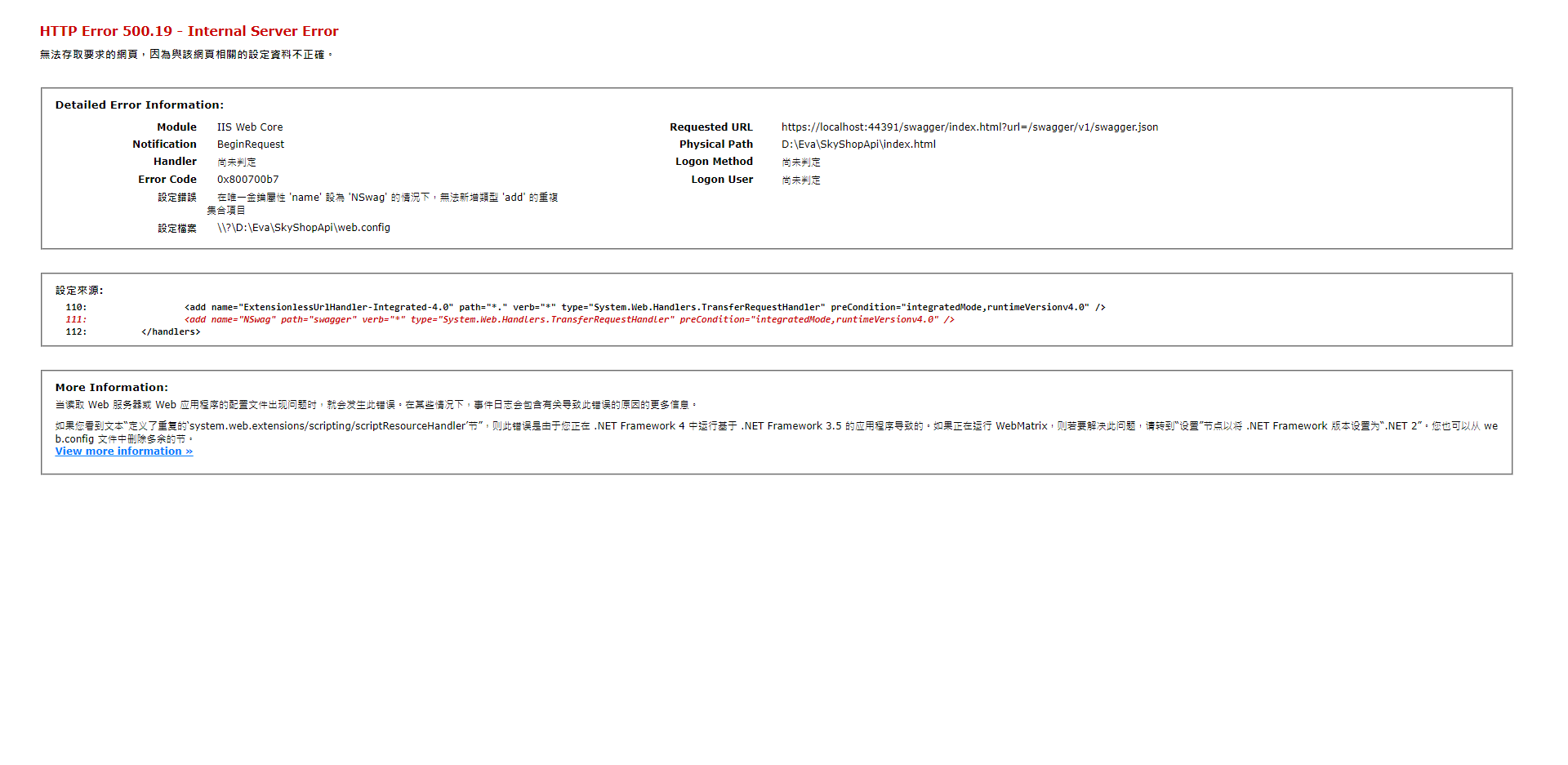
於VS Web中建立虛擬目錄,導致Swagger Handler出現重複錯誤
主要原因是因為跟網站與子網站指向同一個資料夾,而父子網站的web.config有繼承關係導致。
解決方式:
1. 前往 根目錄 / .vs / 專案 / config / applicationhost.config
2. 將site中設定的子網站移除或變更虛擬目錄位置
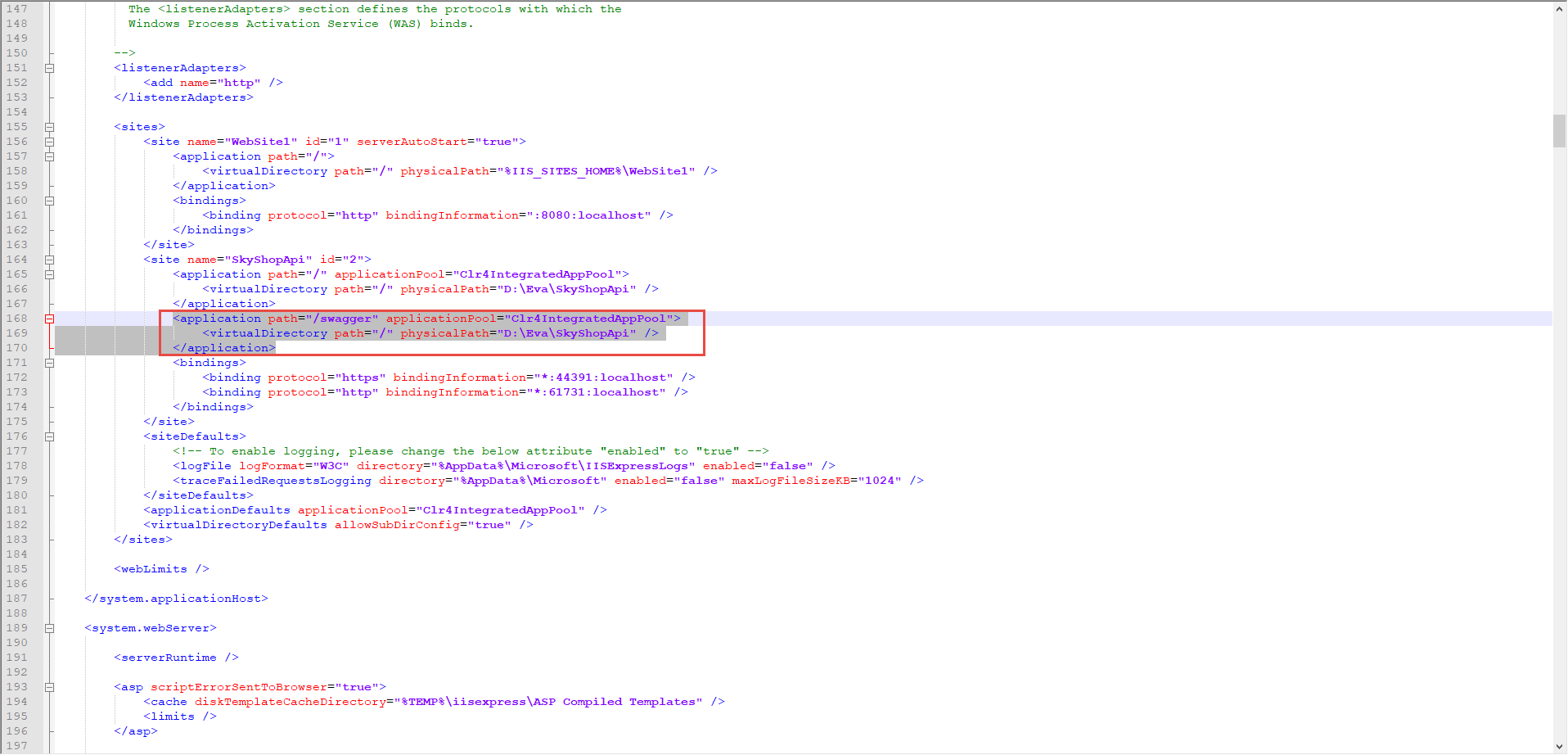
3. 回到網頁重新整理就完成囉!
參考: 【茶包射手日記】怪異的web.config HttpHandler重複錯誤
梨子, 2022/7/1 上午 11:57:02
我們的目標是在啟動時,掛一個 global filter 來檢查上傳的檔案附檔名,避免上傳未預期的可執行檔。使用 global filter 可以防止程式設計師忘了做檔案檢查,發生危險。我們目前用到的 .Net Framework 有兩個類別,一個是 System.Web.Http.ApiController,另一個是 System.Web.Mvc.Controller,兩個要分開處理。
1. Web API (System.Web.Http.ApiController)
.Net Framework 的 Web API 2 在接收檔案時,必需使用 Request.Content.ReadAsMultipartAsync 把上傳的資料存入 MultipartMemoryStreamProvider 之後再來處理。
範例如下:
程式碼中有個地方我沒有注意到。我一開始是用 Request.Content.ReadAsMultipartAsync(provider); 把資料讀進 provider,但前方沒有加上 await,造成有時讀不到檔案的情況,再次提醒自己 Async 和 Await 的關係。
直覺的想法是在 filter 中執行一樣的程式碼,不存檔,只要抓出檔名來檢查即可。但這時遇到一個問題 Request.Content.ReadAsMultipartAsync 不能執行兩次,Google 了一陣子,也沒找不到類似 seek(0) 的操作。所以只好自己寫一個暫存的機製。
這裡決定使用 System.Web.HttpContext.Current.Items 來暫存 provider,最後的 OnActionExecutingAsync 結果如下:
而 controller 中的 Action 則改為以下的版本;本版本中,除了把上傳的檔案存檔以外,還有讀取 form data 中其它欄位的範例:
以上是展示 Web Api 的 Filter。
如果是 MVC 的 Controller,就簡單多了,直接讀取 actionContext.HttpContext.Request.Files 裡面各檔案的 FileName 即可。不過也遇到了一個和直覺不同的地方,對 actionContext.HttpContext.Request.Files 居然不能用 foreach 請見下方註解掉的地方。也許是我的用法有問題,如果有人找到可以使用的方法也麻煩告知。
最後是把 filter 掛在 global filter 裡,如下:
Web API Controller 的部份:
在 WebApiConfig.cs 裡加上 config.Filters.Add(new ApiCheckFile()); 見下圖:
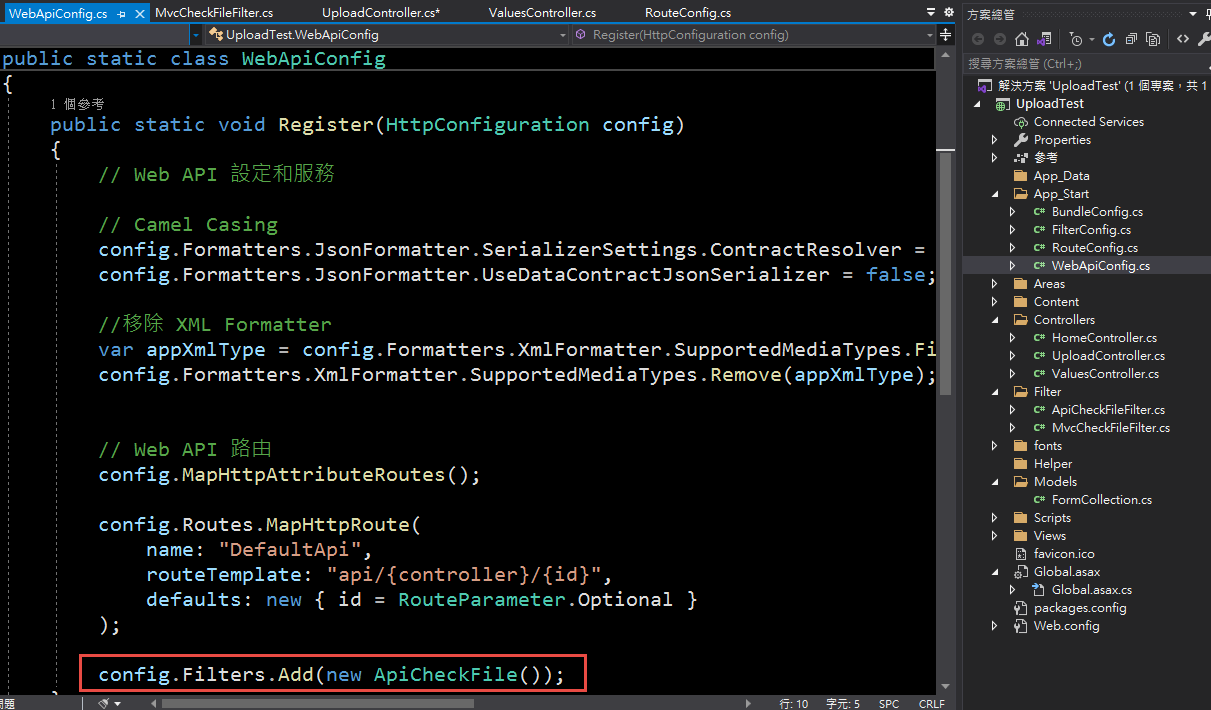
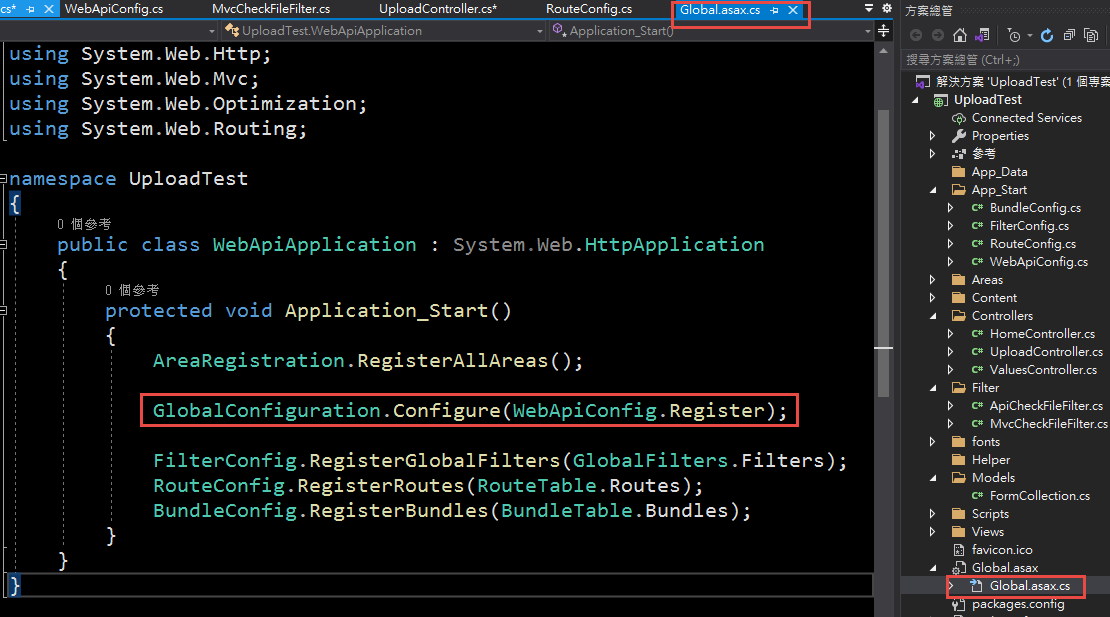
附帶一提,Register 是在 global.asax 裡被叫用的。微軟的架構常常這樣,硬是拉到另一個目錄的獨立檔案裡,如果 global.asax 沒有這一行,不知所以的人,在 App_Start 裡,建立了一個 WebApiConfig.cs 然後會發現完全沒做用... 見下圖
MVC Controller 的部份,
在 FilterConfig.cs 中,加上 filters.Add(new MvcCheckFileFilter()); 如下圖
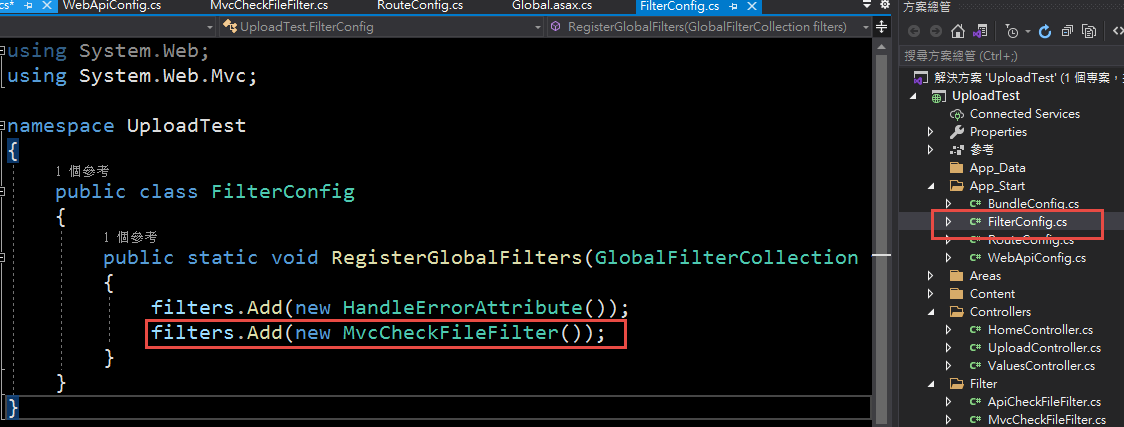
一樣是在 global.asax 中呼叫 FilterConfig.RegisterGlobalFilters,見下圖:
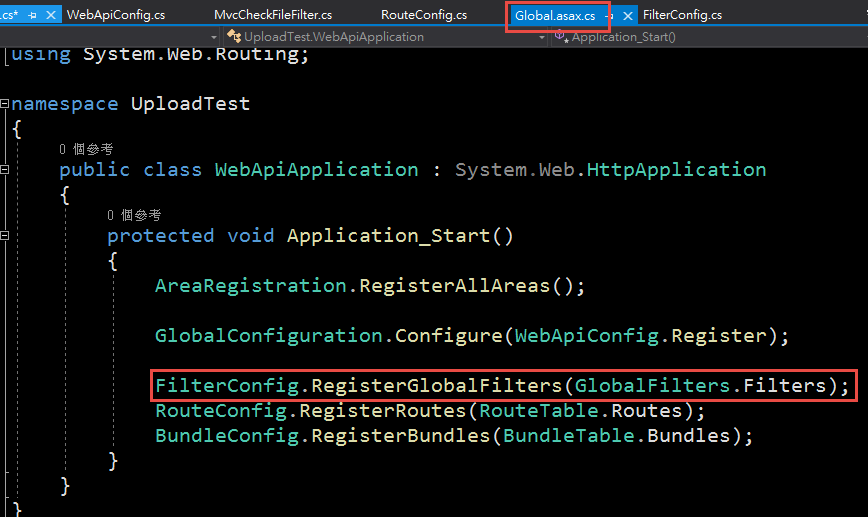
不過有趣的地方是,在 global.asax 裡, WebApiConfig.Register 和 FilterConfig.RegisterGlobalFilters 的叫用方法不同,一個是把 function 當作變數,一個是直接呼叫 function, 大家可以比較一下。
附註 1, 關於 OnActionExecutingAsync 和 OnActionExecuting:
Web API 的 filter 中,提供了 OnActionExecutingAsync 和 OnActionExecuting 兩個 method 可以 override ,我實驗的結果是如果兩個 method 都 override 了,只有 OnActionExecutingAsync 會被呼叫。
MVC 的 filter 中,只有 OnActionExecuting 可以 override。
1. Web API (System.Web.Http.ApiController)
.Net Framework 的 Web API 2 在接收檔案時,必需使用 Request.Content.ReadAsMultipartAsync 把上傳的資料存入 MultipartMemoryStreamProvider 之後再來處理。
範例如下:
    public class UploadController : ApiController

    {

        public async Task<object> PostFormData()

        {

            var provider = new MultipartMemoryStreamProvider();


            if (! Request.Content.IsMimeMultipartContent())

            {

                return "no file";

            }


            //要注意這裡的 await

            await Request.Content.ReadAsMultipartAsync(provider);


            foreach (var content in provider.Contents)

            {

                if (content.Headers.ContentDisposition.FileName != null)

                {

                    string localFilename = content.Headers.ContentDisposition.FileName.Replace("\"", "");

                    System.IO.Directory.CreateDirectory(HttpContext.Current.Server.MapPath(@"~/App_Data/Temp/"));

                    string filename = HttpContext.Current.Server.MapPath(@"~/App_Data/Temp/" + localFilename);

                    if (System.IO.File.Exists(filename))

                    {

                        System.IO.File.Delete(filename);

                    }


                    using (var fileStream = new FileStream(filename, FileMode.Create, FileAccess.Write))

                    {

                        var contentStream = await content.ReadAsStreamAsync();

                        await contentStream.CopyToAsync(fileStream);

                        Trace.WriteLine("Save To" + filename);

                    }

                }

            }

            return "OK";

        }

    }
程式碼中有個地方我沒有注意到。我一開始是用 Request.Content.ReadAsMultipartAsync(provider); 把資料讀進 provider,但前方沒有加上 await,造成有時讀不到檔案的情況,再次提醒自己 Async 和 Await 的關係。
直覺的想法是在 filter 中執行一樣的程式碼,不存檔,只要抓出檔名來檢查即可。但這時遇到一個問題 Request.Content.ReadAsMultipartAsync 不能執行兩次,Google 了一陣子,也沒找不到類似 seek(0) 的操作。所以只好自己寫一個暫存的機製。
這裡決定使用 System.Web.HttpContext.Current.Items 來暫存 provider,最後的 OnActionExecutingAsync 結果如下:
        /// <summary>

        /// 檔案檢查

        /// </summary>

        /// <param name="actionContext"></param>

        /// <param name="cancellationToken"></param>

        /// <returns></returns>

        public override async Task OnActionExecutingAsync(HttpActionContext actionContext, CancellationToken cancellationToken)

        {

            Trace.WriteLine("ApiCheckFile OnActionExecutingAsync");


            var request = actionContext.Request;

            if (!request.Content.IsMimeMultipartContent())

            {

                return;

            }


            var provider = new MultipartMemoryStreamProvider();

            await request.Content.ReadAsMultipartAsync(provider);


            //把 provider 存入 System.Web.HttpContext.Current.Items 之中,以便在 controller 中再度使用

            System.Web.HttpContext.Current.Items["MimeMultipartContentProvider"] = provider;


            foreach (var content in provider.Contents)

            {

                if (content.Headers.ContentDisposition.FileName != null)

                {

                    var filename = content.Headers.ContentDisposition.FileName.Replace("\"", "");

                    Trace.WriteLine(filename);


                    var ext = System.IO.Path.GetExtension(filename);

                    if (!".jpg,.jpeg,.png".Contains(ext.ToLower()))

                    {

                        throw new Exception("file format error.");

                    }

                }

            }


            return;

        }
而 controller 中的 Action 則改為以下的版本;本版本中,除了把上傳的檔案存檔以外,還有讀取 form data 中其它欄位的範例:
        public async Task<object> PostFormData()

        {

            //改由 HttpContext.Current.Items 中,讀取資料。

            MultipartMemoryStreamProvider provider = (MultipartMemoryStreamProvider)System.Web.HttpContext.Current.Items["MimeMultipartContentProvider"];


            //如果沒有經過 filter,provider會是 null, 這時就要直接由 Request.Content 讀入 provider

            if (provider == null)

            {

                provider = new MultipartMemoryStreamProvider();

                Request.Content.ReadAsMultipartAsync(provider);

            }


            foreach (var content in provider.Contents)

            {

                if (content.Headers.ContentDisposition.FileName != null)

                {

                    string localFilename = content.Headers.ContentDisposition.FileName.Replace("\"", "");

                    Trace.WriteLine("FileName: " + localFilename);

                    Trace.WriteLine("FileName: " + @"~/App_Data/Temp/" + localFilename);

                    System.IO.Directory.CreateDirectory(HttpContext.Current.Server.MapPath(@"~/App_Data/Temp/"));

                    string filename = HttpContext.Current.Server.MapPath(@"~/App_Data/Temp/" + localFilename);

                    if (System.IO.File.Exists(filename))

                    {

                        System.IO.File.Delete(filename);

                    }


                    using (var fileStream = new FileStream(filename, FileMode.Create, FileAccess.Write))

                    {

                        var contentStream = await content.ReadAsStreamAsync();

                        await contentStream.CopyToAsync(fileStream);

                        Trace.WriteLine("Save To" + filename);

                    }

                }

                else

                {

                    var contentStream = await content.ReadAsStreamAsync();

                    var reader = new System.IO.StreamReader(contentStream);

                    var data = reader.ReadToEnd();

                    Trace.WriteLine("data: " + data);

                }

            }

            return "OK";

        }
以上是展示 Web Api 的 Filter。
如果是 MVC 的 Controller,就簡單多了,直接讀取 actionContext.HttpContext.Request.Files 裡面各檔案的 FileName 即可。不過也遇到了一個和直覺不同的地方,對 actionContext.HttpContext.Request.Files 居然不能用 foreach 請見下方註解掉的地方。也許是我的用法有問題,如果有人找到可以使用的方法也麻煩告知。
        public override void OnActionExecuting(ActionExecutingContext actionContext)

        {

            Debug.WriteLine("MvcCheckFileFilter OnActionExecuting");

            if (actionContext.HttpContext.Request.Files.Count > 0)

            {

                for (int i = 0; i < actionContext.HttpContext.Request.Files.Count; i++)

                {

                    System.Web.HttpPostedFileBase file = actionContext.HttpContext.Request.Files[i];

                    if (System.IO.Path.GetExtension(file.FileName) != ".jpg")

                    {

                        throw new Exception("file format error.");

                    }

                    Debug.WriteLine(i + "MvcCheckFileFilter OnActionExecuting File type: " + file.FileName.ToString());

                }

            }


            //以下寫法會發生錯誤: 無法將類型 'System.String' 的物件轉換為類型 'System.Web.HttpPostedFileBase'。

            //foreach (HttpPostedFileBase file in actionContext.HttpContext.Request.Files)

            //{

            //    if (System.IO.Path.GetExtension(file.FileName) != ".jpg")

            //    {

            //        throw new Exception("file format error.");

            //    }

            //}

        }
最後是把 filter 掛在 global filter 裡,如下:
Web API Controller 的部份:
在 WebApiConfig.cs 裡加上 config.Filters.Add(new ApiCheckFile()); 見下圖:
附帶一提,Register 是在 global.asax 裡被叫用的。微軟的架構常常這樣,硬是拉到另一個目錄的獨立檔案裡,如果 global.asax 沒有這一行,不知所以的人,在 App_Start 裡,建立了一個 WebApiConfig.cs 然後會發現完全沒做用... 見下圖
MVC Controller 的部份,
在 FilterConfig.cs 中,加上 filters.Add(new MvcCheckFileFilter()); 如下圖
一樣是在 global.asax 中呼叫 FilterConfig.RegisterGlobalFilters,見下圖:
不過有趣的地方是,在 global.asax 裡, WebApiConfig.Register 和 FilterConfig.RegisterGlobalFilters 的叫用方法不同,一個是把 function 當作變數,一個是直接呼叫 function, 大家可以比較一下。
附註 1, 關於 OnActionExecutingAsync 和 OnActionExecuting:
Web API 的 filter 中,提供了 OnActionExecutingAsync 和 OnActionExecuting 兩個 method 可以 override ,我實驗的結果是如果兩個 method 都 override 了,只有 OnActionExecutingAsync 會被呼叫。
MVC 的 filter 中,只有 OnActionExecuting 可以 override。
Bike, 2022/5/15 上午 10:01:11
上一集當中我們完成了Lucene基本操作中的Create與Read,這一集會將CRUD中的Update與Delete的操作方法告訴你,並且本集會著重於講解關於"Norms"與權重(Boost)在Lucene中的運作概念。
首先我們建立一個.Net 6的主控台應用程式
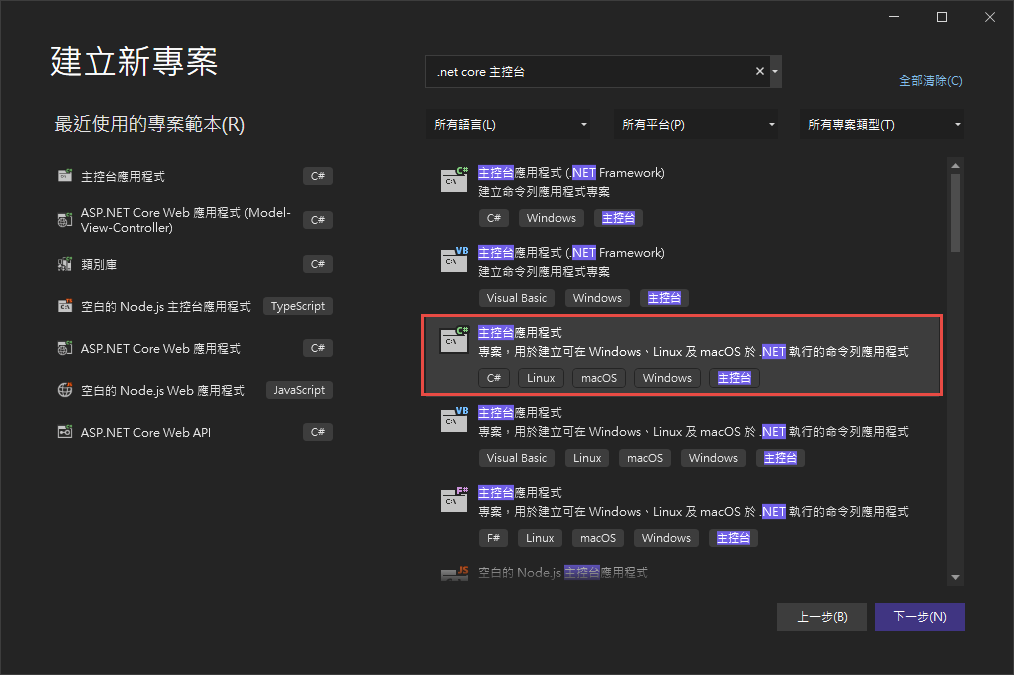
建立好後於右側專案右鍵選擇"管理Nuget套件",並選擇"瀏覽">於搜索列中搜尋"Lucene">安裝3.0.3最新穩定版 與 "System.Configuration.ConfigurationManager"
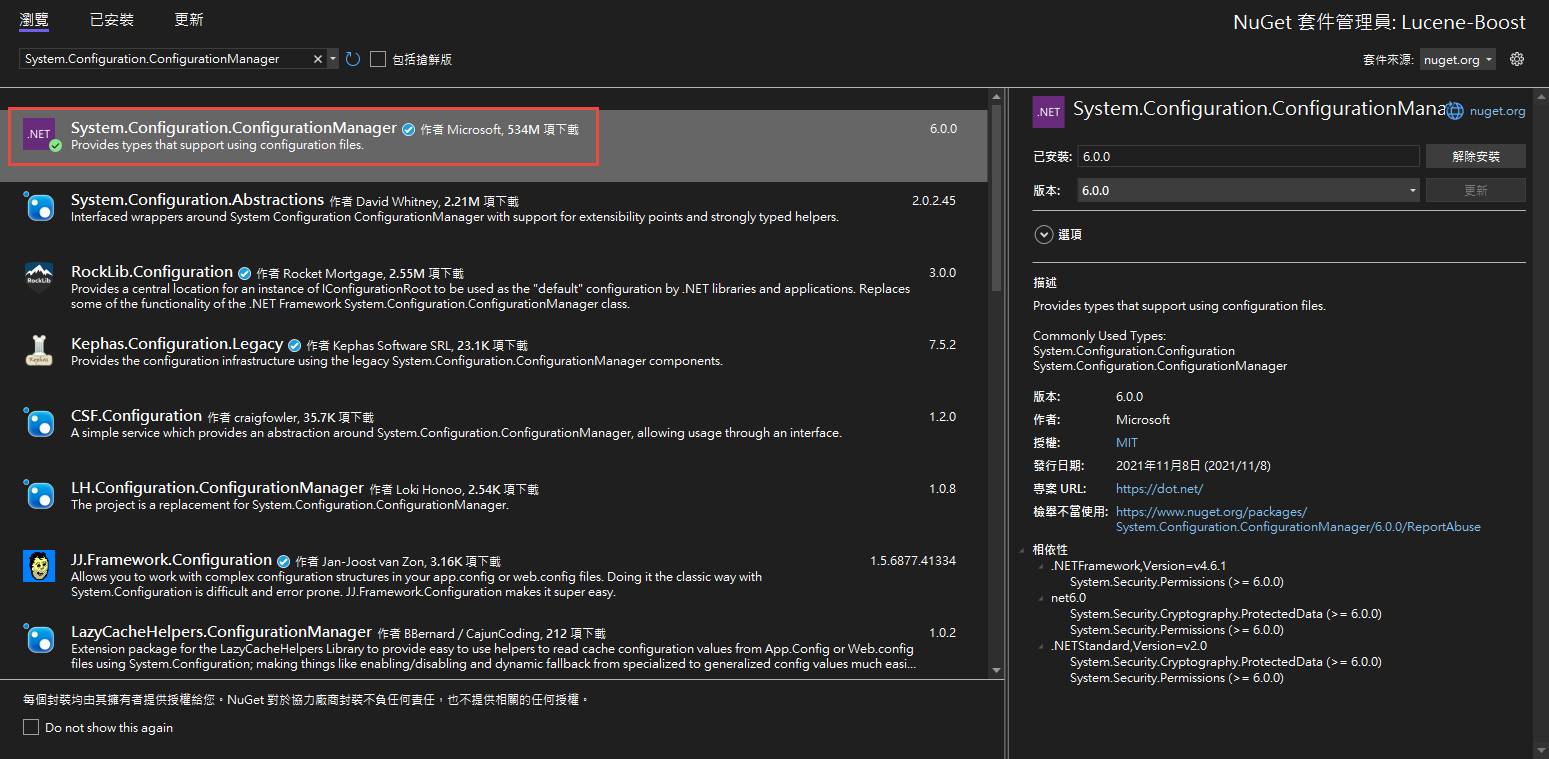
安裝好後就可以於專案內使用Lucene套件囉!
再來依照上一篇的教學建立一套簡單的Lucene查詢
好囉! 接下來我們要如何更新索引呢?
更新其實就是將存在的索引刪除並重新建立Document,不存在的則直接新增。
首先準備一組資料準備更新
*欲更新的Document必須與創建所引時使用的Document欄位相同*
來測試看看
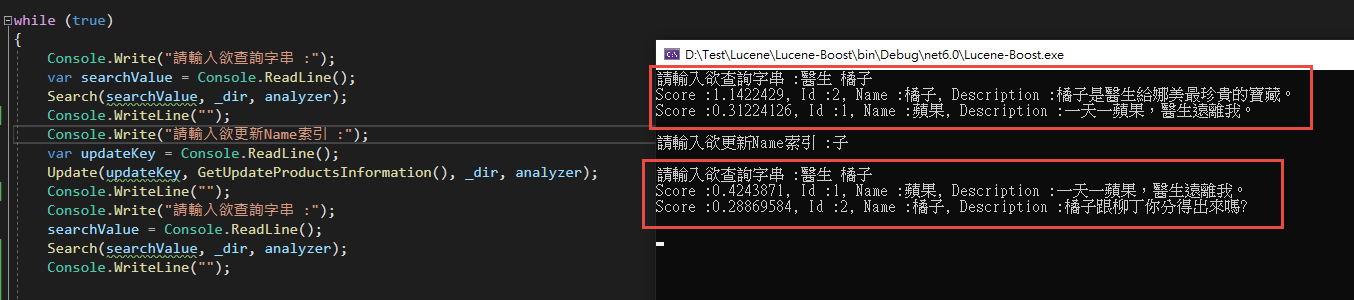
可以看見 Name = 橘子 的索引已經改為我們新準備的資料囉。
再來是刪除!
與更新非常相似,只需要使用deleteDocument()就可以了。
再來看看輸出結果
可以發現 Score :0.7554128, Id :2, Name :橘子, Description :醫生給娜美最珍貴的寶藏。這筆索引已經被移除囉!
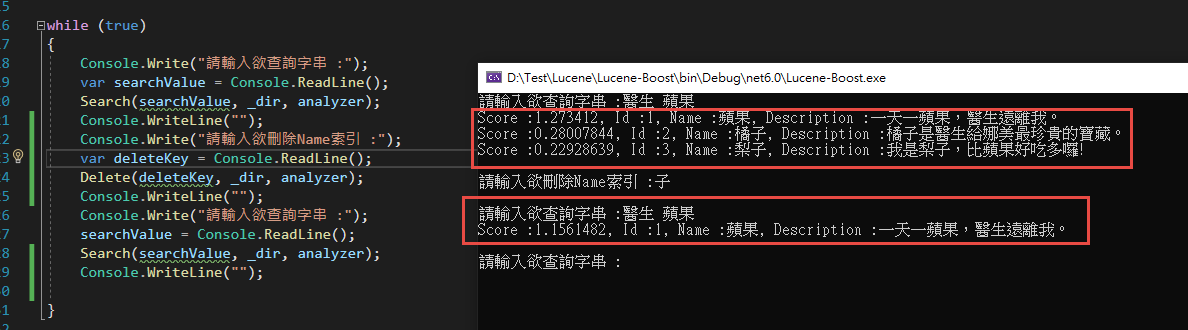
可以發現筆者於更新或刪除時都是輸入單一字來做異動,除了表達可以對索引做複合更動外,
是因為更新與刪除索引同樣會使用到分詞器(analyzer),
*所輸入的索引值非ID等數值時必須要配合分詞器的分詞能力*才能取得所想異動的索引喔!
Boost是什麼呢?
Boost 分為 :
1. Index Time Boost : 在建立索引時就計算好的值。例如上一篇中提到的(NORMS)
2. Query Time Boost : 查詢時賦與搜尋條件不同的值以影響結果。
我們先來測試Index Time Boost的部分
並記得重新CreateIndex才能刷新欄位的權重值喔。
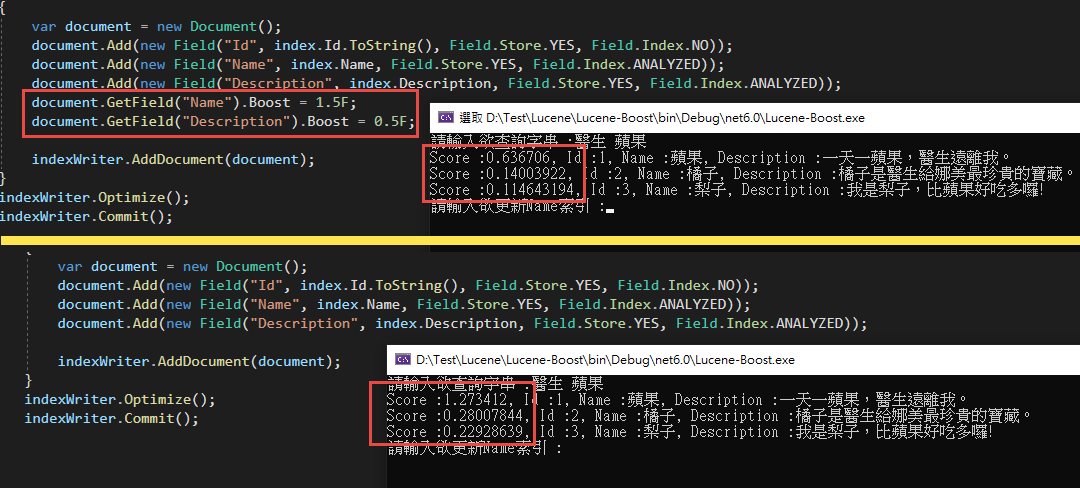
很明顯的搜尋出來的Score分數變動了! 但是有沒有發現明明Name欄位的Boost改成了1.5,蘋果的數值卻仍然只有一半呢?
這是因為我們的Search中所參照的欄位為Description,所以在計算Score的時候其實是完全沒有參與的喔!
另外要記得,使用Index Time Boost的時候,欲給予銓重分配的欄位Field.Index不能使用NO_NORMS,不然這個欄位並不會紀錄權重的資料。
再來我們試試看Query Time Boost
這次我們搜尋兩個欄位"Name"與"Description",並使用 BooleanQuery來將其組合。
BooleanQuery中的 Occur有三種參數 : "MUST","MUST_NOT","SHOULD",功能與字面上的意思一樣為"必須要有","必須沒有"與"有無都包含"。

查詢出來的分數就不一樣囉!
以上就是這一次的分享,Lucene是一款容易入門但是要實際上戰場卻又十分複雜的功能,想要達成真正高效能的全文檢索,在前期的文件規畫配置與資料的權重配比都是一個巨大的挑戰。未來會繼續分享關於Lucene的其他有趣功能,還請繼續期待呦!
另外也可以到GitHub下載我的範例來參考呦!
GitHub: https://github.com/g13579112000/Lucene
參考文件:
1. 黑暗大大的全文檢索筆記 : https://blog.darkthread.net/blog/lucene-net-notes-1/
2. Makble : http://makble.com/lucene-field-boost-example
3. CSDN Jack2013tong 文章 : https://blog.csdn.net/huwei2003/article/details/53408388
首先我們建立一個.Net 6的主控台應用程式
建立好後於右側專案右鍵選擇"管理Nuget套件",並選擇"瀏覽">於搜索列中搜尋"Lucene">安裝3.0.3最新穩定版 與 "System.Configuration.ConfigurationManager"
安裝好後就可以於專案內使用Lucene套件囉!
再來依照上一篇的教學建立一套簡單的Lucene查詢
using Lucene.Net.Analysis.Standard;

using Lucene.Net.Documents;

using Lucene.Net.Index;

using Lucene.Net.QueryParsers;

using Lucene.Net.Search;

using Lucene.Net.Store;


var _dir = new DirectoryInfo("LuceneDocument");

if (!File.Exists(_dir.FullName))

{

    System.IO.Directory.CreateDirectory(_dir.FullName);

}

var analyzer = new StandardAnalyzer(Lucene.Net.Util.Version.LUCENE_CURRENT);

CreateIndex(GetProductsInformation(), _dir, analyzer);


while (true)

{

    Console.Write("請輸入欲查詢字串 :");

    var searchValue = Console.ReadLine();

    Search(searchValue, _dir, analyzer);

}


void CreateIndex(List<Product> information, DirectoryInfo dir, StandardAnalyzer analyzer)

{

    using (var directory = FSDirectory.Open(dir))

    {

        using (var indexWriter = new IndexWriter(directory, analyzer, true, IndexWriter.MaxFieldLength.LIMITED))

        {

            foreach (var index in information)

            {

                var document = new Document();

                document.Add(new Field("Id", index.Id.ToString(), Field.Store.YES, Field.Index.NO));

                document.Add(new Field("Name", index.Name, Field.Store.YES, Field.Index.ANALYZED));

                document.Add(new Field("Description", index.Description, Field.Store.YES, Field.Index.ANALYZED));

                indexWriter.AddDocument(document);

            }

            indexWriter.Optimize();

            indexWriter.Commit();

        }

    }

}

void Search(string searchValue, DirectoryInfo dir, StandardAnalyzer analyzer)

{

    using (var directory = FSDirectory.Open(_dir))

    {

        var parser = new QueryParser(Lucene.Net.Util.Version.LUCENE_CURRENT, "Description", analyzer).Parse(searchValue);

        using (var indexSearcher = new IndexSearcher(directory))

        {

            var queryLimit = 20;

            var hits = indexSearcher.Search(parser, queryLimit);

            if (!hits.ScoreDocs.Any())

            {

                Console.WriteLine("查無相關結果。");

                return;

            }

            Document doc;

            foreach (var hit in hits.ScoreDocs)

            {

                doc = indexSearcher.Doc(hit.Doc);

                Console.WriteLine("Score :" + hit.Score + ", Id :" + doc.Get("Id") + ", Name :" + doc.Get("Name") + ", Description :" + doc.Get("Description"));

            }

        }

    }

}


List<Product> GetProductsInformation()

{

    return new List<Product> {

            new Product{ Id = 1, Name = "蘋果", Description = "一天一蘋果,醫生遠離我。"},

            new Product{ Id = 2, Name = "橘子", Description = "醫生給娜美最珍貴的寶藏。"},

            new Product{ Id = 3, Name = "梨子", Description = "我是梨子,比蘋果好吃多囉!"},

            new Product{ Id = 4, Name = "葡萄", Description = "吃葡萄不吐葡萄皮,不吃葡萄倒吐葡萄皮"},

            new Product{ Id = 5, Name = "榴槤", Description = "水果界的珍寶!好吃一直吃。"}

        };

}

class Product

{

    public long Id { get; set; }

    public string Name { get; set; } = null!;

    public string Description { get; set; } = null!;

}
好囉! 接下來我們要如何更新索引呢?
更新其實就是將存在的索引刪除並重新建立Document,不存在的則直接新增。
首先準備一組資料準備更新
List<Product> GetUpdateProductsInformation()

{

    return new List<Product>

    {

        new Product{ Id = 6, Name = "香蕉", Description = "運動完後吃根香蕉補充養分。"},

        new Product{ Id = 2, Name = "橘子", Description = "橘子跟柳丁你分得出來嗎?"}

    };

}
*欲更新的Document必須與創建所引時使用的Document欄位相同*
void Update(string key, List<Product> information, DirectoryInfo dir, StandardAnalyzer analyzer)

{

    using( var directory = FSDirectory.Open(dir))

    {

        using(var indexWriter = new IndexWriter(directory, analyzer, false, IndexWriter.MaxFieldLength.LIMITED))

        {

            foreach (var index in information)

            {

                var document = new Document();

                document.Add(new Field("Id", index.Id.ToString(), Field.Store.YES, Field.Index.NO));

                document.Add(new Field("Name", index.Name, Field.Store.YES, Field.Index.ANALYZED));

                document.Add(new Field("Description", index.Description, Field.Store.YES, Field.Index.ANALYZED));

                indexWriter.UpdateDocument(new Term("Name", key) ,document);

            }

        }

    }

}
來測試看看
可以看見 Name = 橘子 的索引已經改為我們新準備的資料囉。
再來是刪除!
與更新非常相似,只需要使用deleteDocument()就可以了。
void Delete(string key, DirectoryInfo dir, StandardAnalyzer analyzer)

{

    using (var directory = FSDirectory.Open(dir))

    {

        using (var indexWriter = new IndexWriter(directory, analyzer, false, IndexWriter.MaxFieldLength.LIMITED))

        {

            indexWriter.DeleteDocuments(new Term("Name", key));

            indexWriter.Optimize();

            indexWriter.Commit();

        }

    }

}
再來看看輸出結果
可以發現 Score :0.7554128, Id :2, Name :橘子, Description :醫生給娜美最珍貴的寶藏。這筆索引已經被移除囉!
可以發現筆者於更新或刪除時都是輸入單一字來做異動,除了表達可以對索引做複合更動外,
是因為更新與刪除索引同樣會使用到分詞器(analyzer),
*所輸入的索引值非ID等數值時必須要配合分詞器的分詞能力*才能取得所想異動的索引喔!
Boost是什麼呢?
Boost 分為 :
1. Index Time Boost : 在建立索引時就計算好的值。例如上一篇中提到的(NORMS)
2. Query Time Boost : 查詢時賦與搜尋條件不同的值以影響結果。
我們先來測試Index Time Boost的部分
void CreateIndexWithBoost(List<Product> information, DirectoryInfo dir, StandardAnalyzer analyzer)

{

    using (var directory = FSDirectory.Open(dir))

    {

        using (var indexWriter = new IndexWriter(directory, analyzer, true, IndexWriter.MaxFieldLength.LIMITED))

        {

            foreach (var index in information)

            {

                var document = new Document();

                document.Add(new Field("Id", index.Id.ToString(), Field.Store.YES, Field.Index.NO));

                document.Add(new Field("Name", index.Name, Field.Store.YES, Field.Index.ANALYZED));

                document.Add(new Field("Description", index.Description, Field.Store.YES, Field.Index.ANALYZED));

                document.GetField("Name").Boost = 1.5F;

                document.GetField("Description").Boost = 0.5F;


                indexWriter.AddDocument(document);

            }

            indexWriter.Optimize();

            indexWriter.Commit();

        }

    }

}
並記得重新CreateIndex才能刷新欄位的權重值喔。
很明顯的搜尋出來的Score分數變動了! 但是有沒有發現明明Name欄位的Boost改成了1.5,蘋果的數值卻仍然只有一半呢?
這是因為我們的Search中所參照的欄位為Description,所以在計算Score的時候其實是完全沒有參與的喔!
另外要記得,使用Index Time Boost的時候,欲給予銓重分配的欄位Field.Index不能使用NO_NORMS,不然這個欄位並不會紀錄權重的資料。
再來我們試試看Query Time Boost
void SearchWithBoost(string searchValue, DirectoryInfo dir, StandardAnalyzer analyzer)

{

    using (var directory = FSDirectory.Open(_dir))

    {

        using (var indexSearcher = new IndexSearcher(directory))

        {

            var query = new QueryParser(Lucene.Net.Util.Version.LUCENE_CURRENT, "Name", analyzer).Parse(searchValue);

            var query2 = new QueryParser(Lucene.Net.Util.Version.LUCENE_CURRENT, "Description", analyzer).Parse(searchValue);


            query.Boost = 2.0F;

            query2.Boost = 0.5F;


            BooleanQuery booleanQuery = new BooleanQuery();

            booleanQuery.Add(query, Occur.SHOULD);

            booleanQuery.Add(query2, Occur.SHOULD);


            var hits = indexSearcher.Search(booleanQuery, 20);

            if (!hits.ScoreDocs.Any())

            {

                Console.WriteLine("查無相關結果。");

                return;

            }

            Document doc;

            foreach (var hit in hits.ScoreDocs)

            {

                doc = indexSearcher.Doc(hit.Doc);

                Console.WriteLine("Score :" + hit.Score + ", Id :" + doc.Get("Id") + ", Name :" + doc.Get("Name") + ", Description :" + doc.Get("Description"));

            }

        }

    }

}
這次我們搜尋兩個欄位"Name"與"Description",並使用 BooleanQuery來將其組合。
BooleanQuery中的 Occur有三種參數 : "MUST","MUST_NOT","SHOULD",功能與字面上的意思一樣為"必須要有","必須沒有"與"有無都包含"。
查詢出來的分數就不一樣囉!
以上就是這一次的分享,Lucene是一款容易入門但是要實際上戰場卻又十分複雜的功能,想要達成真正高效能的全文檢索,在前期的文件規畫配置與資料的權重配比都是一個巨大的挑戰。未來會繼續分享關於Lucene的其他有趣功能,還請繼續期待呦!
另外也可以到GitHub下載我的範例來參考呦!
GitHub: https://github.com/g13579112000/Lucene
參考文件:
1. 黑暗大大的全文檢索筆記 : https://blog.darkthread.net/blog/lucene-net-notes-1/
2. Makble : http://makble.com/lucene-field-boost-example
3. CSDN Jack2013tong 文章 : https://blog.csdn.net/huwei2003/article/details/53408388
梨子, 2022/4/20 下午 09:34:03
Visual Studio 在 建置專案時會出現很多警告:
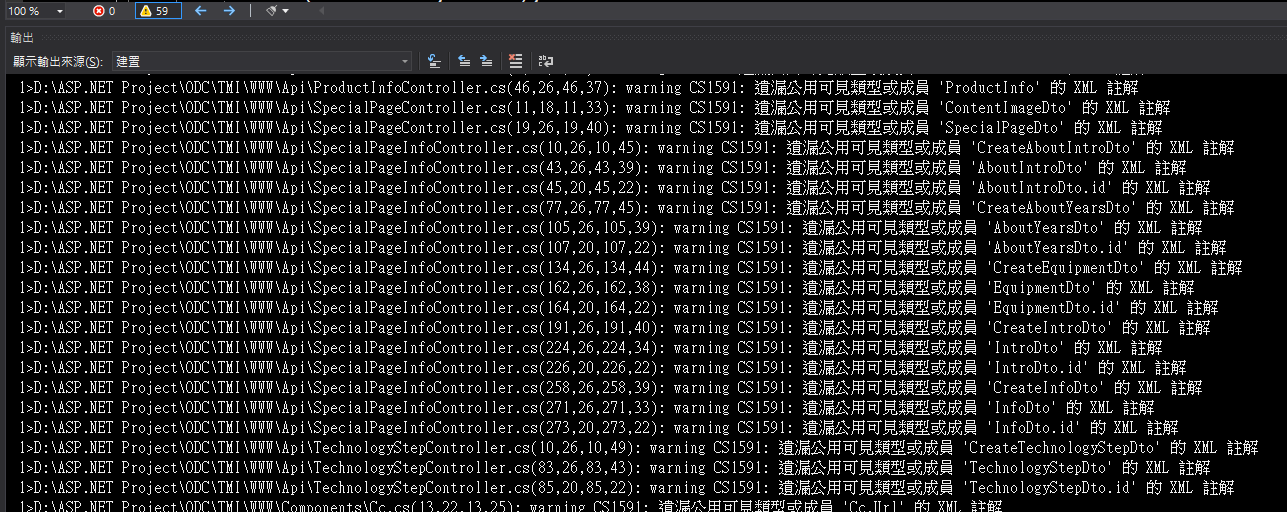
要關閉它,可以在專的目錄下,建立一個 .editorconfig 檔內容如下:
dotnet_diagnostic.CS8618.severity = none
dotnet_diagnostic.CS8600.severity = silent
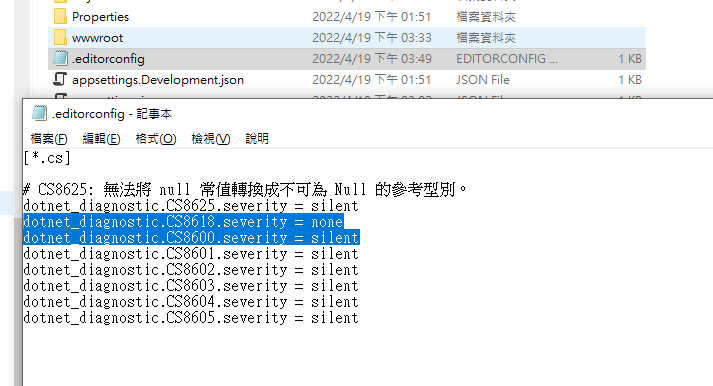
要關閉它,可以在專的目錄下,建立一個 .editorconfig 檔內容如下:
dotnet_diagnostic.CS8618.severity = none
dotnet_diagnostic.CS8600.severity = silent
Bike, 2022/4/19 下午 03:53:33